
What each product actually is
Meta offers two completely separate products that share a name. Most comparison articles bury this distinction in paragraph three. It belongs at the top, because the distinction is architectural — not just a feature difference.
The WhatsApp Business App is a standalone mobile application. You download it, verify your business phone number, fill in a profile, and you're done. It's essentially WhatsApp Personal with a business profile attached. The app runs on your phone. Messages live on your phone. When you close the app, nothing is happening on any server.
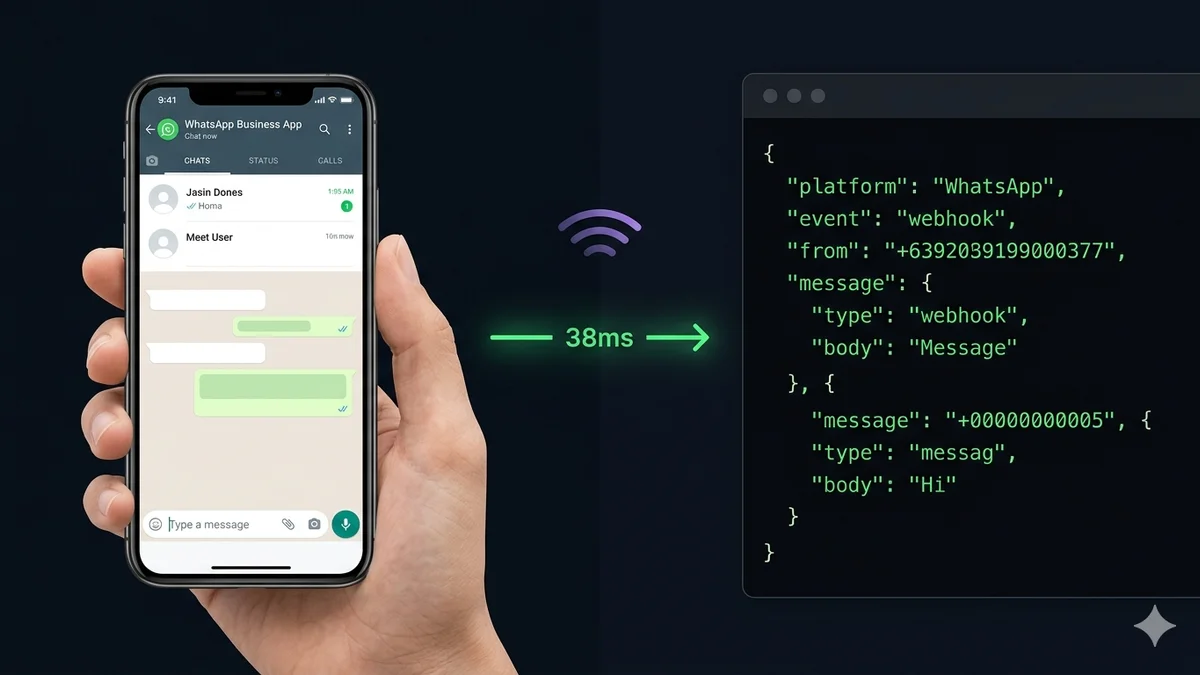
The WhatsApp Business API — officially called the WhatsApp Business Platform — has no interface of its own. It is a set of HTTP endpoints and a webhook system. When a customer sends a message to your connected number, Meta's infrastructure (the WhatsApp Cloud API) fires an HTTP POST request containing a JSON payload to a registered endpoint. That endpoint is typically a server you control, or a platform like SocialHook that normalizes and delivers it to your webhook URL.
The app is consumer software. The API is infrastructure. Treating them as "basically the same thing with different feature sets" is the most expensive mistake growing businesses make on WhatsApp.
Full comparison table
| Feature | Business App | Business API |
|---|---|---|
| Cost | Free | Per-conversation (Meta) + BSP / platform fee |
| Setup | Download app, instant | Via Business Solution Provider (BSP) |
| Interface | Mobile app + web companion | No native UI — accessed via BSP dashboard or raw webhooks |
| Simultaneous users | 1 phone + 4 linked devices | Unlimited agents |
| Inbound webhooks | Not available | JSON payload per event |
| Automation depth | Quick replies, away messages | Full chatbots, AI agents, conditional logic, workflows |
| Bulk messaging | Max 256 saved contacts per list | Unlimited with Meta-approved templates + opt-in |
| CRM integration | None native | Full REST API + webhook integration with any CRM |
| Analytics | Basic (sent / delivered / read) | Response time, resolution rate, CSAT, per-agent stats |
| Verification badge | Meta Verified (paid subscription) | Official Business Account (merit-based, free) |
| WhatsApp Flows | Not available | Available |
| API infrastructure | WhatsApp Cloud API | WhatsApp Cloud API (On-Premise API deprecated by Meta) |
| Target user | Freelancers, micro-businesses | Developers, teams, agencies, enterprises |
| Data ownership | Data stays in WhatsApp | Every message delivered to your server as JSON |
6 differences that actually matter
Most comparison articles stop at "the app is free, the API is paid." That tells you nothing about whether you need the switch. Here are the six differences that drive real business decisions.
This is the difference nobody talks about — and it's the one that matters most if you want to build anything on top of WhatsApp.
The message appears in your app's chat list. That's it. It goes nowhere else. Your CRM doesn't know. Your server doesn't know. Nothing is automated. The next step is you, manually reading and replying.
Meta's Cloud API fires an HTTP POST to your registered endpoint within milliseconds. The payload contains the sender's number, message type, body, timestamp, and conversation ID — in JSON, ready for your server to process.
The app allows linking one phone number to a maximum of five devices simultaneously. That ceiling is hard — you cannot add a sixth device regardless of how you configure it.
5 devices maximum. At more than 50 daily conversations, messages get missed, context disappears, and agents overwrite each other's replies. The app has no assignment system, no queue, no priority routing.
Unlimited agents from the same number. Messages route to the right team automatically. Work queues, priority flags, and conversation assignment all work natively through your BSP dashboard or your own system built on top of webhook events.
The gap between app automation and API automation is not a feature gap. It's an architectural gap.
Away messages and quick reply shortcuts. Nothing connects to an external system. You cannot query a database, trigger a workflow, or run conditional logic based on message content. There is no "automation" — there are only canned responses.
Your server receives every inbound event. You decide what happens: run the message through an LLM, query your CRM, update an order record, trigger an n8n workflow, log to Airtable, fire a Slack alert, or respond using the WhatsApp Cloud API directly. The API is a blank canvas.
The app's broadcast feature sounds useful until you hit the ceiling — and you will hit it immediately.
256 contacts per broadcast list, and only contacts who have your number saved in their address book actually receive the message. Real-world reach is far below 256. No segmentation, no personalization variables, no analytics on who opened what.
Send Meta-approved message templates to an unlimited contact list with opt-in consent. Personalize with dynamic variables. Segment by behavior. Schedule sends. Track delivery, read, and click events back to your server via webhook. Marketing at actual scale.
The app is free. The API is not. But the real cost picture is more nuanced than most articles admit.
$0 to download and run. The cost is your time: manually handling every conversation, every reply, every follow-up. At scale, the app's "free" cost becomes an enormous labour cost that the API eliminates.
Meta charges per conversation category (marketing, utility, authentication, service). The first 1,000 service conversations per month are free. Your BSP or webhook platform adds its own fee. SocialHook charges a flat $50/month for inbound webhook delivery — no per-message charges on top.
Data ownership is the difference between a communication channel and a business asset.
Your conversations live in WhatsApp. No export, no sync, no structured data. Customer history is trapped in a chat thread. If you switch devices, reinstall the app, or lose your phone — that history is gone or inaccessible.
Every inbound event fires a webhook to your server. Your database receives the message. Your system owns the conversation history. You can query it, analyze it, feed it to an AI, and export it whenever you want. The data is yours.
The piece nobody explains: what actually happens to inbound messages on the API
Every article you'll find about the WhatsApp Business API focuses on outbound features — sending templates, running campaigns, building chatbots. Almost none of them explain what happens on the receiving end, which is where most of the actual technical work lives.
Here is the exact sequence of events when a customer sends a message to a WhatsApp Business number connected via the API:
The payload that arrives at step 4 looks like this when normalized through SocialHook's WhatsApp webhook integration:
"platform": "whatsapp",
"event": "message.received",
"timestamp": 1744009821,
"from": "+1 555 000 1234",
"conversation_id": "conv_9k2m...",
"message": {
"type": "text",
"body": "Hey, is the Black Friday deal still running?",
"id": "msg_x7k..."
}
}
SocialHook sits between Meta's Cloud API and your server. Instead of dealing with Meta's complex webhook verification, inconsistent payload structures across platforms, and retry logic yourself — SocialHook handles all of it and forwards a clean, consistent JSON event to your endpoint in under 50ms. The same normalized format works for Facebook Messenger and Instagram DMs too, so you're not writing three different payload parsers for three different Meta APIs.
Who actually needs the app vs the API
Stop reading comparison articles that give you "small business vs enterprise" as the decision framework. The real decision criteria are operational — and they're specific.
How to actually get on the WhatsApp Business API
Unlike the Business App — which you download — getting access to the WhatsApp Business API requires going through a Business Solution Provider (BSP). Meta does not offer direct API access to businesses without a BSP in the middle.
There are two categories of BSP you'll encounter, and the distinction matters depending on what you want to build:
Option A — A platform BSP (no-code dashboard)
Tools like Wati, Respond.io, ManyChat, and Trengo give you a dashboard that sits on top of the API. You configure automated flows, manage agent inboxes, and run broadcasts — all without writing code. This works well if you want someone else's product between you and your customers. The trade-off: you're building on their platform, in their data structure, subject to their pricing model. Our SocialHook vs ManyChat comparison breaks this down in detail.
Option B — A webhook platform (raw data, your logic)
If you want to build your own AI agent, connect WhatsApp to your own CRM, or run your own automation logic, you don't need a no-code dashboard. You need a webhook platform that catches every inbound message and delivers it to your server as structured JSON. That's exactly what SocialHook does.
You connect your WhatsApp Business number, paste your server's webhook URL, and SocialHook handles everything between Meta and you: Cloud API registration, payload normalization, HMAC signature verification, automatic retry on failure, and full delivery logs. Every inbound WhatsApp message fires a clean JSON event to your endpoint in under 50ms. You build on top.
SocialHook covers all three Meta messaging channels under one account and one flat price — Facebook Messenger webhooks, Instagram DM webhooks, and WhatsApp Business API webhooks — so you're not maintaining separate API integrations for each platform. See the full pricing page for details, or go straight to the quickstart guide to connect your first number.
Common questions
Connect WhatsApp.
Build anything.
Stop reading about the API. Connect your WhatsApp Business number to SocialHook and receive your first webhook payload in under 5 minutes — no BSP paperwork, no developer credentials.