How to Build an Instagram DM Auto-Responder Without Third-Party Tools
May 13, 2026
·
22 min read
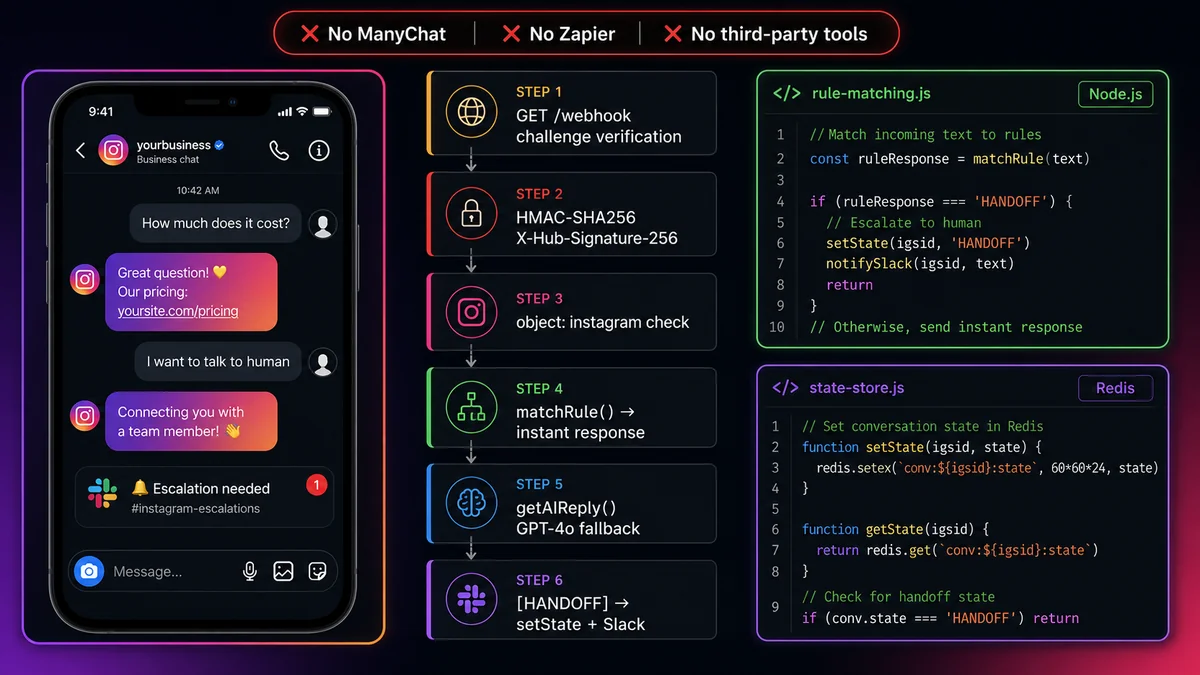
What you'll build: A production Instagram DM auto-responder that handles text, story replies, and story mentions — with rule-based fast responses for common questions, GPT-4o for everything else, Redis for conversation state, and human escalation when needed. Official API only. Zero third-party platforms.
Why build your own instead of using a third-party tool?
ManyChat, Interakt, and similar platforms are the right choice if you need something working in an afternoon with no coding. They're the wrong choice when you need:
Custom business logic. Connecting your DM bot to your internal systems — your database, your CRM, your Shopify store — requires code. No-code tools can't do arbitrary API integrations.
Data ownership. Your customer conversations are yours. On ManyChat, they live in ManyChat's database. On your own stack, they live wherever you want.
No per-contact fees. ManyChat charges monthly based on contact count. Your own code has no per-contact cost — just your server hosting.
No platform risk. Third-party tools can change pricing, add caps, or deprecate features. Your own code changes only when you change it.
Prerequisites
Instagram Professional account (Business or Creator) linked to a Facebook Page you admin
Node.js 18+ installed locally
Public HTTPS URL for local development — use ngrok: ngrok http 3000
Go to developers.facebook.com → Create App → Business type
Add the Instagram product to your app
Under Instagram → Settings, connect your Instagram Professional account
Graph API Explorer → select your App → select your Facebook Page → Generate Token with: instagram_manage_messages + pages_messaging + pages_read_engagement
Copy the generated token as IG_PAGE_TOKEN
Query GET /me?fields=instagram_business_account — the returned instagram_business_account.id is your IG_BUSINESS_ID
Copy App Secret from Settings → Basic as IG_APP_SECRET
App Review for production: During development, the API works for accounts added as Test Users in your App settings. For production (responding to real customers who haven't been added as test users), you must submit for App Review with instagram_manage_messages. Prepare a screen recording showing your bot and a clear use case description. Review typically takes 5–10 business days.
2
Webhook verification endpoint
Node.js + Express — webhook verification
index.js
require('dotenv').config();
const express = require('express');
const crypto = require('crypto');
const app = express();
// CRITICAL: raw body needed for HMAC verification — must come BEFORE express.json()
app.use('/webhook', express.raw({ type: 'application/json' }));
app.use(express.json());
// GET /webhook — Instagram challenge handshake (same pattern as Messenger)
app.get('/webhook', (req, res) => {
const mode = req.query['hub.mode'];
const token = req.query['hub.verify_token'];
const challenge = req.query['hub.challenge'];
if (mode === 'subscribe' && token === process.env.IG_VERIFY_TOKEN) {
console.log('✓ Instagram webhook verified');
return res.status(200).send(challenge);
}
res.sendStatus(403);
});
app.listen(process.env.PORT || 3000, () => console.log('🤖 Instagram auto-responder running'));
After running your server, go to your Facebook App → Instagram → Webhooks → Add Callback URL. Enter your ngrok URL + /webhook and your verify token. Subscribe to: messages and messaging_referrals.
3
HMAC-SHA256 signature verification — never skip this
Every POST from Instagram includes X-Hub-Signature-256. Without verifying it, anyone who knows your URL can forge events. The express.raw() middleware (set up in Step 2) provides the raw Buffer needed for HMAC computation.
Node.js — HMAC signature middleware
verifySignature.js
const crypto = require('crypto');
functionverifyInstagramSignature(req, res, next) {
const signature = req.headers['x-hub-signature-256'];
if (!signature) return res.sendStatus(401);
const hash = crypto
.createHmac('sha256', process.env.IG_APP_SECRET)
.update(req.body) // req.body is raw Buffer from express.raw()
.digest('hex');
const expected = Buffer.from(signature.split('=')[1], 'hex');
const computed = Buffer.from(hash, 'hex');
if (expected.length !== computed.length ||
!crypto.timingSafeEqual(expected, computed)) {
return res.sendStatus(401);
}
// Parse body after verification — it was raw Buffer before
req.body = JSON.parse(req.body.toString('utf8'));
next();
}
module.exports = { verifyInstagramSignature };
4
Complete POST webhook event handler
Node.js — full Instagram event handler
webhookHandler.js
const { verifyInstagramSignature } = require('./verifySignature');
const { routeMessage } = require('./autoResponder');
app.post('/webhook', verifyInstagramSignature, async (req, res) => {
res.sendStatus(200); // respond immediately — always before processingconst body = req.body;
if (body.object !== 'instagram') return; // critical check — not "page" like Messengerfor (const entry of body.entry) {
for (const event of (entry.messaging || [])) {
const igsid = event.sender.id; // Instagram-Scoped ID — store as stringtry {
// Route by event typeif (event.message?.reply_to?.story) {
// User replied to your story via DMawaitrouteMessage(igsid, event.message.text, 'story_reply', event.message.reply_to.story);
} else if (event.referral?.source === 'STORY_MENTION') {
// User mentioned your account in their storyawaitrouteMessage(igsid, null, 'story_mention', event.referral.story);
} else if (event.message?.text) {
// Standard text DMawaitrouteMessage(igsid, event.message.text, 'text');
} else if (event.message?.attachments) {
// Image, video, audio, or sticker sent in DMawaitrouteMessage(igsid, null, 'media', event.message.attachments[0]);
} else if (event.reaction) {
// Emoji reaction — usually no response needed
console.log(`Reaction from ${igsid}: ${event.reaction.reaction} (${event.reaction.action})`);
}
} catch (err) {
console.error(`Error handling event for ${igsid}:`, err.message);
}
}
}
});
5
Rule-based auto-responder engine
Fast, deterministic responses for common questions — no AI inference cost, instant reply. Regex patterns match specific intents; each maps to a pre-written response. GPT-4o handles anything that doesn't match.
Node.js — rule-based responder + GPT-4o fallback
autoResponder.js
const RULES = [
{
patterns: [/^(hi|hello|hey|hola|yo|sup)[\s!]*$/i, /^good (morning|afternoon|evening)/i],
response: "Hey! 👋 Thanks for reaching out. How can we help you today?",
},
{
patterns: [/price|how much|cost|pricing/i],
response: "Great question! Our pricing is on our website 💛\nCheck it out: https://yoursite.com/pricing\n\nAny other questions?",
},
{
patterns: [/ship.{0,20}(to|time|free|worldwide)/i, /delivery|deliver/i],
response: "We ship worldwide! 🌍\n• USA: 3–5 business days\n• International: 7–14 days\nFree shipping on orders over $50 🎉",
},
{
patterns: [/return|refund|exchange/i],
response: "We accept returns within 30 days of delivery 📦\nItems must be unused and in original packaging.\nStart here: https://yoursite.com/returns",
},
{
patterns: [/hours|open|when.{0,10}(open|close|available)/i],
response: "Our support team is available Mon–Fri, 9am–6pm EST 🕐\nFor urgent questions, reply here and we'll get back to you ASAP!",
},
{
patterns: [/(human|person|agent|someone|representative)/i, /talk to.{0,10}(human|person|real)/i],
response: "HANDOFF", // special signal — triggers escalation flow
},
];
functionmatchRule(text) {
if (!text) returnnull;
for (const rule of RULES) {
if (rule.patterns.some(p => p.test(text))) {
return rule.response;
}
}
returnnull; // no rule matched → use GPT-4o
}
module.exports = { matchRule, RULES };
6
GPT-4o for intelligent replies
Node.js — GPT-4o integration with typing indicator
aiReply.js
const OpenAI = require('openai');
const oai = newOpenAI({ apiKey: process.env.OPENAI_API_KEY });
const IG_SYSTEM_PROMPT = `You are a helpful assistant for @yourbrand on Instagram.
Answer questions about our products, services, shipping, and returns.
Keep replies SHORT — Instagram DM users are on mobile. Max 150 words.
Use plain text (no markdown). Warm, friendly, conversational tone.
If you're unsure or the question is complex, say: [HANDOFF]
Never make up information about products you don't know.`;
async functiongetAIReply(igsid, userMessage, conversationHistory) {
// Send typing indicator first — makes the bot feel humanawaitsendTypingIndicator(igsid);
const messages = [
{ role: 'system', content: IG_SYSTEM_PROMPT },
...conversationHistory.slice(-8), // last 8 exchanges for context
{ role: 'user', content: userMessage },
];
const completion = await oai.chat.completions.create({
model: 'gpt-4o',
messages,
max_tokens: 200,
temperature: 0.7,
});
return completion.choices[0].message.content;
}
async functionsendTypingIndicator(igsid) {
awaitfetch(
`https://graph.facebook.com/v21.0/${process.env.IG_BUSINESS_ID}/messages?access_token=${process.env.IG_PAGE_TOKEN}`,
{
method: 'POST',
headers: { 'Content-Type': 'application/json' },
body: JSON.stringify({ recipient: { id: igsid }, sender_action: 'typing_on' }),
}
);
}
module.exports = { getAIReply, sendTypingIndicator };
Instagram Send API + the full routeMessage function
Node.js — complete routeMessage function
autoResponder.js
const { matchRule } = require('./rules');
const { getAIReply, sendTypingIndicator } = require('./aiReply');
const { getConversation, addToHistory, setState } = require('./conversationState');
constGRAPH = 'https://graph.facebook.com/v21.0';
constBIZ_ID = process.env.IG_BUSINESS_ID;
constTOKEN = process.env.IG_PAGE_TOKEN;
async functionsendDM(igsid, text) {
const res = awaitfetch(`${GRAPH}/${BIZ_ID}/messages?access_token=${TOKEN}`, {
method: 'POST',
headers: { 'Content-Type': 'application/json' },
body: JSON.stringify({ recipient: { id: igsid }, message: { text } }),
});
if (!res.ok) console.error('Send failed:', await res.json());
}
async functionrouteMessage(igsid, text, eventType, extra) {
const conv = awaitgetConversation(igsid);
// If user is in HANDOFF state, don't auto-reply — human handles itif (conv.state === 'HANDOFF') {
console.log(`User ${igsid} is in HANDOFF — skipping auto-reply`);
return;
}
// Story mention — thank them automaticallyif (eventType === 'story_mention') {
awaitsendDM(igsid, "We saw you mentioned us — thank you so much! 🙏✨ We might repost it. Cool with you? Just reply 'YES' 😊");
return;
}
// Story reply — acknowledge the story contextif (eventType === 'story_reply' && !text) {
awaitsendDM(igsid, "Hey! Thanks for reacting to our story 😍 Anything you'd like to know?");
return;
}
// Media sent (image/video) — acknowledgeif (eventType === 'media') {
awaitsendDM(igsid, "Thanks for sharing! 📸 How can we help you today?");
return;
}
// Save inbound message to historyawaitaddToHistory(igsid, 'user', text);
// 1. Try rule match first (fast, free)const ruleResponse = matchRule(text);
if (ruleResponse === 'HANDOFF') {
awaithandleEscalation(igsid);
return;
}
if (ruleResponse) {
awaitsendDM(igsid, ruleResponse);
awaitaddToHistory(igsid, 'assistant', ruleResponse);
return;
}
// 2. Fall back to GPT-4o for anything elseconst updatedConv = awaitgetConversation(igsid);
const aiReply = awaitgetAIReply(igsid, text, updatedConv.history);
if (aiReply.includes('[HANDOFF]')) {
awaithandleEscalation(igsid);
return;
}
awaitsendDM(igsid, aiReply);
awaitaddToHistory(igsid, 'assistant', aiReply);
}
module.exports = { routeMessage, sendDM };
9
Human escalation: when the bot can't help
Node.js — human escalation with Slack notification
escalation.js
const { sendDM } = require('./autoResponder');
const { setState } = require('./conversationState');
async functionhandleEscalation(igsid) {
// Tell the user a human is on the wayawaitsendDM(igsid,
"Let me connect you with a team member who can help! 👋\n" +
"Someone will reply to you within 1 business hour during Mon–Fri 9am–6pm EST.\n" +
"Anything else I can answer in the meantime? 😊"
);
// Set conversation state to HANDOFF — bot stops auto-replyingawaitsetState(igsid, 'HANDOFF');
// Notify your team via Slackif (process.env.SLACK_WEBHOOK_URL) {
awaitfetch(process.env.SLACK_WEBHOOK_URL, {
method: 'POST',
headers: { 'Content-Type': 'application/json' },
body: JSON.stringify({
text: `🔔 Instagram DM escalation needed\nIGSID: ${igsid}\nCheck Instagram DMs to respond.`
}),
});
}
console.log(`Escalated IGSID ${igsid} to human agent`);
}
module.exports = { handleEscalation };
10
SocialHook: skip Steps 2–4 entirely
Steps 2, 3, and 4 — webhook verification, HMAC signature validation, raw payload parsing — are infrastructure boilerplate every Instagram integration rebuilds from scratch. SocialHook handles all of it. Connect your Instagram account and every event arrives pre-verified and pre-parsed to your endpoint. Your routeMessage() from Steps 5–9 plugs in directly:
Node.js — minimal handler with SocialHook (no boilerplate)
minimal.js
// SocialHook version: no HMAC, no raw body, no object:instagram check// Every event arrives pre-verified and pre-classified
app.post('/webhook', express.json(), async (req, res) => {
res.sendStatus(200);
const { event, from: igsid, message, story } = req.body;
// event: "message.received" | "story.reply" | "story.mention"// message.body: the text content// story.storage_url: already downloaded (CDN expiry handled)if (event === 'message.received') {
awaitrouteMessage(igsid, message.body, 'text');
} else if (event === 'story.reply') {
awaitrouteMessage(igsid, message.body, 'story_reply', story);
} else if (event === 'story.mention') {
awaitrouteMessage(igsid, null, 'story_mention', story);
}
});
// Total handler: 12 lines vs 80+ lines of raw webhook parsing and verification
FAQ
Common questions
Does building an Instagram auto-responder without ManyChat violate Instagram's Terms of Service?
No — building with the official Meta Instagram Messaging API is fully compliant. What violates ToS: browser automation, session token scraping, unofficial scraper APIs, and tools that simulate a logged-in user to send DMs at scale. The official Messaging API is Meta's designed and approved method for businesses to automate Instagram DMs. It requires an Instagram Professional account, App Review, and explicit permission grants.
Why must I use express.raw() instead of express.json() for HMAC verification?
HMAC-SHA256 signature verification requires the raw bytes of the request body — exactly as received over the network. express.json() parses the body into a JavaScript object, which can no longer produce the original bytes for HMAC computation. express.raw({ type: 'application/json' }) gives you a Buffer with the raw body. Compute the HMAC on that Buffer, verify against the signature header, then manually parse with JSON.parse(req.body.toString()).
How do I handle Instagram story replies differently from regular DMs?
Check for event.message.reply_to.story in your webhook handler. When present, the message event is a story reply — the user replied to your story via DM. The reply text is in event.message.text. The story media URL is in event.message.reply_to.story.url (download immediately — CDN URLs expire within hours). The auto-responder can acknowledge the story context differently from a cold-start DM.
How do I stop auto-replies when a human takes over a conversation?
Use a Redis state per IGSID. When escalation is triggered (user asks for a human, or AI includes [HANDOFF]), set the conversation state to "HANDOFF" in Redis. At the top of your routeMessage() function, check this state — if "HANDOFF", skip auto-reply entirely and return. Your human agent replies manually via the Instagram app. Reset the state to "ACTIVE" when the human marks the conversation resolved, or automatically after the Redis TTL expires.
How do I avoid duplicate auto-replies for the same message?
Instagram can retry webhook delivery if your server is slow or returns a non-200 status. Use the message ID (event.message.mid) as a deduplication key — store it in Redis with a short TTL (5 minutes) when you first process it. At the start of your handler, check if the mid is already in Redis: if yes, skip processing and return 200. This prevents duplicate replies from webhook retries.
Do I need a separate server for each Instagram account?
No — one server handles multiple Instagram accounts. Events from different accounts arrive at the same webhook URL, differentiated by entry[0].id (the Instagram Business Account ID). Your handler looks up the correct Page Access Token and client context from a database using that ID. See the multi-account webhook guide for the complete routing architecture.
You write the business rules. We handle the webhook layer.
Connect your Instagram account to SocialHook. Every DM, story reply, and story mention arrives pre-verified and normalized to your endpoint. Your rule engine, GPT-4o integration, and Redis state machine plug in directly. 12 lines instead of 80+.