Instagram Story Reply Webhooks: How to Capture and Respond Automatically
May 13, 2026
·
16 min read
In this guide: Story reply vs story mention — the distinction that matters · Exact webhook payload schemas for both · The messaging_referrals subscription · CDN URL expiry and how to handle it · The 24-hour window for auto-responses · Full auto-respond pipeline code (Node.js + Python) · Use cases and templates · SocialHook normalized format
Two distinct events: story reply vs story mention
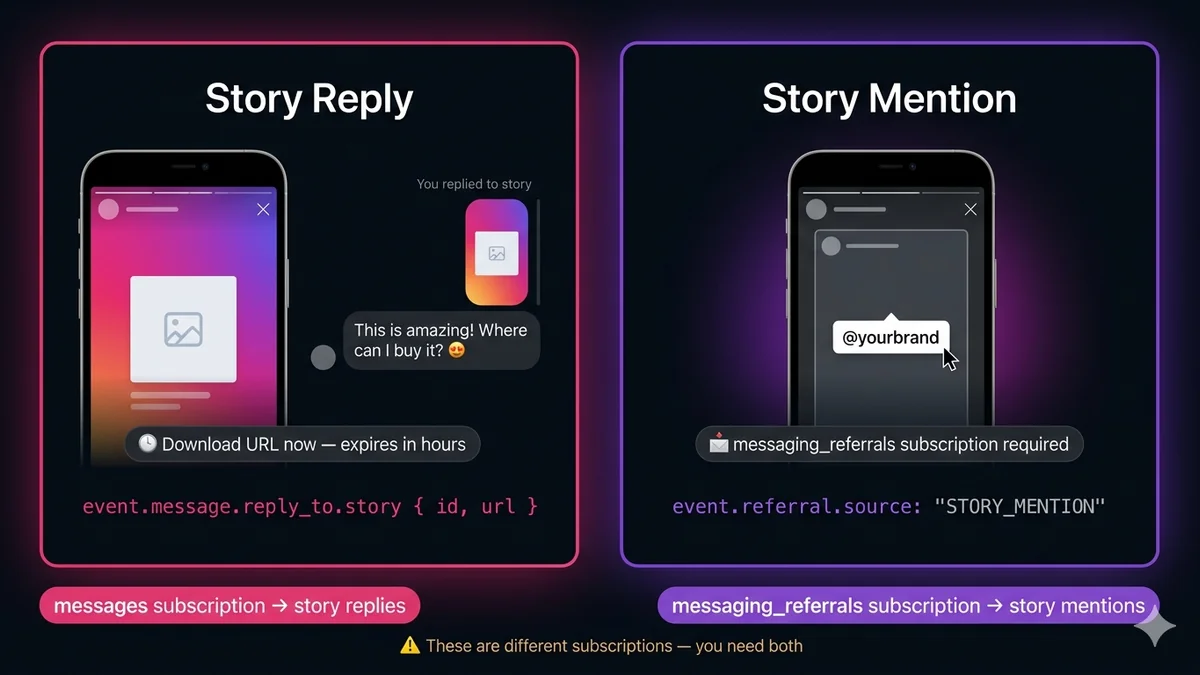
The first thing to understand: "Instagram story interactions" covers two completely different webhook events with different payload structures, different webhook subscriptions, and different triggered actions. Confusing them is the #1 source of bugs in story automation systems.
Story Reply
User replies to YOUR story
"You post a story. A follower swipes up and sends 'This is amazing!' in DM reply to your story."
This is the most commonly missed setup detail — each story event type requires its own webhook field subscription. Both must be enabled in your Facebook App → Instagram → Webhooks → Edit Subscriptions.
Field
Required for
What you miss without it
messages
Required
All DMs including story replies. Without this, you receive no message events whatsoever — no text DMs, no story replies, no media messages. This is the base subscription.
messaging_referrals
Required
Story mentions (when users tag you in their own stories) and Click-to-DM ad entries. Without this, story mentions silently disappear — no error, no event, just nothing.
messaging_optins
Optional
Opt-in events when users tap Allow on a recurring notification opt-in widget. Not needed for story interactions.
Subscribe to both right now. If you currently only have messages subscribed, you've already missed every story mention that came to your account. There's no way to retrieve them retroactively — the events fired and were lost. Add messaging_referrals in your App settings immediately after reading this section.
Story reply: exact webhook payload
When a user replies to your Instagram Story via DM, the event arrives as a standard messages webhook event — but with an additional reply_to object nested inside the message. This is how you distinguish a story reply from a regular DM.
Story reply — full webhook payload
{
"object": "instagram",
"entry": [{
"id": "987654321098765", // your IG Business Account ID"messaging": [{
"sender": { "id": "12345678901234" }, // IGSID of the user who replied"recipient": { "id": "987654321098765" },// your account ID"timestamp": 1747231892,
"message": {
"mid": "aWdtc2c_ZmlkPW...",
"text": "This is amazing! Where can I buy it? 😍", // their reply text"reply_to": { // ← presence of this object = it's a story reply"story": {
"id": "17893310459840806", // story ID (stable for 30 days)"url": "https://lookaside.fbsbx.com/..."// CDN URL — expires! download now
}
}
}
}]
}]
}
// If user replied with an emoji reaction instead of text, you get:// "message": { "mid": "...", "attachments": [{ "type": "like_heart", ... }], "reply_to": {...} }// If user replied with an image/video, attachments array contains the media
Story mention: exact webhook payload
When a user tags your account in their own story, the event arrives as a referral event — completely separate from the message object. The structure is distinctly different, which is why the two are often confused.
Story mention — full webhook payload
{
"object": "instagram",
"entry": [{
"id": "987654321098765",
"messaging": [{
"sender": { "id": "12345678901234" }, // IGSID of user who mentioned you"recipient": { "id": "987654321098765" },
"timestamp": 1747231892,
"referral": { // ← presence of this = story mention or ad entry"source": "STORY_MENTION", // confirms this is a story mention (not an ad)"type": "OPEN_THREAD",
"story": {
"id": "17893310459898765", // the user's story ID"url": "https://lookaside.fbsbx.com/..."// CDN — download immediately!
}
},
"message": { // present but often empty for cold-start story mentions"mid": "aWdtc2c..."
}
}]
}]
}
// KEY DIFFERENCES from story reply:// 1. referral object present, not reply_to// 2. referral.source === "STORY_MENTION" (could also be "ADS" or "CUSTOMER_CHAT_PLUGIN")// 3. Story URL is at referral.story.url, not message.reply_to.story.url// 4. No reply text — user didn't type anything, they just tagged you
The CDN URL expiry problem — download immediately
Both story reply and story mention payloads include a story URL — a CDN link pointing to the story's media (image or video). This URL is temporary. It typically expires within a few hours of the webhook firing. If you store the URL and try to load it later — in your database, in your CRM, in a Slack message — you get a 403 or 404.
The only correct approach: download the story media bytes immediately when the webhook fires, before acknowledging or finishing the event processing.
Node.js — download story media before it expires
downloadStory.js
const { S3Client, PutObjectCommand } = require('@aws-sdk/client-s3');
const s3 = newS3Client({ region: process.env.AWS_REGION });
async functiondownloadAndStoreStory(storyUrl, storyId) {
// Download story media from CDN — no auth header needed for these URLsconst res = awaitfetch(storyUrl);
if (!res.ok) {
// URL may have already expired if webhook processing was delayed
console.warn(`Story URL expired for story ${storyId}: ${res.status}`);
returnnull;
}
const contentType = res.headers.get('content-type'); // image/jpeg, video/mp4, etc.const bytes = Buffer.from(await res.arrayBuffer());
const ext = contentType.includes('video') ? 'mp4' : 'jpg';
const key = `stories/${storyId}.${ext}`;
// Store permanently in S3await s3.send(newPutObjectCommand({
Bucket: process.env.S3_BUCKET,
Key: key,
Body: bytes,
ContentType: contentType,
}));
return`s3://${process.env.S3_BUCKET}/${key}`; // save THIS, not the CDN URL
}
Python + boto3
download_story.py
import os, boto3, requests
s3 = boto3.client("s3", region_name=os.environ["AWS_REGION"])
defdownload_and_store_story(story_url: str, story_id: str) -> str | None:
"""Download story media and store permanently. Return S3 path."""
res = requests.get(story_url)
if not res.ok:
# URL may have already expiredprint(f"Story URL expired: {res.status_code} for story {story_id}")
returnNone
content_type = res.headers.get("content-type", "image/jpeg")
ext = "mp4"if"video"in content_type else"jpg"
key = f"stories/{story_id}.{ext}"
s3.put_object(
Bucket=os.environ["S3_BUCKET"],
Key=key,
Body=res.content,
ContentType=content_type,
)
returnf"s3://{os.environ['S3_BUCKET']}/{key}"# save THIS, not CDN URL
Complete detection and routing code
This is the production-grade handler that correctly identifies both event types from the raw webhook and routes them to appropriate handlers:
Node.js — story event detection and routing
storyRouter.js
async functionrouteInstagramEvent(event) {
const igsid = event.sender.id;
// ── Story MENTION (user tagged you in THEIR story) ───────────────────────if (event.referral?.source === 'STORY_MENTION') {
const { story } = event.referral;
const storagePath = awaitdownloadAndStoreStory(story.url, story.id);
awaithandleStoryMention({ igsid, storyId: story.id, storagePath });
return;
}
// ── Story REPLY (user replied to YOUR story via DM) ─────────────────────if (event.message?.reply_to?.story) {
const { story } = event.message.reply_to;
const replyText = event.message.text || null; // may be null if emoji reactionconst attachments = event.message.attachments || []; // for emoji/media repliesconst storagePath = awaitdownloadAndStoreStory(story.url, story.id);
awaithandleStoryReply({
igsid,
storyId: story.id,
storagePath,
replyText,
attachments,
mid: event.message.mid,
});
return;
}
// ── Regular DM (no story context) ───────────────────────────────────────if (event.message?.text) {
awaithandleTextDM({ igsid, text: event.message.text, mid: event.message.mid });
return;
}
// ── Reaction, read, or other ────────────────────────────────────────────if (event.reaction) {
awaithandleReaction({ igsid, ...event.reaction });
}
}
Python — story event detection and routing
story_router.py
async defroute_instagram_event(event: dict) -> None:
igsid = event["sender"]["id"]
# ── Story MENTION (user tagged you in THEIR story) ───────────────────
referral = event.get("referral", {})
if referral.get("source") == "STORY_MENTION":
story = referral["story"]
storage_path = download_and_store_story(story["url"], story["id"])
awaithandle_story_mention(igsid=igsid, story_id=story["id"], storage_path=storage_path)
return# ── Story REPLY (user replied to YOUR story via DM) ──────────────────
message = event.get("message", {})
reply_to = message.get("reply_to", {})
if"story"in reply_to:
story = reply_to["story"]
storage_path = download_and_store_story(story["url"], story["id"])
awaithandle_story_reply(
igsid=igsid,
story_id=story["id"],
storage_path=storage_path,
reply_text=message.get("text"),
mid=message.get("mid"),
)
return# ── Regular DM ────────────────────────────────────────────────────────if message.get("text"):
awaithandle_text_dm(igsid=igsid, text=message["text"])
Complete auto-response pipeline
Now the useful part — automatically responding to story interactions. The pattern is the same for both event types: detect the story context, compose a contextual reply, and call the Instagram Send API within the 24-hour window.
Node.js — auto-respond to story replies and mentions
storyAutoReply.js
constGRAPH = 'https://graph.facebook.com/v21.0';
constIG_BIZ_ID = process.env.IG_BUSINESS_ID;
constTOKEN = process.env.IG_PAGE_TOKEN;
async functionsendDM(igsid, text) {
const res = awaitfetch(`${GRAPH}/${IG_BIZ_ID}/messages?access_token=${TOKEN}`, {
method: 'POST',
headers: { 'Content-Type': 'application/json' },
body: JSON.stringify({ recipient: { id: igsid }, message: { text } }),
});
if (!res.ok) console.error('DM send failed', await res.json());
return res.ok;
}
// Handle story REPLY — user replied to one of your storiesasync functionhandleStoryReply({ igsid, storyId, replyText, storagePath }) {
// Log for your team
console.log(`Story reply from ${igsid}: "${replyText}" to story ${storyId}`);
awaitdb.storyReplies.insert({ igsid, storyId, replyText, storagePath });
// Auto-respond within the 24h service windowconst autoReply = buildStoryReplyResponse(replyText);
awaitsendDM(igsid, autoReply);
}
// Handle story MENTION — user tagged you in their own storyasync functionhandleStoryMention({ igsid, storyId, storagePath }) {
console.log(`Story mention from ${igsid}, story ${storyId} saved: ${storagePath}`);
awaitdb.storyMentions.insert({ igsid, storyId, storagePath });
// Auto-reply to thank them for the mentionawaitsendDM(igsid,
"Hi! 👋 We just saw you mentioned us in your story — thank you so much! " +"We'd love to repost it. Would you be okay with that? Just reply 'Yes' if you agree. 🙏"
);
// Optional: alert your team via SlackawaitnotifySlack(`📸 New story mention from ${igsid} | Media: ${storagePath}`);
}
functionbuildStoryReplyResponse(replyText) {
const text = replyText?.toLowerCase() || '';
// Route to different responses based on intent signals in reply textif (text.includes('buy') || text.includes('price') || text.includes('cost')) {
return"Thanks for your interest! 💛 Check our link in bio for pricing. Want me to send you the direct link to this specific product?";
}
if (text.includes('where') || text.includes('ship') || text.includes('deliver')) {
return"We ship worldwide! 🌍 Orders typically arrive in 5-7 days. Want to place an order?";
}
if (text.includes('love') || text.includes('amazing') || text.includes('beautiful')) {
return"Aw, thank you so much! 😍 That really makes our day. Check out more on our page!";
}
// Default auto-reply for emoji reactions or unmatched textreturn"Thanks for watching our story! 🙏 Let us know if you have any questions — we're here to help!";
}
The 24-hour window: when you can and cannot reply
Story interactions open a 24-hour messaging window — exactly like regular DMs. When a user replies to your story or mentions you, the window opens immediately and stays open for 24 hours after their last message. Within this window you can send any message freely. After 24 hours, you cannot message that user again unless they send another message.
Story reply → window opens immediately. The user initiated contact by replying to your story. You can respond right away and continue the conversation for 24 hours.
Story mention → window also opens. The mention is treated as an initiation event. You can DM the person who mentioned you within 24 hours of the referral event firing.
Expired window → can't reply. If you process the webhook event more than 24 hours after it fired (delayed processing, retry failure), your reply DM will fail with a Messenger window error.
Auto-reply within the webhook handler. The safest approach: send your auto-reply synchronously inside the event handler, immediately after the webhook fires. This guarantees you're within the window.
Check timestamps before replying. If your webhook has retry logic that might re-deliver an old event, always check event.timestamp before sending a reply. If the event is more than 23 hours old, skip the auto-reply — you'd risk sending it outside the window (causing an API error) or sending a duplicate (if the user already received one).
Use cases and response templates
Story reply use cases
Purchase intent detection: Keywords like "buy", "price", "where to get" in the reply text trigger a product link or discount code.
Support triage: Keywords like "help", "problem", "issue" route the user to your support team via a Slack alert and send a holding message.
Engagement nurturing: Emoji reactions or generic positive replies get a warm acknowledgment and a call to action (follow, subscribe, check bio link).
Survey or poll: Stories that ask "Would you prefer A or B?" can auto-capture the text reply and log it to a spreadsheet.
Story mention use cases
UGC (User Generated Content) collection: Download and store the story media immediately. Ask the user for repost permission. Build a library of authentic customer content.
Influencer pipeline: Flag mentions from accounts above a follower threshold for manual review by your marketing team.
Thank-you campaign: Auto-send a discount code to anyone who mentions you in their story — rewards organic advocacy.
CRM contact creation: First-time mention from a user who isn't in your CRM? Create a contact record with their IGSID.
SocialHook: story events pre-labeled in normalized format
When you connect your Instagram account to SocialHook, story replies and story mentions arrive already classified — you don't parse reply_to.story vs referral.source. The event type field tells you exactly what happened:
SocialHook — story events already classified
// Story reply (user replied to YOUR story)
{
"platform": "instagram",
"event": "story.reply", // ← already classified, no parsing needed"from": "12345678901234", // IGSID"timestamp": 1747231892,
"story": {
"id": "17893310459840806",
"storage_url": "s3://bucket/stories/17893..."// already downloaded! no CDN expiry
},
"message": {
"type": "text",
"body": "This is amazing! Where can I buy it? 😍"
}
}
// Story mention (user tagged YOU in their story)
{
"platform": "instagram",
"event": "story.mention", // ← no referral.source parsing needed"from": "98765432109876",
"timestamp": 1747231892,
"story": {
"id": "17893310459898765",
"storage_url": "s3://bucket/stories/17893..."// already downloaded + stored
}
}
// Your handler becomes trivial:
app.post('/webhook', async (req, res) => {
res.sendStatus(200);
const { event, from, story, message } = req.body;
if (event === 'story.reply') awaithandleStoryReply({ igsid: from, ...story, replyText: message?.body });
if (event === 'story.mention') awaithandleStoryMention({ igsid: from, ...story });
});
FAQ
Common questions
What is the difference between an Instagram story reply and a story mention?
A story reply: a user replies to one of YOUR stories via DM. Arrives as a messages event with event.message.reply_to.story. Requires the messages webhook subscription. A story mention: a user tags YOUR account in THEIR own story. Arrives as a referral event with event.referral.source === "STORY_MENTION". Requires the messaging_referrals webhook subscription — separate from messages.
Why does the story URL in the webhook expire?
Instagram's story media URLs are hosted on Meta's CDN and are temporary — they typically expire within a few hours. The correct approach: download the story media bytes immediately when the webhook fires and store them in your own permanent storage (S3, GCS, etc.). Save the storage path to your database, not the CDN URL. The story ID (story.id) is stable and can be used as a reference key.
How do I receive Instagram story mentions in my webhook?
You must subscribe to the messaging_referrals webhook field — this is separate from the messages field. Go to: Facebook App → Instagram → Webhooks → Edit Subscriptions → check messaging_referrals. Without this subscription, story mention events silently disappear — no error, no event. If you've had this subscription missing, you cannot retroactively retrieve missed story mentions.
How do I detect if a story reply is a text reply vs an emoji reaction?
Check both event.message.text and event.message.attachments. Text reply: event.message.text contains the string. Emoji/heart reaction as reply: event.message.attachments contains an object with type: "like_heart" or similar sticker type. Media reply (user sent a photo/video as the reply): event.message.attachments with type: "image" or "video" and a payload URL. Both text and attachments also have the reply_to.story context so you know they're story replies.
Can I auto-reply to story mentions within the 24-hour window?
Yes. When a user mentions you in their story, a 24-hour messaging window opens allowing you to DM them. Your webhook receives the referral event — call the Instagram Send API with the user's IGSID as the recipient within 24 hours. This is how you send "thanks for the mention!" messages, repost permission requests, or discount codes automatically. After 24 hours without further interaction, the window closes and you cannot DM them.
What permissions do I need for story reply webhooks?
Same as the Instagram Messaging API generally: instagram_manage_messages, pages_messaging, and pages_read_engagement. For story mentions specifically, you also need the messaging_referrals webhook subscription (this is a subscription field, not an App permission — enable it in your App's webhook settings). All permissions require App Review for production use beyond test users.
story.reply and story.mention already labeled for you.
SocialHook receives your Instagram story events, downloads the media before the CDN URL expires, classifies story replies vs mentions, and delivers everything as clean normalized JSON. No payload parsing. No CDN race conditions. $50/month for all your Instagram, Messenger, and WhatsApp events.