
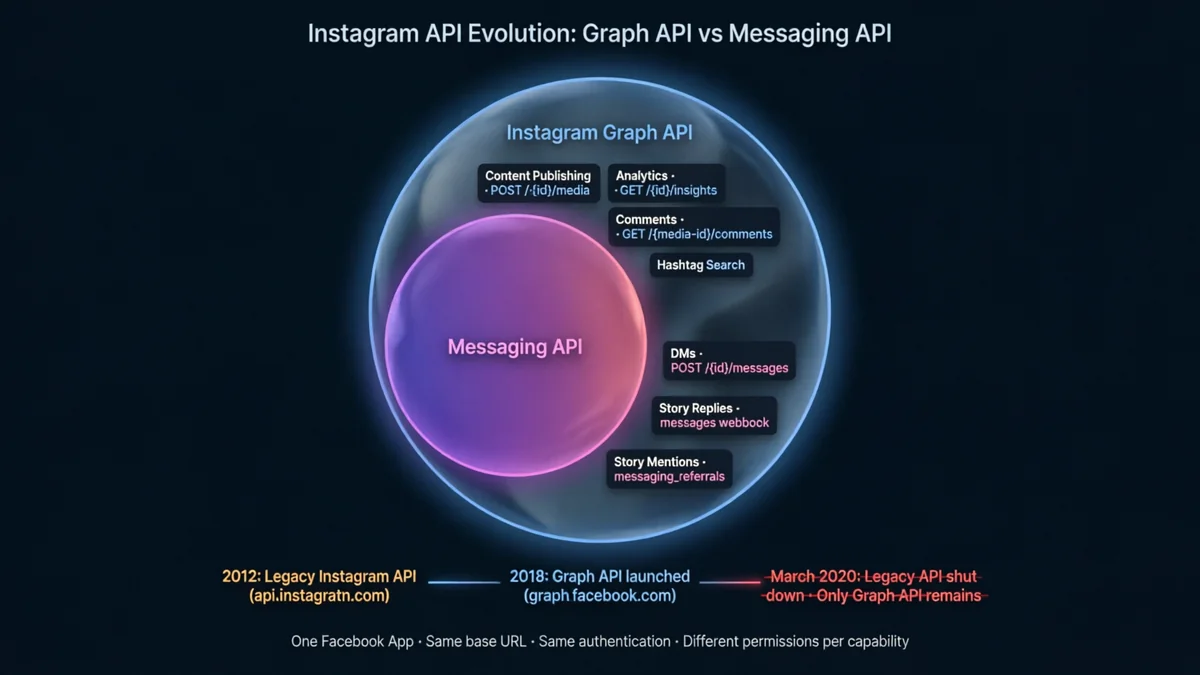
The one-sentence answer
graph.facebook.com/v21.0), the same authentication system, and the same App setup. "Instagram Messaging API" is Meta's marketing label for the DM-specific capabilities within the larger Graph API.The confusion arises because Meta markets different API capabilities under different product names — "Instagram Graph API" for the full platform, "Instagram Messaging API" or "Messenger API for Instagram" for the DM-specific subset. Developers searching for "Instagram Messaging API" often find documentation that reads as if it's a completely different system. It isn't. You set up one Facebook App, get one set of tokens, and use different endpoints and permissions depending on what you're building.
What is the Instagram Graph API?
The Instagram Graph API is the complete, official API for Instagram Business and Creator accounts. It is the only legitimate way to access Instagram data and functionality programmatically — everything from posting content to reading analytics to responding to DMs flows through it.
The Graph API covers six major capability areas:
- Content management — create, publish, and retrieve posts, reels, stories, and carousels on behalf of a business account
- Media insights — read impressions, reach, engagement, and audience data for individual media and account-level metrics
- Comments — read comments on posts, reply to comments, delete comments, hide comments
- Hashtag search — search for public posts by hashtag (with significant rate limits)
- Mentions — detect when other accounts mention or tag your business account in posts or stories
- Direct Messages — receive and send DMs, handle story replies and story mentions (this is the "Messaging API" subset)
All six of these are part of the same Graph API. The base URL, authentication system, App Review process, and token type are identical across all of them. The differences are in which endpoints you call, which permissions you request, and which webhook fields you subscribe to.
What is the "Instagram Messaging API" specifically?
When Meta (and most third-party documentation) refers to the "Instagram Messaging API" or "Messenger API for Instagram," they mean the subset of the Graph API that enables:
- Receiving DMs — webhook events when users send your business account a direct message
- Sending DMs — calling
POST /{ig-user-id}/messagesto send a reply to a user's IGSID - Story replies — webhook events when users reply to your story via DM (arrives with
message.reply_to.story) - Story mentions — webhook events when users tag your account in their story (arrives as a referral event)
- Emoji reactions — webhook events when users react to one of your messages
- Read receipts — webhook events when users read your messages
This is a focused, DM-only subset of what the full Graph API can do. It requires specific messaging permissions (instagram_manage_messages), specific webhook subscriptions (messages, messaging_referrals), and its own send endpoint. But it runs on the same infrastructure, same authentication, and same App as everything else.
Full endpoint map: Graph API vs Messaging API
Here is a complete map of Instagram Graph API endpoints, labeled by whether they are Graph-only, Messaging-only (the "Messaging API" subset), or apply to both:
Permissions: what you need for each capability
Permissions are the clearest way to distinguish what the "Messaging API" requires vs what the rest of the Graph API needs. Every permission requires App Review for production use beyond test accounts.
| Permission | Category | What it enables |
|---|---|---|
| instagram_manage_messages | Messaging API | Receive DM webhook events. Send DM replies via /{ig-user-id}/messages. Access conversation history. Required for all DM automation. |
| pages_messaging | Messaging API | Subscribe to and receive webhook events via the linked Facebook Page. Without this, Instagram DM webhooks do not fire regardless of other permissions. |
| pages_read_engagement | Both | Read basic information about the linked Facebook Page and Instagram account. Required by both messaging and Graph API features for account verification. |
| instagram_manage_insights | Graph API | Read account-level and media-level analytics data including impressions, reach, engagement, follower demographics. For analytics dashboards and reporting tools. |
| instagram_content_publish | Graph API | Create and publish posts, reels, stories, and carousels on behalf of a business account. For content scheduling and publishing tools. |
| instagram_manage_comments | Graph API | Read, reply to, hide, and delete comments on posts. For comment management tools and comment-to-DM automation (needs instagram_manage_messages too for the DM send step). |
| instagram_basic | Graph API | Read basic profile information and list of posts. Often included as a base permission alongside more specific permissions for most Graph API use cases. |
Webhook subscriptions: messaging vs everything else
Webhook field subscriptions are where the Messaging API and the rest of the Graph API diverge most clearly. All subscriptions go through your Facebook App's Instagram Webhooks settings, but the fields you subscribe to determine which events you receive:
The single most confusing overlap: story-related events split across two different webhook fields. A user replying to your story is a messaging event (messages field). A user tagging your account in their own story is a referral event (messaging_referrals field). An account mentioning you in a caption is a non-messaging event (mentions field). Three different webhook fields for three superficially similar interactions.
The deprecated old Instagram API — what it was and why it matters
The Stack Overflow question from 2019 that often surfaces for this query was comparing two things that don't exist in the same form today: the "Instagram API" (now fully deprecated) and the "Instagram Graph API" (current). Understanding this history explains why so many online answers are wrong.
Decision matrix: what to use for your use case
instagram_manage_messages, pages_messaging. Webhook fields: messages, messaging_referrals.instagram_manage_insights, instagram_basic.instagram_content_publish, instagram_basic.instagram_manage_comments.instagram_manage_comments + instagram_manage_messages.Common questions
graph.facebook.com/v21.0), the same authentication system, and the same Facebook App setup. "Instagram Messaging API" is Meta's product name for the DM-specific capabilities within the broader Graph API framework.instagram_manage_messages + pages_messaging + pages_read_engagement. Analytics (Graph API): instagram_manage_insights + instagram_basic. Content publishing (Graph API): instagram_content_publish + instagram_basic. Comments (Graph API): instagram_manage_comments. All require App Review for production use.api.instagram.com. It allowed access to personal accounts and used Instagram-specific OAuth. It was fully shut down in March 2020 and no longer functions. All current Instagram integrations must use the Instagram Graph API (graph.facebook.com). Any tutorial referencing "api.instagram.com" is describing a broken, deprecated system.messages field. For story mentions (when users tag your account in their story): messaging_referrals field. For @mentions in post captions/comments: mentions field (non-messaging, Graph API). For comments on posts: comments field (Graph API). Subscribe to all fields you need in your Facebook App's Instagram Webhooks settings.POST /v21.0/{ig-user-id}/messages called against graph.facebook.com. The ig-user-id is your Instagram Business Account numeric ID (also the entry[0].id value in incoming webhooks). The request body: {"recipient": {"id": "USER_IGSID"}, "message": {"text": "your reply"}}. Authenticated with a Page Access Token that has instagram_manage_messages permission.The Messaging API webhook layer,
handled for you.
Now that you know the Messaging API is a subset of the Graph API, the next step is receiving those events on your server. SocialHook handles the HMAC verification, raw payload parsing, and event normalization — every DM, story reply, and story mention arrives as clean JSON to your endpoint.