Facebook Messenger Postbacks Explained: Handling Button Taps in Webhooks
May 13, 2026
·
14 min read
In this guide: What a postback is · The data flow · All three postback-generating button types · Exact webhook payload schemas · The messaging_postbacks subscription gotcha · Postback vs quick reply comparison · Payload design patterns · Referral postbacks from ads · Production routing system · SocialHook normalized format
What is a Facebook Messenger postback?
A postback is the webhook event fired when a user taps a button configured with a payload string in Facebook Messenger. The payload is a string you define when building the button — it travels from your server to Meta to the user's client, and then back to your server when tapped. It is how Messenger tells your bot: "the user made a deliberate choice, and here is which one."
Unlike a text message (where the user types something unpredictable), a postback carries exactly the payload you configured — no NLP needed, no fuzzy matching, no intent detection. The user tapped "Track My Order" and your server receives TRACK_ORDER. Deterministic, clean, reliable.
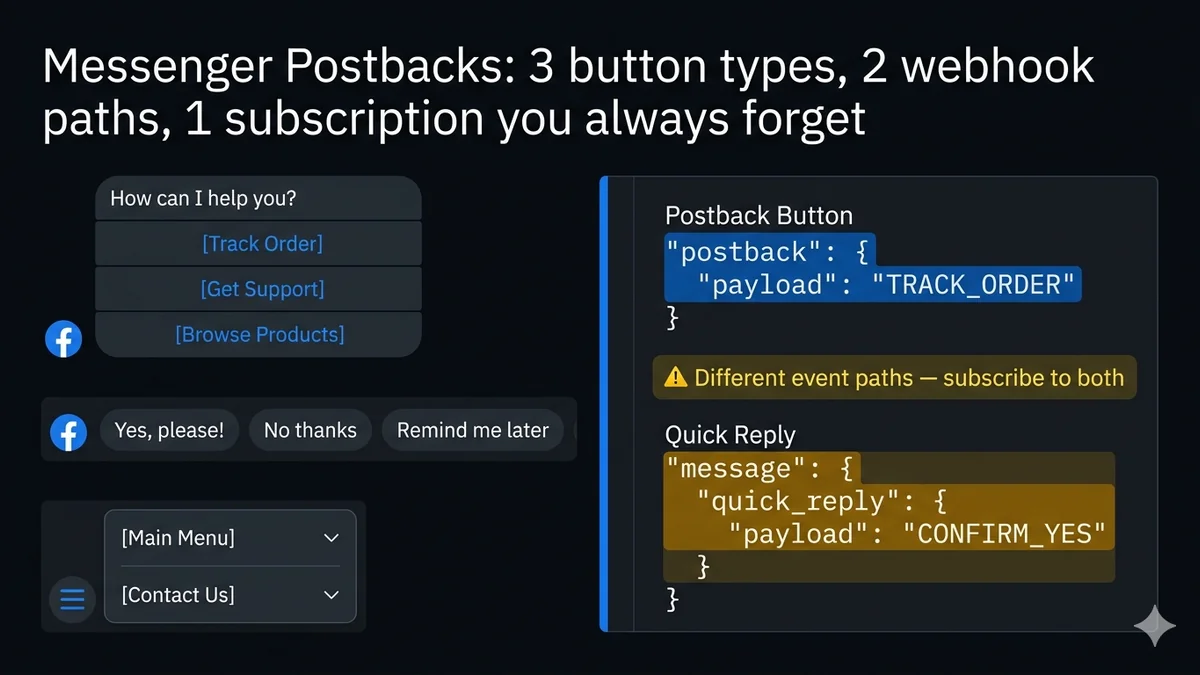
The postback mechanism powers three of Messenger's most important interactive elements:
Persistent menu items (the hamburger icon at the bottom of every conversation)
Referral entries (users arriving via m.me links or Click-to-Messenger ads)
The complete data flow: tap to webhook event
🔘
You configure
Button with payload: "TRACK_ORDER"
👆
User taps
Button in Messenger UI
📡
Meta fires
POST to your webhook URL
⚡
Your server
event.postback .payload === "TRACK_ORDER"
The critical detail in that flow: the webhook event Meta fires is a postback event — it arrives under entry.messaging[].postback, not under entry.messaging[].message. This is why many developers miss it: they write a message handler and wonder why button taps never arrive. See the subscription section below for why this happens and how to fix it.
All three button types that generate postbacks
Postback Button
In templates
Appears inside button template, generic template (carousel), or media template messages. Stays visible in the conversation after being tapped. Maximum 3 buttons per button template, 3 per generic template card. Button label max 20 chars.
Payload arrives at
event.postback.payload
Persistent Menu Item
Always visible
Set via the Messenger Profile API once per Page — appears as a hamburger menu icon for all users. Nested structure allowed (2 levels). Menu items with type "postback" fire postback events; type "web_url" opens a URL without a postback.
Payload arrives at
event.postback.payload
Quick Reply
Disappears after tap
Appears as horizontally scrollable bubbles. Disappears after the user taps one or sends another message. Despite firing a "payload" string, quick replies do NOT arrive in postback events — they arrive in message events. See the comparison below.
Payload arrives at
event.message.quick_reply.payload
Exact webhook payload schemas for every type
Postback button and persistent menu item
Postback event — full raw webhook payload
{
"object": "page",
"entry": [{
"id": "PAGE_ID",
"messaging": [{
"sender": { "id": "12345678901234" }, // PSID of user who tapped"recipient": { "id": "PAGE_ID" },
"timestamp": 1747231892100,
"postback": { // ← THIS IS THE POSTBACK OBJECT (not .message)"mid": "m_abc123...", // message ID of the button message"title": "Track My Order",// the button label the user saw and tapped"payload": "TRACK_ORDER"// ← YOUR PAYLOAD — what you configured on the button
}
}]
}]
}
// Extraction: event.postback.payload === "TRACK_ORDER"// event.postback.title === "Track My Order" (the label — useful for logging)// event.sender.id === PSID of the user who tapped
Quick reply (NOT a postback — arrives in messaging events)
Quick reply event — lives in .message, not .postback
{
"messaging": [{
"sender": { "id": "12345678901234" },
"timestamp": 1747231892100,
"message": { // ← note: .message, not .postback"mid": "m_def456...",
"text": "Yes, please!", // the quick reply title sent as a message text"quick_reply": {
"payload": "CONFIRM_YES"// ← YOUR PAYLOAD — same concept, different location
}
}
}]
}
// Extraction: event.message.quick_reply.payload === "CONFIRM_YES"// event.message.text still contains the quick reply title text// Subscription needed: messages (NOT messaging_postbacks)
The subscription gotcha: why your postbacks aren't arriving
⚠️
You must subscribe to messaging_postbacks separately
This is the #1 reason developers report "my buttons don't work" — they subscribed to messages but not messaging_postbacks. These are separate webhook field subscriptions. Subscribing to one does not include the other. Without messaging_postbacks, your POST endpoint will never receive a postback event, even if your button is correctly configured with a payload.
✓ messages → text messages, attachments, quick replies
✓ messaging_postbacks → button taps, persistent menu, referrals
✗ NOT included automatically
Graph API (programmatically): POST to /PAGE_ID/subscribed_apps with subscribed_fields=messages,messaging_postbacks,message_reads
Postback buttons vs quick replies: which to use when
The fundamental distinction in your webhook handler: postback events arrive at event.postback; quick reply payloads arrive at event.message.quick_reply. Your router needs to check both locations.
Node.js — detect and extract all payload types
detectPayload.js
functionextractPayload(event) {
// 1. Standard postback button or persistent menu tapif (event.postback?.payload) {
return {
type: 'POSTBACK',
payload: event.postback.payload,
title: event.postback.title, // button label — useful for logging
};
}
// 2. Quick reply button tap (arrives in message event)if (event.message?.quick_reply?.payload) {
return {
type: 'QUICK_REPLY',
payload: event.message.quick_reply.payload,
title: event.message.text, // quick reply title sent as message text
};
}
// 3. Referral postback (user arrived via m.me link or ad)if (event.postback?.referral || event.referral) {
const ref = event.postback?.referral || event.referral;
return {
type: 'REFERRAL',
payload: event.postback?.payload || null,
ref: ref.ref, // your tracking parameter
source: ref.source, // 'SHORTLINK' | 'ADS' | 'CUSTOMER_CHAT_PLUGIN' | etc
};
}
// 4. Regular text message — no payloadif (event.message?.text) {
return {
type: 'TEXT',
payload: null,
text: event.message.text,
};
}
return { type: 'UNKNOWN', payload: null };
}
Payload design patterns: good vs bad
The payload string is yours to design — Facebook treats it as an opaque string. How you design your payloads determines how maintainable and debuggable your bot's logic becomes at scale. Here are the patterns that work and the ones that cause problems:
Easy to route with startsWith() or switch. The prefix tells you the flow, the suffix tells you the choice. Readable in logs. Short enough to stay well under the 1,000 char limit.
JSON.stringify() the object, JSON.parse() on receive. Use only when you need to pass context that cannot be inferred from the conversation state. Keep compact — every character counts toward 1,000.
✗ Bad — opaque single words
Colliding, ambiguous payloads
YES NO NEXT OK BACK
These collide across flows. "YES" to what? In which conversation state? If you have two different button templates both using "YES", your router can't distinguish them without checking conversation state every time.
✗ Bad — empty or user-visible text
Non-machine-readable payloads
"Yes, please!" "Track my order" ""
Empty payload strings cause Facebook to reject the button configuration. User-visible text as payloads breaks when you change the button label without updating your router. Payloads should be machine identifiers, not display strings.
Version your persistent menu payloads. The persistent menu is set globally for all users of your Page. If you add a menu item that changes a payload string, existing users who haven't opened Messenger yet will get the new menu. Use version suffixes like MENU_SUPPORT_V2 so your router handles both old and new payloads during transitions. Never reuse a payload string for a different action.
When a user clicks an m.me link with a ref parameter — like m.me/yourpage?ref=EMAIL_CAMPAIGN_MAY — or arrives via a Click-to-Messenger ad, Facebook fires a referral event. This is how you track which campaign, ad, or entry point brought a user into Messenger.
Referral events have two forms depending on whether the user is starting a new conversation or returning to an existing one:
Referral postback payloads — both forms
// Form 1: New conversation — arrives as a standalone referral event// (user has never messaged your Page before, or is starting fresh)
{
"referral": {
"ref": "EMAIL_CAMPAIGN_MAY", // your ?ref= parameter"source": "SHORTLINK", // 'SHORTLINK' | 'ADS' | 'CUSTOMER_CHAT_PLUGIN'"type": "OPEN_THREAD"// always "OPEN_THREAD" for user-initiated
}
// Note: no postback.payload — this is a pure referral with no button
}
// Form 2: Button click with referral context (e.g. persistent menu from ad landing)// Arrives as a postback event with BOTH payload AND referral
{
"postback": {
"title": "Get Started",
"payload": "GET_STARTED",
"referral": {
"ref": "AD_SUMMER_SALE",
"source": "ADS",
"type": "OPEN_THREAD"
}
}
// postback.payload = the button action// postback.referral.ref = the campaign tracking string
}
To receive referral events, subscribe to messaging_referrals. This is a third webhook subscription separate from messages and messaging_postbacks. Without it, Form 1 referral events (new conversation cold starts) never arrive. Form 2 (postback + referral) arrives with messaging_postbacks subscribed. Subscribe to all three for complete coverage.
Production routing system: structured handler architecture
A switch statement on payload works for 5 buttons. At 50 buttons across 10 flows, it becomes unmaintainable. Here is the production pattern: a routing registry that maps payload prefixes to handler modules, with JSON payload support.
When you receive Messenger events through SocialHook, postbacks are pre-extracted and delivered in the same normalized format as all other event types. The raw entry[0].messaging[0].postback nesting is already unwrapped:
SocialHook normalized postback event
// Postback button tap:
{
"platform": "facebook",
"event": "postback",
"from": "12345678901234", // PSID"postback": {
"payload": "TRACK_ORDER", // your payload — ready to route"title": "Track My Order"// button label
},
"signature_verified": true
}
// Quick reply payload:
{
"platform": "facebook",
"event": "message.received",
"from": "12345678901234",
"message": {
"type": "quick_reply",
"payload": "CONFIRM_YES", // extracted from message.quick_reply.payload"body": "Yes, please!"// the quick reply title text
},
"signature_verified": true
}
// Your handler:
app.post('/webhook', async (req, res) => {
res.sendStatus(200);
const { event, from, postback, message } = req.body;
if (event === 'postback') awaitroutePostback(from, postback.payload);
if (message?.type === 'quick_reply') awaitroutePostback(from, message.payload);
});
FAQ
Common questions
What is a Facebook Messenger postback?
A postback is the webhook event fired when a user taps a Postback Button or Persistent Menu item. You configure a payload string on the button — when tapped, Facebook sends that exact string to your webhook at event.postback.payload. It is how your bot receives structured intent signals from user button taps, without any NLP or text parsing needed.
Why are my Messenger postbacks not arriving at my webhook?
Most likely cause: you subscribed to messages but not messaging_postbacks. These are separate subscriptions. Fix: Messenger Settings → Webhooks → Edit Subscriptions → check messaging_postbacks. Second check: your button has type: 'postback' (not type: 'web_url'). Third check: your button's payload field is not empty (empty payloads cause silent rejection).
What is the difference between a postback and a quick reply in Messenger?
Both deliver a payload string when tapped, but differ in three ways: (1) Location in webhook: postback → event.postback.payload; quick reply → event.message.quick_reply.payload. (2) Appearance: postback buttons persist in the conversation; quick replies disappear after one tap. (3) Subscription: postbacks need messaging_postbacks; quick replies arrive with messages.
Can I use JSON as a Messenger postback payload?
Yes — JSON.stringify() an object and use the resulting string as the payload. On receive, JSON.parse() it back. Facebook treats the payload as an opaque string up to 1,000 characters. Use JSON payloads when you need to pass structured context (productId, quantity, flow state) that can't be inferred from conversation state alone. Use compact JSON: remove whitespace with JSON.stringify(obj) (no space argument).
How do I track which campaign brought a user to my Messenger bot?
Use referral postbacks. Add a ?ref=YOUR_CAMPAIGN_ID parameter to your m.me link (e.g. m.me/yourpage?ref=EMAIL_MAY). When the user opens Messenger, a referral event fires with your ref string at event.referral.ref. Subscribe to messaging_referrals to receive cold-start referral events. If the user taps a button after arriving, the referral data appears alongside the postback in event.postback.referral.ref.
How do I set up a Messenger persistent menu?
POST once to graph.facebook.com/v21.0/me/messenger_profile with your Page Access Token and a persistent_menu array. Each item has a type (postback or web_url), a title, and either a payload (postback) or url (web_url). Changes apply globally to all users. You only need to call this API when updating the menu — it persists until you change it. Postback events from menu items arrive identically to template button postbacks.
Connect your Facebook Page to SocialHook. Every postback arrives at your handler with the payload already extracted — no raw webhook parsing, no subscription debugging, no HMAC boilerplate. Just event.postback.payload exactly when you need it.