What is a Facebook Page-Scoped ID (PSID) and How Do You Use It?
May 25, 2026
·
12 min read
In this guide: What a PSID is · PSID vs ASID vs IGSID · The isolation principle · Where PSID lives in webhook payloads · Sending messages with a PSID · Graph API lookup · ID Matching API · PSID reset edge case · Database indexing · SocialHook normalized format
What is a Facebook Page-Scoped ID (PSID)?
A Page-Scoped ID (PSID) is a unique numeric string that Facebook assigns to represent a specific Facebook user in the context of a specific Facebook Page. It is how your application identifies who sent a message via Facebook Messenger.
Here is what makes it distinct from a regular user ID:
A PSID is not the user's real Facebook user ID. Real Facebook IDs are internal to Meta's systems.
A PSID is page-specific. The same user has a different PSID for every Facebook Page they interact with through Messenger.
A PSID is stable for a given user-page pair — until the user blocks and unblocks your page (see the reset edge case below).
A PSID is opaque — it carries no intrinsic information about the user. It is just a reference handle.
In practice: when a customer sends your business a Facebook Messenger message, their PSID is the identifier your application uses to send replies, look up their history, and store their conversation record. It is the primary key for any Messenger user in your system.
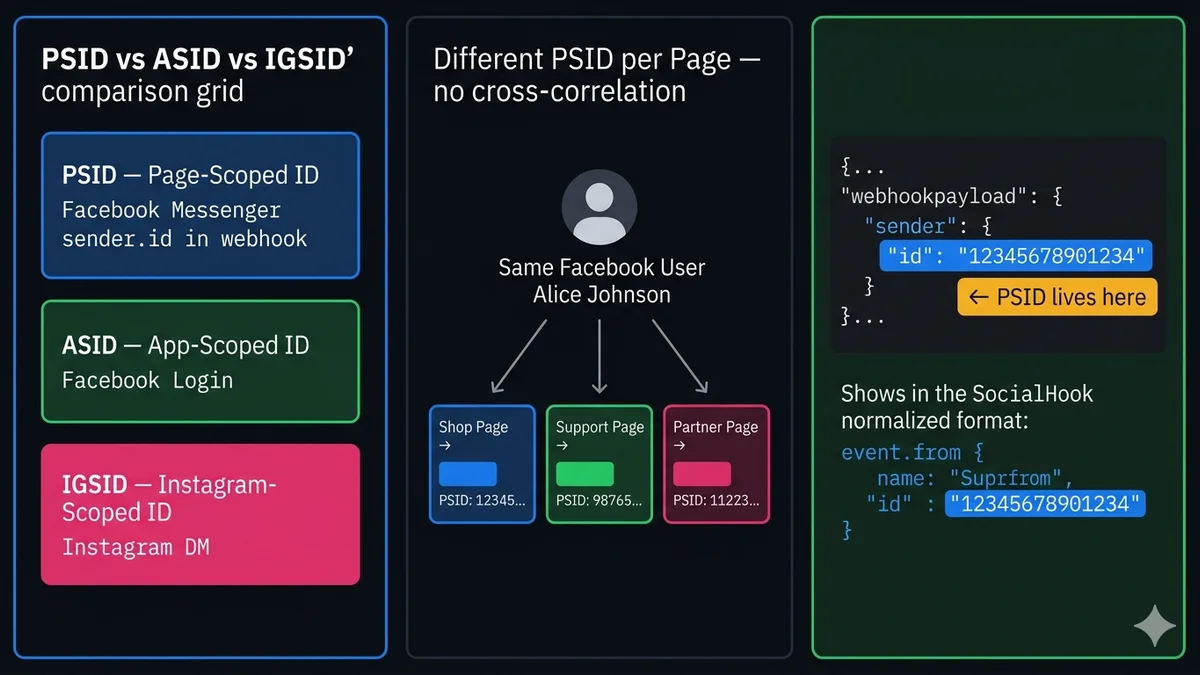
PSID, ASID, and IGSID: the three Facebook user ID types
Facebook maintains three different scoped ID systems for three different contexts. Knowing which one you're working with prevents a whole category of bugs where you inadvertently mix up user identifiers.
Messenger
Page-Scoped ID (PSID)
Identifies a user in the context of a specific Facebook Page. Appears in Messenger webhook events as sender.id. Used to send messages via the Send API. Different for every Page the user contacts.
sender.id in webhook
Facebook Login / Social Apps
App-Scoped ID (ASID)
Identifies a user in the context of a specific Facebook App. Returned when users log in via Facebook Login (OAuth). Different for every app the user authenticates with. Used in Graph API calls for social apps.
returned by Facebook Login
Instagram DM
Instagram-Scoped ID (IGSID)
Identifies a user in the context of a specific Instagram Business Account. Appears in Instagram DM webhook events. Similar concept to PSID but for Instagram. Used to send replies via the Instagram Messaging API.
sender.id in IG webhook
Never mix these IDs. Trying to send a Messenger message to an ASID returns an error. Trying to use a PSID from one Facebook Page to send a message via a different Page also fails — PSIDs are page-scoped and can only be used with the Page Access Token of the page that generated them. Storing different ID types in the same database column without a type label is a common bug.
The isolation principle: why PSIDs differ per page
Facebook designed the PSID system specifically to prevent cross-platform user tracking. If every app and page operator received the same user ID, data brokers and malicious actors could correlate user identities across hundreds of different businesses — exactly the kind of cross-service data harvesting that led to the Cambridge Analytica scandal.
The isolation means: if your business operates two Facebook Pages, the same Facebook user has different PSIDs on each page. You cannot use Page A's PSID to look up activity on Page B without explicit user consent and the ID Matching API (covered below).
Same Facebook user
Alice Johnson (real FB ID: hidden from you)
Your Main Shop Page
PSID: 12345678901234
Your Support Page
PSID: 98765432109876
Your Partner's Page
PSID: 11223344556677
Alice has three completely different PSIDs across three Pages. No correlation is possible between them from the data alone. This is by design — and it is why building multi-page Messenger operations requires careful thought about which PSID belongs to which page context.
Where the PSID lives in Messenger webhook payloads
When a user sends a message to your Facebook Page, the Messenger Platform fires an HTTP POST to your registered webhook URL. The PSID is at entry[0].messaging[0].sender.id in the raw payload. Here is the complete structure:
Facebook Messenger webhook payload
messenger-webhook.json
{
"object": "page", // always "page" for Messenger webhooks"entry": [{
"id": "PAGE_ID", // your Facebook Page ID (not a PSID)"time": 1747231892123,
"messaging": [{
"sender": {
"id": "12345678901234"// ← THIS IS THE PSID — the user who sent the message
},
"recipient": {
"id": "PAGE_ID"// your Page ID — same as entry.id
},
"timestamp": 1747231892100,
"message": {
"mid": "m_abc123...", // unique message ID"text": "Hello! I need help with my order."
}
}]
}]
}
// PSID extraction path: body.entry[0].messaging[0].sender.id// Page ID path: body.entry[0].id (same as recipient.id)
Extracting the PSID correctly:
Node.js — PSID extraction from raw webhook
extractPsid.js
app.post('/webhook/facebook', (req, res) => {
res.sendStatus(200); // acknowledge firstconst body = req.body;
if (body.object !== 'page') return;
body.entry.forEach(entry => {
const pageId = entry.id; // your Page ID
entry.messaging.forEach(event => {
const psid = event.sender.id; // ← the PSIDconst pageId = event.recipient.id; // confirms which Page received itif (event.message) {
console.log(`Message from PSID ${psid} on page ${pageId}:`, event.message.text);
handleMessage(psid, pageId, event.message);
} else if (event.postback) {
handlePostback(psid, pageId, event.postback);
} else if (event.read) {
handleRead(psid, event.read.watermark);
}
});
});
});
Sending messages back using a PSID
To reply to a user, you POST to the Send API using their PSID as the recipient. The PSID is the only identifier you need — Facebook resolves the user from it and delivers the message to their Messenger inbox.
Node.js — send Messenger message by PSID
sendByPsid.js
constGRAPH = 'https://graph.facebook.com/v21.0';
const PAGE_ACCESS_TOKEN = process.env.FB_PAGE_ACCESS_TOKEN; // must match the Page that got the PSIDasync functionsendMessengerMessage(psid, messageText) {
const res = awaitfetch(
`${GRAPH}/me/messages?access_token=${PAGE_ACCESS_TOKEN}`,
{
method: 'POST',
headers: { 'Content-Type': 'application/json' },
body: JSON.stringify({
recipient: { id: psid }, // PSID goes here
message: { text: messageText },
messaging_type: 'RESPONSE', // within 24h window
}),
}
);
if (!res.ok) {
const err = await res.json();
if (err.error?.code === 551 || err.error?.code === 100) {
// PSID may be invalid/reset — user may have blocked and unblockedthrowObject.assign(newError('Invalid PSID'), { code: 'PSID_INVALID', psid });
}
thrownewError(`Messenger send error: ${JSON.stringify(err)}`);
}
returnawait res.json(); // { recipient_id: psid, message_id: "m_..." }
}
// Critical: use the Page Access Token from the Page that the user's PSID belongs to.// Using a different Page's token returns an error even if the PSID format is correct.
Looking up user information via the Graph API using a PSID
With a PSID and your Page Access Token, you can query the Graph API to retrieve the user's public profile information — specifically their first name, last name, and profile picture. This is useful for personalizing your bot's responses and pre-populating CRM records.
Permissions required: Your Facebook App must have the pages_messaging permission approved to read user profile via PSID. Without it, the Graph API returns only the id field. The profile fields (name, picture) require the user to have explicitly messaged your Page first — you cannot look up arbitrary PSIDs, only ones that have initiated conversation with your Page.
Node.js — Graph API user lookup by PSID
lookupByPsid.js
async functiongetUserProfile(psid) {
const fields = 'first_name,last_name,profile_pic,locale,timezone,gender';
const url = `${GRAPH}/${psid}?fields=${fields}&access_token=${PAGE_ACCESS_TOKEN}`;
const res = awaitfetch(url);
if (!res.ok) throw newError(`Profile lookup failed: ${await res.text()}`);
returnawait res.json();
// Returns: { id, first_name, last_name, profile_pic, locale, timezone }
}
// Usage — look up profile on first contact and store itasync functiononFirstContact(psid) {
const profile = awaitgetUserProfile(psid);
awaitupsertUser({
psid,
firstName: profile.first_name,
lastName: profile.last_name,
profilePic: profile.profile_pic,
locale: profile.locale, // e.g. "pt_BR" — useful for language routing
});
}
// Note: gender and timezone fields deprecated by Meta in v18.0+// Stick to first_name, last_name, profile_pic, locale for future-safe code
The ID Matching API: converting PSID ↔ ASID
In some cases you may need to correlate a Messenger user (identified by PSID) with the same user authenticated via Facebook Login (identified by ASID). Facebook provides the ID Matching API for this purpose — but it requires pages_user_ids permission AND only works across applications under the same Business Portfolio.
The typical use case: a user authenticated with Facebook Login (giving you their ASID) later contacts you via Messenger (giving you their PSID). You want to link both identifiers to the same user record in your database.
Node.js — ID Matching API (PSID ↔ ASID)
idMatching.js
// Convert PSID → ASID (to find the same user who logged in via Facebook Login)async functiongetAsidFromPsid(psid) {
const url = `${GRAPH}/${psid}?fields=ids_for_apps&access_token=${PAGE_ACCESS_TOKEN}`;
const res = awaitfetch(url);
const data = await res.json();
// Returns array of app-scoped IDs for apps in the same Business Portfolioconst appIds = data.ids_for_apps?.data ?? [];
const match = appIds.find(a => a.app.id === process.env.FB_APP_ID);
return match?.id; // the ASID for this user on your app
}
// Convert ASID → PSID (to find the Messenger identity of a logged-in user)async functiongetPsidFromAsid(asid) {
const url = `${GRAPH}/${asid}?fields=ids_for_pages&access_token=${PAGE_ACCESS_TOKEN}`;
const res = awaitfetch(url);
const data = await res.json();
const pageIds = data.ids_for_pages?.data ?? [];
const match = pageIds.find(p => p.page.id === process.env.FB_PAGE_ID);
return match?.id; // the PSID for this user on your Page
}
// Requirements:// - App must have pages_user_ids permission (requires App Review)// - Both apps must be under the same Business Portfolio// - User must have interacted with both the Page and the App
The PSID reset edge case you must handle
There is one scenario where a user's PSID changes: if the user blocks your Facebook Page and then later unblocks it. When they unblock and message you again, they receive a brand-new PSID for your Page. Their old PSID is now orphaned — any message you attempt to send to it will fail.
This edge case is easy to miss because it happens silently. The user doesn't know their PSID changed. Your database still has the old PSID. When you try to send them a message, you get an error. Here is how to handle it correctly:
Node.js — PSID reset detection and update
psidReset.js
async functionhandleInboundMessage(event) {
const psid = event.sender.id;
const message = event.message;
// Look up this PSID in your databaselet user = await db.findByPsid(psid);
if (!user) {
// New PSID — either genuinely new user or a PSID reset after block/unblock// Check if we have a user with matching profile (name + profile pic)const profile = awaitgetUserProfile(psid);
const existing = await db.findByProfile(profile.first_name, profile.last_name);
if (existing) {
// Likely a PSID reset — update the stored PSIDawait db.updatePsid(existing.id, psid);
user = { ...existing, psid };
console.log(`PSID reset detected for user ${existing.id} — new PSID: ${psid}`);
} else {
// Genuinely new user
user = await db.createUser({ psid, ...profile });
}
}
awaitprocessMessage(user, message);
}
// Also: subscribe to the messaging_optins and messaging_optouts webhook events// messaging_optouts fires when a user blocks your page — flag the PSID as potentially stale
Database indexing: the correct way to store PSIDs
PSID storage mistakes cause subtle, hard-to-debug bugs. Here are the correct patterns:
Never use PSID as a primary key. PSIDs can change (block/unblock scenario). Use an internal auto-increment or UUID as your primary key. PSID is a foreign identifier that maps to your internal user.
Always store the Page ID alongside the PSID. A PSID is only meaningful in the context of the Page it was generated for. If you operate multiple Pages, (psid, page_id) should be a composite unique constraint, not psid alone.
Index the PSID column. Every inbound message requires a PSID lookup. Without an index, this is a full table scan on every webhook event.
Store the PSID as a string. PSIDs are numeric strings but can exceed JavaScript's safe integer range (Number.MAX_SAFE_INTEGER). Always treat them as strings, not numbers.
SQL — correct PSID schema
schema.sql
CREATE TABLE messenger_users (
id UUID PRIMARY KEY DEFAULT gen_random_uuid(),
psid VARCHAR(25) NOT NULL, -- string, not bigint
page_id VARCHAR(25) NOT NULL, -- which Facebook Page generated this PSID
first_name VARCHAR(100),
last_name VARCHAR(100),
profile_pic TEXT,
locale VARCHAR(10), -- e.g. 'pt_BR', 'en_US'
asid VARCHAR(25), -- linked App-Scoped ID (Facebook Login), nullable
is_active BOOLEAN DEFAULT TRUE, -- false if PSID became invalid
created_at TIMESTAMPTZ DEFAULT NOW(),
updated_at TIMESTAMPTZ DEFAULT NOW(),
UNIQUE (psid, page_id) -- composite unique — PSID is page-scoped
);
CREATE INDEX idx_messenger_users_psid ON messenger_users (psid);
CREATE INDEX idx_messenger_users_page_id ON messenger_users (page_id);
CREATE INDEX idx_messenger_users_asid ON messenger_users (asid) WHERE asid IS NOT NULL;
-- Never store PSID as INTEGER or BIGINT-- Example PSID: '1234567890123456789' — exceeds JS Number.MAX_SAFE_INTEGER-- parseInt('1234567890123456789') === 1234567890123456800 — wrong!
PSID in SocialHook's normalized Facebook Messenger events
When you use SocialHook for Facebook Messenger, the PSID is pre-extracted from the raw Messenger webhook envelope and delivered at the top level of the normalized event. No need to navigate the nested entry[0].messaging[0].sender.id path:
SocialHook normalized Facebook Messenger event
{
"platform": "facebook",
"event": "message.received",
"timestamp": 1747231892,
"from": "12345678901234", // ← this IS the PSID, ready to use"page_id": "PAGE_ID", // which Page received the message"conversation_id": "conv_fb_8j3k...",
"message": {
"type": "text",
"body": "Hello! I need help with my order.",
"id": "m_abc123..."
},
"signature_verified": true
}
// event.from === the PSID — same format as WhatsApp's event.from for phone numbers// event.page_id — use this for multi-page routing (PSID is specific to this page)// Same payload structure as WhatsApp and Instagram events — one handler for all channels
The key benefit for multi-channel deployments: SocialHook normalizes PSID (Facebook), phone number (WhatsApp), and IGSID (Instagram) all into the same from field with the same payload shape. Your application code can handle all three channels with a single message handler function, differentiating by platform when needed. See the payload reference for the complete schema comparison across all three channels.
FAQ
Common questions
What is a Facebook Page-Scoped ID (PSID)?
A PSID is a unique opaque string Facebook assigns to represent a specific user in the context of a specific Facebook Page. When someone sends your Facebook Page a Messenger message, Facebook identifies them to your application using their PSID — not their real Facebook user ID. The same person has a different PSID for every Page they interact with, providing privacy isolation between Page operators.
Where does the PSID appear in a Facebook Messenger webhook payload?
In the raw Messenger webhook: body.entry[0].messaging[0].sender.id. In SocialHook's normalized format: event.from. The sender.id is always the PSID of the person who sent the message. The recipient.id is your Page ID (not a PSID). When iterating multiple entries and messaging arrays, always use messaging[n].sender.id, not entry[n].id.
Can a user's PSID change?
Yes — when a user blocks your Facebook Page and later unblocks it, they receive a new PSID for your Page. Their old PSID becomes invalid. This happens silently. Always check for PSID_INVALID errors when sending messages and update your database when you receive a new PSID from a user whose profile matches an existing record. Never use PSID as a primary key for this reason.
Can I send a Messenger message to a user I've never received a message from?
Not via the standard Send API without a PSID. You need the user to initiate contact (giving you their PSID) or you need to obtain their PSID via the ID Matching API (if they've used Facebook Login on your app and you have pages_user_ids permission). You cannot look up arbitrary users' PSIDs — PSIDs only exist in the context of a user who has interacted with your specific Page. This is by design for privacy.
Why should I store PSID as a string and not an integer?
PSIDs are numeric strings that can exceed JavaScript's Number.MAX_SAFE_INTEGER (9,007,199,254,740,991). If you parse a PSID like "1234567890123456789" as a JavaScript integer, you get precision loss: parseInt('1234567890123456789') === 1234567890123456800 — the last few digits are wrong. Always store and pass PSIDs as strings in your database (VARCHAR/TEXT) and in your code. Never cast them to numbers.
How is PSID different from ASID?
PSID (Page-Scoped ID) is for Messenger — it identifies a user per Facebook Page. ASID (App-Scoped ID) is for Facebook Login — it identifies a user per Facebook App. The same user has a different PSID for every Page and a different ASID for every App. You can convert between them using the ID Matching API, but only if both the Page and the App are under the same Business Portfolio and you have pages_user_ids permission.
Connect your Facebook Page to SocialHook and receive every Messenger event with the PSID pre-extracted at event.from — alongside your WhatsApp and Instagram events in the same normalized format. One handler for all three channels.