How to Handle WhatsApp Media Messages in Webhooks (Images, Docs, Voice Notes)
May 22, 2026
·
16 min read
In this guide: Media type reference table · The 5-minute URL expiry · Full download pipeline · All media payload schemas · Image & document handling · Voice note OGG→MP3 conversion · Whisper transcription · S3/GCS storage patterns · Complete handler with all types · SocialHook normalized format
Media types: complete reference table
The Cloud API delivers 8 media message types, each with different formats, size limits, and handling requirements. Know the constraints before you build the handler.
type value
Formats accepted
Size limit
Special notes
🖼️
image
JPEG, PNG
5 MB
Optional caption. GIF not supported inline — send as document.
🎵
audio
AAC, AMR, MP3, OGG/Opus
16 MB
voice: true if recorded in-app (OGG/Opus). Regular audio files may vary. Always convert OGG before transcription.
🎬
video
MP4, 3GPP
16 MB
Optional caption. H.264 video + AAC audio recommended for broadest compatibility.
📄
document
Any MIME type Meta accepts
100 MB
Includes filename — store it. PDF, DOCX, XLSX, images as documents, etc.
💿
sticker
WebP
Static 500KB / Animated 100KB
animated: true if animated. WebP format — browsers support it natively now.
The 5-minute URL expiry — the detail that breaks most implementations
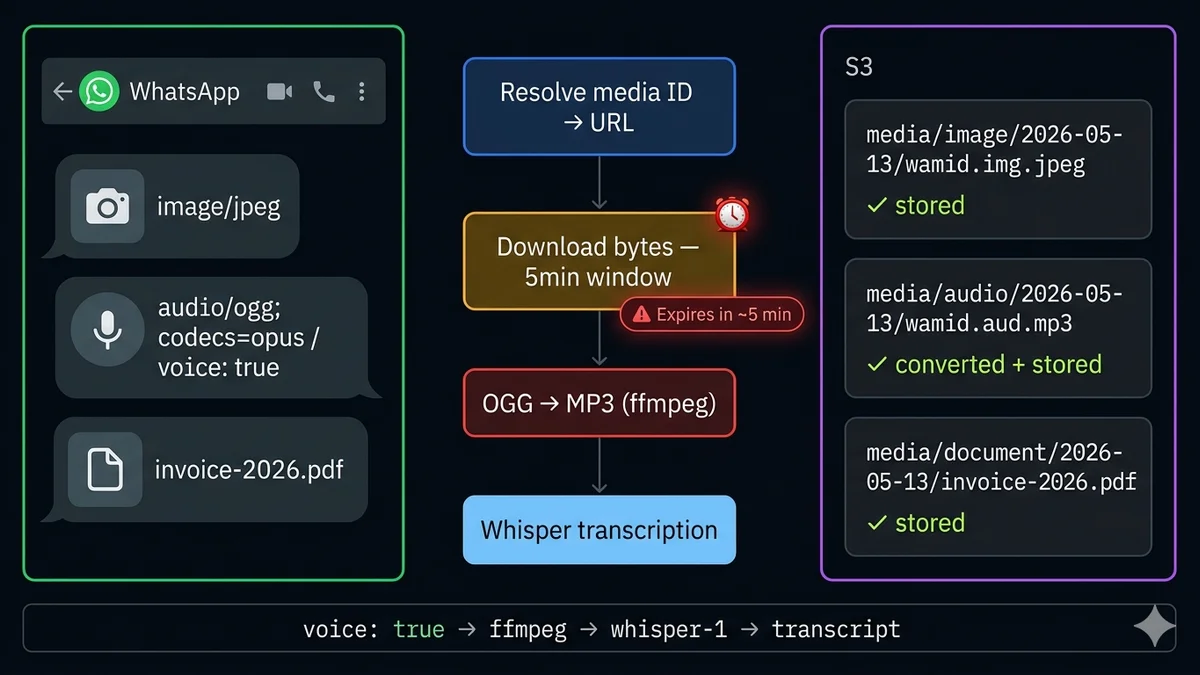
This is the most commonly missed detail in WhatsApp media handling, and it causes the most production bugs. When you call the Cloud API media endpoint to resolve a media ID, you receive a temporary download URL. That URL is valid for approximately 5 minutes.
The two patterns developers use — and why one breaks:
❌ Store the URL, download later — you receive the webhook, call the media endpoint, store the temporary URL in your database for async processing. By the time your worker picks it up, the URL has expired. You get a 403. This pattern fails.
✓ Download immediately, store the file — you receive the webhook, immediately resolve the media ID to a URL, immediately download the bytes, store the file on your own storage (S3, GCS, disk), save only the storage path in your database. Async processing works on the stored file. This pattern is correct.
Alternative: store the media ID, resolve on demand. If you don't need the file immediately, you can store just the media ID and resolve it fresh when you need the file. Media IDs are valid for 30 days — much longer than the temporary download URL. This is useful when you're not sure if you'll ever need the binary (e.g. stickers you might ignore). Just know the resolve call adds latency when you finally need it.
The download pipeline: ID → URL → bytes → storage
1
Receive webhook — extract media ID
msg.image.id / msg.audio.id / msg.document.id — NOT a URL, just a reference
2
Return HTTP 200 immediately do this first
Acknowledge to Meta before any downloads. Push media processing to async queue.
GET {download_url} — ALSO requires Authorization: Bearer {token} — returns raw binary bytes
5
Store file to S3 / GCS / local disk
Organize by: media/{client_id}/{media_type}/{date}/{media_id}.{ext}
6
Process (type-specific)
Image: extract metadata, generate thumbnail. Audio/voice: convert OGG→MP3, transcribe. Document: extract text for search. Video: generate thumbnail frame.
Payload schemas for every media type
Here is the exact webhook value object structure for each media type. The nesting from the top-level envelope (entry[0].changes[0].value.messages[0]) is already extracted when using SocialHook's normalized format.
Images and documents share the same two-step download pattern. The key difference: documents include a filename field that you should preserve in your storage key — it's what the customer named the file and what you'll want to show in your UI.
Voice notes recorded in WhatsApp are encoded in OGG/Opus format. You can identify them by the voice: true flag in the audio payload and the mime_type: "audio/ogg; codecs=opus" value. This format is not supported by OpenAI Whisper for transcription, and has limited browser playback support.
The solution: convert to MP3 using ffmpeg. ffmpeg is the universal audio conversion tool, available on every major OS and all cloud environments.
Once you have the MP3, send it to OpenAI's Whisper API. Whisper supports 57 languages, handles background noise well, and costs approximately $0.006 per minute of audio — a 30-second voice note costs less than a cent to transcribe. The transcript then becomes queryable, AI-processable text.
What to do with the transcript: Store it alongside the audio file. Pass it to your AI agent as the user's message (instead of "audio message received"). Index it in your search database. Log it in your CRM as the conversation text. Customers send voice notes because typing is slower — treating their voice notes as searchable text dramatically improves your AI agent's ability to understand and respond correctly.
Storage patterns: organize your media files
How you organize files in S3 or GCS matters for performance, billing, and debugging. Here is the storage key pattern that scales cleanly across multiple clients and message types:
One function that receives a normalized media event and routes to the correct handler by type:
Node.js — universal media dispatcher
mediaDispatcher.js
async functiondispatchMedia(event) {
const { from, message } = event;
const { type } = message;
// Text messages — not media, handle separatelyif (type === 'text') returnhandleText(from, message.text.body);
// Non-media message typesif (['location', 'contacts', 'reaction', 'interactive'].includes(type)) {
returnhandleNonMedia(from, message);
}
// Media types — all require downloadswitch (type) {
case'image':
case'video':
case'sticker':
case'document': {
const result = awaithandleMediaMessage(message, from);
awaitsaveMediaRecord(from, result);
break;
}
case'audio': {
// Voice notes get transcribed; regular audio files just storedconst result = awaitprocessVoiceNote(message, from);
awaitsaveMediaRecord(from, result);
// If voice note was transcribed, treat transcript as text inputif (result.transcript?.text) {
console.log(`Voice note from ${from}: "${result.transcript.text}"`);
awaithandleText(from, result.transcript.text, { isVoiceNote: true });
}
break;
}
default:
console.warn(`Unhandled media type: ${type}`);
}
}
SocialHook: pre-extracted media IDs in normalized format
When you use SocialHook, the media payload arrives already extracted from Meta's nested Cloud API envelope. Instead of navigating entry[0].changes[0].value.messages[0], you receive a flat event:
SocialHook normalized media event
// Image message
{
"platform": "whatsapp",
"event": "message.received",
"from": "+1 555 000 1234",
"message": {
"type": "image",
"id": "wamid.HBgL...",
"image": {
"id": "12345678901234", // ← use this to resolve URL"mime_type": "image/jpeg",
"caption": "Here's the damage to my package"
}
},
"signature_verified": true
}
// Voice note
{
"message": {
"type": "audio",
"audio": {
"id": "98765432109876",
"mime_type": "audio/ogg; codecs=opus",
"voice": true// ← this tells you to run OGG→MP3 conversion
}
}
}
Your dispatchMedia(event) function above receives this format directly — no additional parsing needed. The media ID is at event.message.image.id (or .audio.id, .document.id, etc.), ready to feed into resolveMediaUrl().
FAQ
Common questions
How do I download media from a WhatsApp Cloud API webhook?
Two steps: (1) Call GET graph.facebook.com/v21.0/{media_id} with your access token to get a temporary download URL. (2) Fetch that URL (also with your access token in the Authorization header) to get the file bytes. Download immediately — the URL expires in approximately 5 minutes. Store the file bytes to S3/GCS/disk, not the temporary URL.
Why does my WhatsApp media download URL return 403?
Two causes: (1) URL expired — WhatsApp media download URLs are valid for approximately 5 minutes. If you stored the URL and fetched it later, it expired. Re-resolve from the media ID. (2) Missing Authorization header — the download URL itself also requires Authorization: Bearer {ACCESS_TOKEN} in the request. WhatsApp media URLs are not public CDN URLs.
What format are WhatsApp voice notes in and how do I convert them?
WhatsApp voice notes are OGG/Opus format (identified by voice: true in the payload and mime_type: "audio/ogg; codecs=opus"). Convert to MP3 with ffmpeg: ffmpeg -i input.ogg -codec:a libmp3lame -qscale:a 2 output.mp3. OGG/Opus is not supported by OpenAI Whisper or most browsers — always convert before transcription or playback. Full Node.js and Python code is in the voice notes section above.
How do I transcribe WhatsApp voice notes with Whisper?
Download the OGG → convert to MP3 with ffmpeg → send to OpenAI Audio Transcriptions API with model: "whisper-1". Whisper returns the transcript text. Cost is ~$0.006 per minute of audio. A 30-second voice note costs less than a third of a cent. The transcript can then be treated as a regular text message by your AI agent or CRM.
How long are WhatsApp media IDs valid?
Media IDs are valid for 30 days. The temporary download URL you get from resolving the ID is valid for approximately 5 minutes. This means you can safely store just the media ID in your database and resolve it fresh when you need the file (within 30 days). After 30 days, the media is deleted from Meta's servers and the ID is invalid.
What are the file size limits for WhatsApp media?
By type: Image (JPEG, PNG) — 5MB. Audio — 16MB. Video — 16MB. Document — 100MB. Sticker — 500KB static, 100KB animated. Messages with media exceeding these limits are rejected before your webhook fires — the sender sees a failure, not you.
SocialHook delivers every WhatsApp media event — image, voice note, document — as pre-extracted JSON to your handler. You get the media ID ready to resolve, the MIME type, and the voice flag. No Cloud API parsing. Just pipe it straight to your download function.