
Webhook fundamentals
The WhatsApp Cloud API delivers events to your application through a push-based webhook system. Rather than polling an endpoint for new events, Meta's servers POST a JSON payload to a URL you register — your webhook endpoint. Your server processes the payload and returns HTTP 200 to acknowledge receipt.
Two HTTP methods operate on the same URL:
- GET — one-time verification challenge during registration. Your endpoint must return the
hub.challengequery parameter as plain text. - POST — live event notifications. Every inbound message, status update, and account event arrives here.
The most important constraints to internalize before writing any code:
- Respond within 20 seconds — anything slower triggers a retry. Acknowledge immediately, process async.
- At-least-once delivery — the same event may arrive more than once. Your handler must be idempotent.
- No ordering guarantee — events may arrive out of sequence. Never assume chronological order.
- 3MB payload size limit — individual webhook payloads will not exceed 3MB. Media files are not included inline.
- HTTPS required — Meta rejects plain HTTP endpoints. Valid SSL certificate required.
Complete webhook properties reference
| Property | Value / Spec | Notes |
|---|---|---|
| Protocol | HTTPS only | Valid SSL cert required. HTTP rejected outright. |
| Direction | Provider → Consumer (push) | Meta pushes to you. No polling required. |
| Verification method | GET + hub.verify_token | One-time on registration. Return hub.challenge as plain text. |
| Auth on events | X-Hub-Signature-256 HMAC-SHA256 | Signed with App Secret. Verify every POST. |
| HTTP method for events | POST | Always POST. Never GET for live events. |
| Data format | JSON | Content-Type: application/json |
| Response timeout | 20 seconds | Exceeding triggers retry. Return 200 immediately. |
| Success criteria | HTTP 200 | Any non-200 triggers retry mechanism. |
| Payload size limit | 3 MB | Media not inline — referenced by ID. |
| Retry duration | Up to 7 days | Exponential backoff. See full schedule below. |
| Delivery guarantee | At-least-once | Duplicates possible. Make handler idempotent. |
| Ordering guarantee | None | Events may arrive out of chronological order. |
| Webhook levels | Phone Number + WABA | Phone Number takes priority over WABA fallback. |
| Manual replay | Not supported | No native replay. Events lost after 7 days. |
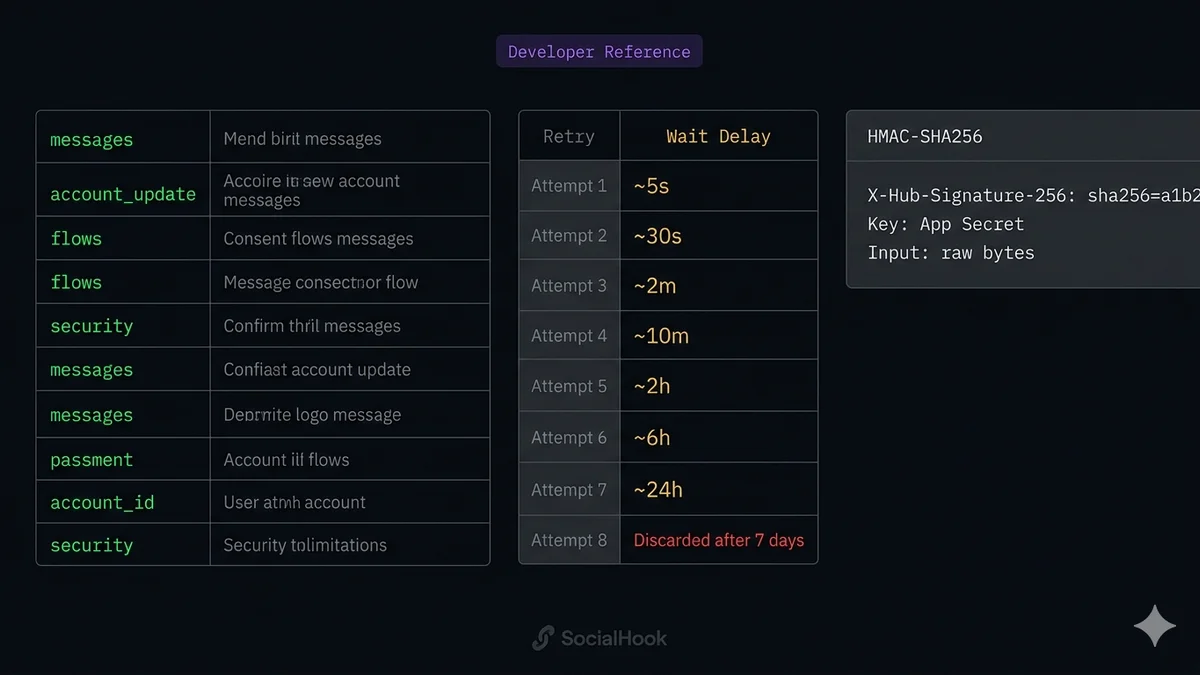
| Signature algorithm | HMAC-SHA256 | Key = App Secret. Input = raw body bytes. |
| Signature header | X-Hub-Signature-256 | Format: sha256=<hex> |
| Concurrent deliveries | Multiple per second | High-volume numbers receive many events/second. |
All webhook subscription fields
You subscribe to individual fields in the Meta Developer Dashboard (WhatsApp → Configuration → Webhooks → Manage). Subscribing to messages is mandatory for most integrations. Each field represents a category of events — subscribe only to what you need to reduce payload volume.
| Field | Coverage | Priority |
|---|---|---|
| messages | All inbound customer messages + all outbound status updates (sent / delivered / read / failed). The primary field for any messaging integration. | Subscribe always |
| account_update | Policy violations (ACCOUNT_VIOLATION) and active restrictions (ACCOUNT_RESTRICTION) on your phone numbers. Essential for production monitoring. |
Recommended |
| message_template_status_update | Template approval, rejection, pausing, and disabling events. Fires whenever Meta changes the status of a template you've submitted. | Recommended |
| phone_number_quality_update | Quality rating changes (GREEN / YELLOW / RED) for your phone numbers. Quality affects your messaging tier. Subscribe to detect degradation early. | Recommended |
| phone_number_name_update | Display name approval or rejection events. Fires when Meta reviews a name you've submitted for your WhatsApp Business number. | Situational |
| business_capability_update | Messaging limit tier changes — when Meta upgrades or downgrades your daily conversation tier (1K / 10K / 100K / Unlimited). | Situational |
| flows | WhatsApp Flows interactions — data submission events when a user completes or interacts with a Flow attached to your number. | If using Flows |
| security | Two-step verification PIN events. Fires when the PIN for a phone number is changed or disabled. | Optional |
| message_template_components_update | Fires when Meta modifies the components of an approved template (rare — Meta may adjust templates to comply with policy). | Optional |
| account_alerts | Billing alerts, capacity warnings, and other account-level operational notices from Meta. | Optional |
Events delivered per subscription field
messages field — inbound message types
The messages field delivers two categories: inbound messages from customers (identified by a messages array in the value object) and outbound delivery status updates (identified by a statuses array). Check which array is present before processing.
| msg.type | Content location | Notes |
|---|---|---|
| text | msg.text.body | Plain text message body. May include URLs. |
| image | msg.image.id, .mime_type, .caption | ID → resolve URL → download. Caption optional. |
| audio | msg.audio.id, .voice | voice: true if recorded in-app. Always download immediately. |
| video | msg.video.id, .caption | Caption optional. |
| document | msg.document.id, .filename, .mime_type | Filename included — store it. |
| sticker | msg.sticker.id, .animated | Animated flag distinguishes WebP vs animated sticker. |
| location | msg.location.latitude, .longitude, .name, .address | Name and address are optional. |
| contacts | msg.contacts[n].name, .phones | Array — customer may share multiple contacts. |
| reaction | msg.reaction.emoji, .message_id | References the message ID the customer reacted to. |
| interactive | msg.interactive.type, then .button_reply or .list_reply | Check type before reading sub-object. |
| order | msg.order.catalog_id, .product_items | WhatsApp Commerce — product order from catalog. |
| system | msg.system.body, .type | System events: customer changed number, etc. |
| button | msg.button.text, .payload | Quick reply button tap from a template message. |
| referral | msg.referral.source_url, .source_type, .source_id | Click-to-WhatsApp ad referral data alongside the message. |
messages field — outbound status updates
| status value | Meaning | Additional fields |
|---|---|---|
| sent | Message accepted by Meta and forwarded to WhatsApp. Not yet delivered to device. | timestamp, recipient_id, conversation, pricing |
| delivered | Message reached the recipient's device (double grey tick). | timestamp, recipient_id, conversation, pricing |
| read | Recipient opened the chat (double blue tick). Only fires if read receipts are enabled. | timestamp, recipient_id |
| failed | Delivery permanently failed. Check status.errors[0].code for the specific error. | errors array with code and title |
Exact retry schedule with backoff timings
Meta retries failed webhook deliveries for up to 7 days using exponential backoff. "Failed" means your endpoint returned non-200, timed out (took more than 20 seconds), or was unreachable. After 7 days, the event is permanently discarded — no recovery path exists natively.
HTTP response code behavior
What you return to Meta determines whether the event is considered delivered, retried, or triggers an alert. The decision tree is simpler than most developers expect — everything is binary: 200 means success, anything else means retry.
Complete HMAC-SHA256 signature specification
Every POST request from Meta includes a cryptographic signature that lets you verify the request genuinely came from Meta and was not tampered with in transit. Skipping this check means any attacker who discovers your webhook URL can feed arbitrary data to your application.
Header format
Verification in Node.js
Verification in Python
JSON.stringify(JSON.parse(body)) produces different bytes than the original — whitespace, key order, and number precision can all change. Always compute HMAC on the exact bytes that arrived in the HTTP request, before any transformation.WABA-level vs Phone Number-level webhooks
The WhatsApp Cloud API supports two webhook configuration levels that interact in a specific priority order. Understanding this prevents silent event loss when managing multiple phone numbers.
| Aspect | Phone Number Webhook | WABA Webhook |
|---|---|---|
| Config location | Meta Developer Dashboard → WhatsApp → Configuration | Meta Business Settings → WhatsApp Accounts → [WABA] → Webhook |
| Scope | One specific phone number | All phone numbers in the WABA |
| Priority | Higher — takes precedence | Lower — fallback only |
| Fallback behavior | If set, WABA webhook does not receive events for this number | Receives events for numbers with no Phone Number webhook |
| Best for | Single-number integrations, per-number routing logic | Multi-number operations, agency managing many client numbers |
| Event routing | Events go to this URL only | Events for all unconfigured numbers arrive here |
| Subscription fields | Configured separately | Configured separately |
metadata.phone_number_id. Add a Phone Number-level webhook only for numbers that need different routing. This is cleaner than maintaining separate webhooks per client number, and SocialHook supports multiple numbers per account under a single normalized event stream.At-least-once delivery — implications and deduplication
Meta's webhook system guarantees that a given event will be delivered at least once. It does not guarantee exactly once. The duplicate scenario: your server processes an event, returns 200, but the acknowledgment is lost in transit before Meta's system records it. Meta retries. Your handler processes the same event again.
For a simple echo bot this is inconsequential. For an AI agent that triggers a CRM action, a payment, or an outbound message — duplicates cause real problems. Your handler must be idempotent.
Deduplication pattern
The msg.id value (the wamid.HBgL... string) is unique per message. Status updates use the outbound message ID. Reactions and other event types have their own unique IDs. Always use the event-specific ID — never a derived value — as your deduplication key.
Payload schemas for key event types
Top-level envelope (all events)
Inbound text message (value object)
Outbound message status update (value object)
Security checklist
X-Hub-Signature-256 header is missing, malformed, or doesn't match. Without this, your endpoint accepts forged events from anyone.crypto.timingSafeEqual() in Node.js, hmac.compare_digest() in Python. Simple string equality (=== / ==) leaks timing information that attackers can exploit to forge signatures character by character.express.raw() middleware on the webhook route. In FastAPI: await request.body() before any JSON deserialization.process.env.WHATSAPP_APP_SECRET (Node.js) or os.environ["WHATSAPP_APP_SECRET"] (Python). Rotate immediately if it leaks.msg.id values in Redis with a 24h+ TTL. Check before processing. Skip duplicates silently — never error on them.crypto.randomBytes(32).toString('hex').Common errors and fixes
| Error / Symptom | Root cause | Fix |
|---|---|---|
| Verification fails at registration | Returning JSON instead of plain text, wrong verify token, or returning hub.challenge wrapped in a JSON object |
Return hub.challenge as plain text with Content-Type: text/plain. Exact string — no JSON wrapping. |
| HMAC always fails | Computing HMAC after JSON parsing, using access token instead of App Secret, double-encoding the body | Use express.raw() in Express. Call await request.body() in FastAPI before parsing. Key = App Secret from App Settings → Basic. |
| Events not arriving at all | messages field not subscribed, or webhook not saved/verified |
Dashboard → WhatsApp → Configuration → Webhooks → Manage → enable messages field. Confirm webhook shows as verified. |
| Receiving same event multiple times | At-least-once delivery — expected behavior, not a bug | Implement deduplication using msg.id as Redis key with 24h TTL. Check before processing. |
| Events arriving out of order | No ordering guarantee — by design | Use timestamp field to sort when building conversation threads. Never assume sequential delivery order. |
| Meta retries keep coming | Handler returning non-200, timing out (>20s), or crashing | Return 200 immediately. Move all processing to async queue. Wrap handler in try-catch. Monitor server stability. |
| Media download returns 401 | Using wrong token or token expired | Media downloads require the same access token used for the API. Ensure it's a permanent System User token, not a temporary user token. Check token hasn't been revoked. |
messages array missing from payload |
It's a status update — the array is statuses, not messages |
Check for value.messages AND value.statuses separately. Both arrive under the messages field subscription. |
| Sender number has no + prefix | Cloud API delivers from without the + prefix (e.g. 15550001234 not +15550001234) |
Normalize on receipt: '+' + msg.from to get E.164 format. SocialHook normalizes this automatically. |
| Timestamp is a string, not an integer | Cloud API delivers timestamp as a Unix timestamp string |
Always parseInt(msg.timestamp, 10) (Node.js) or int(msg["timestamp"]) (Python) before date operations. |
SocialHook: the managed webhook layer
Everything in this reference — HMAC verification, payload extraction from the nested envelope, timestamp parsing, sender normalization, retry handling, deduplication infrastructure, WABA vs phone-level routing — is infrastructure work your product doesn't differentiate on.
SocialHook handles the entire Cloud API webhook layer and delivers a normalized event to your endpoint, so your application code only ever sees clean, consistent JSON — never the raw nested Meta payload with its quirks.
| Concern | Raw Cloud API | SocialHook normalized |
|---|---|---|
| Message extraction | entry[0].changes[0].value.messages[0] | Flat message object at top level |
| Sender format | "15550001234" — no + prefix | "+15550001234" — E.164 normalized |
| Timestamp | "1747231892" — string | 1747231892 — integer |
| HMAC verification | You implement it | Done — signature_verified: true |
| Retry on your downtime | Meta retries (7 days) | SocialHook retries (3x exponential) |
| Multi-channel format | Different schema per platform | Same schema: WhatsApp + FB + Instagram |
| Delivery logs | Not available | Full log per event |
| Monthly cost | Your server infra costs | $50 flat |
SocialHook covers WhatsApp, Facebook Messenger, and Instagram DMs — all three Meta messaging channels — under one account, one webhook URL, one normalized payload format. See the full payload reference or start with the 5-minute quickstart.
Common questions
msg.id in Redis with a 24h TTL using SET ... NX. Before processing any event, check if the ID exists. If it does, skip. If not, add it and process. This prevents duplicate CRM records, double AI responses, and duplicate payments.sha256=<64-character lowercase hex>. The hex value is HMAC-SHA256 of the raw request body bytes, using your App Secret as the key (find it in App Settings → Basic — this is different from your access token). Strip the sha256= prefix before comparing. Always use timing-safe comparison.messages array, status updates contain a statuses array. Always check which array is present before processing — attempting to read value.messages[0] on a status update payload returns undefined.metadata.phone_number_id, and only add Phone Number-level webhooks where different routing is needed.Reference read.
Now receive the first webhook.
You know the spec. SocialHook handles the HMAC verification, payload normalization, retry logic, and delivery logging — so your application code only sees clean JSON. Connect your number in under 5 minutes.