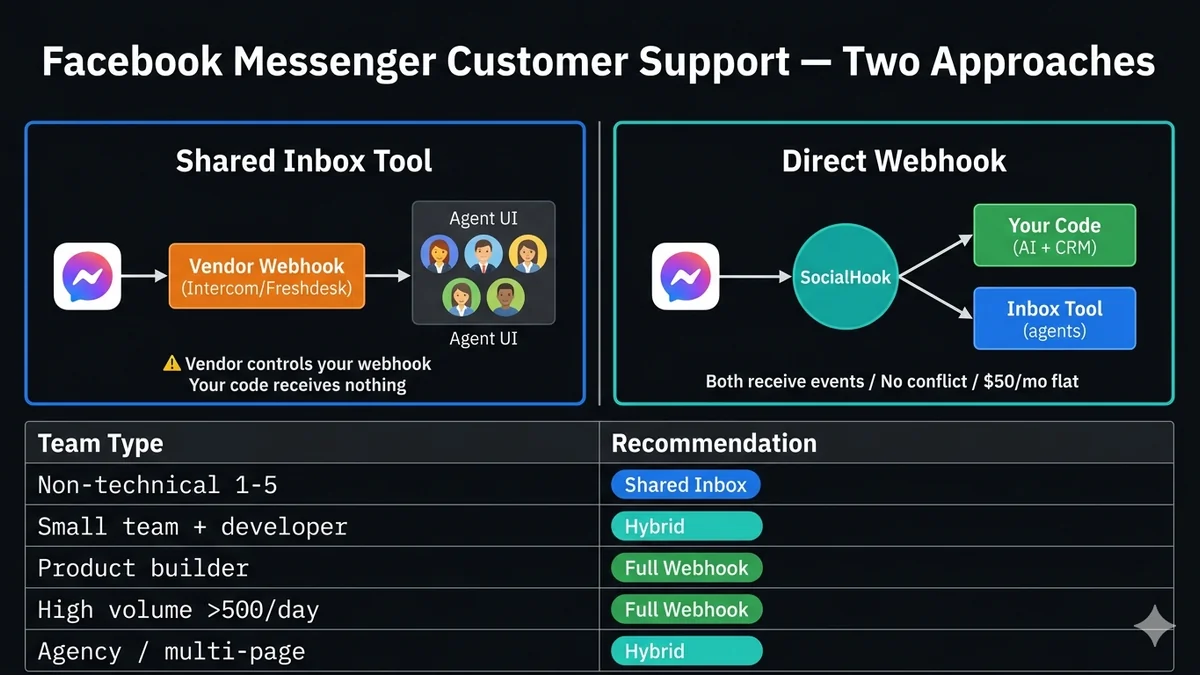
Facebook Messenger for Customer Support: Webhooks vs Shared Inbox Tools
May 13, 2026
·
14 min read
In this guide: What each approach really is · The webhook conflict problem you weren't told about · Cost math: per-seat vs per-volume · Data ownership implications · The "combine both" architecture · Decision matrix by team type · Tools to know · FAQ
What each approach actually is under the hood
Before comparing them, it's worth understanding what these two approaches actually do at a technical level. Marketing pages describe features — the architectural reality determines what you can and can't do later.
Approach 1
Shared Inbox Tool
The vendor registers their webhook URL on your Facebook Page. All Messenger events flow to their servers. Their UI presents conversations to your agents. Your agents reply through their interface, which calls the Messenger Send API on your behalf.
✓ Agent UI, assignment, SLA tracking built-in
✓ Works without any code
✓ CSAT, analytics, reporting
✓ Often handles email + chat + social in one place
✗ Vendor controls your webhook — you don't
✗ Customer data lives in vendor's system
✗ Per-seat pricing scales with team size
✗ Limited or no custom business logic
Approach 2
Direct Webhook
Your server registers a webhook URL on your Facebook Page. All Messenger events flow to your code. You process events, run custom logic, store data where you choose, and call the Messenger Send API for replies. The agent UI is whatever you build or connect.
The webhook conflict problem nobody tells you about
This is the most important technical fact in this comparison, and shared inbox vendors almost never disclose it clearly: Facebook's Messenger Platform only supports one webhook URL per Page at a time.
When you connect Intercom (or Freshdesk, Respond.io, ControlHippo, Gorgias, or any Messenger-connected tool) to your Facebook Page, the tool registers its own webhook URL on your Page. This replaces any webhook you previously had. Your custom code stops receiving events immediately — the shared inbox tool receives them all.
⚠️ The webhook conflict: what happens when you connect a shared inbox tool
Broken setup — one webhook, both tools competing:
Meta Messenger Events
→
Intercom Webhook (registered last = wins)
✗
Your Code (receives nothing)
Correct setup — SocialHook as the multiplexer:
Meta Messenger Events
→
SocialHook (one webhook)
→
Your Code + Inbox Tool (both receive)
The practical consequence: if you connect a shared inbox tool to your Messenger Page, you can no longer run:
Your own chatbot or AI auto-responder on the same Page
Custom logging or CRM writes on every message
Your own analytics pipeline
Any webhook-based automation you built
The only way to run both a shared inbox tool AND your own custom code on the same Page is to use a webhook intermediary that receives events once and forwards copies to multiple destinations. That is what SocialHook does — it registers as the webhook on your Page and can forward events to any URL you configure, including your custom code AND your shared inbox tool's inbound endpoint (if the tool supports it).
Before connecting any shared inbox tool: Check whether the vendor supports webhook forwarding or a secondary endpoint. Most do not. If you currently have custom code running on your Messenger Page, connecting a shared inbox tool without an intermediary will silently break your custom integration — your code will stop receiving events with no error message.
Cost math: per-seat pricing vs infrastructure cost
Shared inbox tools charge per agent seat per month. Webhook infrastructure costs are flat — they don't scale with your team size. The crossover point depends on your team size and conversation volume.
Team size
Intercom (Starter)
Freshdesk Omni
SocialHook + own server
1 agent
~$39/mo
~$29/mo
$50/mo + ~$5-20 server
3 agents
~$117/mo
~$87/mo
$50/mo + server (flat)
5 agents
~$195/mo
~$145/mo
$50/mo + server (flat)
10 agents
~$390/mo
~$290/mo
$50/mo + server (flat)
25 agents
~$975/mo
~$725/mo
$50/mo + server (flat)
The math favors shared inbox tools only when teams are very small (1–2 agents) AND when you factor in the developer time cost of building a custom solution. For a non-technical team of 2 using Freshdesk at $58/month, the time to build an equivalent system would take weeks and cost far more in developer hours. The shared inbox is clearly right here.
For a technical team of 8 where a developer can build the core system in a week, the shared inbox at $232–$312/month adds up to $2,784–$3,744/year — enough to pay for months of a developer's time to build exactly what the team needs, with full customization, data ownership, and no vendor dependency.
The shared inbox cost comparison also misses a key category: you still need a shared inbox UI for agents to respond to customers, even in a webhook-based system. The difference is that many teams use lightweight, low-cost tools (like Crisp, Chatwoot open-source, or even a Slack integration) just for the agent-facing UI — while SocialHook handles the inbound event pipeline. This is the hybrid approach described in the combine-both section below.
Data ownership: what you're giving up
When a shared inbox tool receives your Messenger events, your customer conversation data is stored in the vendor's database. This has several implications that grow in importance as your business scales:
Portability risk. When you migrate to a different tool (and most companies do eventually), conversation history is often difficult or impossible to export fully. Vendors make migration painful by design. Your customer context disappears with the tool.
Analytics access. You can only analyze what the vendor's reporting lets you analyze. Custom metrics, custom cohorts, custom time windows — these require the vendor to build features for you. Your own database is queryable by any tool.
GDPR and right to erasure. If a customer requests deletion of their data, you must be able to delete all their data — including what's in your shared inbox vendor's database. You're dependent on the vendor to honor erasure requests, and you're contractually responsible for it.
AI training data. Some shared inbox tools use conversation data to train their own AI features. Check your vendor's terms carefully — their right to use your customer conversations varies significantly.
Breach exposure. A shared inbox vendor breach exposes your customer conversation data. Their security posture is your exposure.
None of this means shared inbox tools are wrong — for many teams, the tradeoff is clearly worth it. But it's a tradeoff that should be made consciously, not by default.
The combine-both architecture: the answer most teams need
The framing of "webhooks vs shared inbox" presents a false binary. Most teams above a certain size need both: a structured agent UI for human responses, AND custom automation logic running on the same message stream. The webhook conflict problem is what makes this feel impossible — but it isn't.
The architecture that solves this:
Combine-both architecture
// Layer 1: SocialHook receives ALL Messenger events (one webhook, no conflict)
Meta Messenger → SocialHook webhook receiver
│
├─→ Your code (normalized JSON to your server)
│ ├─ AI auto-classification of intent
│ ├─ Automatic response to common questions
│ ├─ CRM contact creation/update
│ ├─ Escalation trigger (if complex → route to human)
│ └─ Write to your own conversation database
│
└─→ Your shared inbox tool (via HTTP forwarding or native integration)
├─ Agent-facing conversation thread
├─ Assignment and SLA tracking
├─ Human responses via Send API
└─ CSAT collection
// Result: AI handles 60-80% of volume automatically (free in Messenger → no cost)// Human agents only handle escalated conversations// Shared inbox seat cost drops because agents handle fewer conversations// All data flows through your own pipeline before the inbox tool
This architecture has a compounding benefit: when your AI agent handles 60–70% of conversations automatically (questions about hours, order status, shipping times, return policy), your agents only deal with the genuinely complex escalations. A team that previously needed 10 agents to handle 1,000 conversations/day might only need 4 after automation — cutting your per-seat inbox cost by 60% while improving response time for every conversation.
The Messenger cost advantage in this architecture: Messenger charges nothing for messaging. Every conversation your AI handles automatically is completely free — no WhatsApp template cost, no per-conversation fee. This makes Messenger particularly powerful for this hybrid model: high AI deflection rate × zero conversation cost = dramatically better economics than equivalent WhatsApp deployments.
Decision matrix: what to choose by team type
Non-technical team 1–5 people, no developer
You need customer support running today with no code. Agent accountability, conversation assignment, CSAT tracking. The shared inbox setup time is 15 minutes; building a webhook system would take weeks or require hiring. The per-seat cost at this scale is manageable.
Shared Inbox
Small team with a developer 3–15 agents, 1 developer
You want agent UI for human responses AND some automation (auto-classification, CRM sync, AI deflection for common questions). SocialHook handles the inbound pipeline; a low-cost shared inbox handles the human-facing UI. Best economics and most flexibility.
Both (hybrid)
Product / platform builder Building for clients or at scale
You're building a product on top of Messenger — a customer service tool, a chatbot for clients, an AI agent. You need full control, custom data model, your own UI, and no vendor dependency. Full webhook stack with SocialHook for the inbound layer.
Full Webhook
High-volume support >500 conversations/day
Per-seat costs at 20+ agents are prohibitive with premium shared inbox tools. Custom webhook stack with AI deflection (target 70%+ deflection rate) + lightweight agent UI for escalations (Chatwoot, Crisp, or custom). Data ownership at this scale is also strategically critical.
Full Webhook
Agency managing client Pages Multiple clients, one team
Managing multiple client Facebook Pages requires the isolation and routing that shared inbox tools handle poorly (most connect one Page per account). SocialHook's multi-Page routing delivers each client's events to separate handlers. See the agency architecture guide for the multi-client pattern (same principles apply to Messenger).
Both (hybrid)
Shared inbox tools worth knowing
If you're going the shared inbox route (or the hybrid route), here are the tools that have solid Facebook Messenger integration as of 2026:
Intercom: Best-in-class agent experience, AI-powered inbox, custom bots. Most expensive at $39+/seat/month. Best for teams that can afford it and value polish over cost.
Freshdesk Omnichannel: Good balance of features and pricing ($29/seat). Unified inbox across email, chat, social. Strong SLA and ticket management.
Gorgias: Built specifically for e-commerce. Deep Shopify/WooCommerce integration. Charges per conversation ($0.04–$0.10) rather than per seat — better for low-volume teams with many agents.
Respond.io: Strong multi-channel (Messenger + WhatsApp + Instagram from one inbox). Good automation builder. Pricing based on active contacts.
Chatwoot (open-source): Self-hosted, free, full-featured. Messenger integration available. Best for technical teams that want a shared inbox without vendor costs. Run it on your own server for under $20/month in infrastructure.
The Chatwoot + SocialHook combination: For technical teams that want both agent UI and custom automation, Chatwoot (self-hosted, free) provides the agent inbox and SocialHook provides the inbound event pipeline. Total cost: ~$20/month server + $50/month SocialHook. Equivalent Intercom setup for 5 agents: $195/month. The tradeoff: Chatwoot requires server maintenance; Intercom does not. Choose based on whether your team has the operational capacity.
FAQ
Common questions
What is the webhook conflict problem with Facebook Messenger shared inbox tools?
Facebook's Messenger Platform allows only one webhook URL per Page. When you connect a shared inbox tool (Intercom, Freshdesk, etc.), it registers its own webhook on your Page — replacing any webhook you had. Your custom code stops receiving events. Using SocialHook as an intermediary solves this: SocialHook receives all events at one URL and forwards copies to both your code and your shared inbox tool's endpoint.
Can I use both a shared inbox tool AND custom automation on the same Facebook Page?
Yes — but you need a webhook multiplexer in the middle. Register SocialHook as your Page's webhook. SocialHook forwards every event to your custom code (for AI, automation, CRM writes) AND to your shared inbox tool's inbound endpoint. Both receive the same events in real-time. This is the hybrid architecture described in the combine-both section above.
Which is cheaper: shared inbox or custom webhook for Messenger?
Shared inbox tools are cheaper for very small teams (1–3 agents) where the per-seat cost is manageable and developer time to build a custom system is more expensive than the subscription. Custom webhook solutions (SocialHook + your own code + optional lightweight agent UI) are cheaper from about 5+ agents and dramatically cheaper at 15+ agents. A 15-agent team on Intercom pays ~$585/month; the equivalent custom setup pays $50/month + server costs regardless of agent count.
Who owns customer conversation data in a shared inbox tool?
Your customer data is stored in the vendor's database. You typically retain rights to export it, but portability is often limited in practice. The vendor uses your data subject to their privacy policy — review it carefully for AI training clauses. Under GDPR, you're responsible for ensuring the vendor can honor erasure requests within required timeframes. With a custom webhook system, all data goes into databases you control, queryable by any tool, fully portable.
What's the best Facebook Messenger support setup for a 10-person team?
The hybrid approach: SocialHook handles inbound event delivery to your code (AI triage, CRM sync, auto-responses to FAQs) + a shared inbox tool handles agent-facing conversations for escalations only. With 60–70% AI deflection, your agents handle 3–4 conversations per person per day instead of 10+. This reduces the number of agents you actually need logged into the shared inbox, cutting per-seat costs. Freshdesk Omnichannel or Respond.io at 4–5 agents + SocialHook at $50/month beats 10 agents on Intercom by $200+/month.
Is there an open-source shared inbox that works with Facebook Messenger?
Yes — Chatwoot is the most mature open-source customer support platform with Facebook Messenger integration. Self-hosted on your own server (about $20/month on DigitalOcean or Railway), it provides agent inbox, conversation assignment, teams, labels, and CSAT. Combined with SocialHook for the inbound pipeline, this is the most cost-efficient setup for technical teams that don't want per-seat vendor costs.
Feed your inbox tool and your code simultaneously.
SocialHook sits between Meta and everything else. Your shared inbox tool gets the conversations it needs to show agents. Your code gets the events it needs to run AI and automation. One webhook. No conflicts. $50/month regardless of agent count.
Aufhören, Meta APIs zu verwalten. Anfangen zu bauen.
Verbinde dein erstes Facebook-, Instagram- oder WhatsApp-Konto in unter 2 Minuten. Dein Webhook erhält sein erstes Payload, bevor dein Kaffee kalt wird.