How to Connect Multiple Instagram Accounts to One Webhook Endpoint
May 13, 2026
·
15 min read
In this guide: How Instagram multi-account webhooks work · entry.id routing pattern · Token management per account · Database schema for multi-account · Client data isolation · Error handling and circuit breakers · Onboarding a new client account · SocialHook as the managed layer
How Instagram multi-account webhooks work under the hood
When you register a webhook URL in your Facebook App and subscribe it to Instagram events, that single URL receives events from every Instagram Business Account that has granted your App the instagram_manage_messages permission. This is by design — Meta's webhook architecture is fundamentally multi-tenant. One App, one webhook URL, unlimited accounts.
The mechanism: when a customer DMs any connected Instagram account, Meta fires an HTTP POST to your webhook URL. The request body contains an entry array, where each element represents one account's events. The entry[0].id field is the Instagram Business Account ID (IGID) that generated the event.
This is the complete picture of what you need to build a multi-account system:
One Facebook App with one webhook registration (one URL, one verify token, one App Secret)
One Page Access Token per Instagram account — each token is specific to the Facebook Page linked to that Instagram account
A routing table that maps each Instagram Business Account ID to its Page Access Token, client data, and database context
Client isolation so that one client's errors, rate limits, or data never affect another's
The entry.id field: the routing key for everything
Every Instagram webhook event you receive — whether a DM, story reply, story mention, or reaction — contains the Instagram Business Account ID at entry[0].id. This is the field that routes the event to the correct client. Store it as your primary key in the accounts table. Look it up on every incoming event. Never process an event without first resolving which client it belongs to.
Raw webhook payload — entry.id is your routing key
{
"object": "instagram",
"entry": [{
"id": "987654321098765", // ← THIS IS YOUR ROUTING KEY// = Instagram Business Account ID of the account that got the DM// = the same ID used in POST /{this_id}/messages to send replies"time": 1747231892,
"messaging": [{
"sender": { "id": "12345678901234" }, // IGSID of the customer"recipient": { "id": "987654321098765" }, // same as entry.id"message": { "text": "Hello!" }
}]
}]
}
// entry[0].id tells you: which of your client's Instagram accounts received this DM// Use it to look up: Page Access Token, client_id, database shard, handler
entry can contain multiple elements in one POST. If two of your client accounts receive DMs within the same delivery batch, Meta may bundle them in a single POST with two elements in the entry array. Always loop over all entries, not just entry[0]. Each element has its own id field pointing to a different Instagram account.
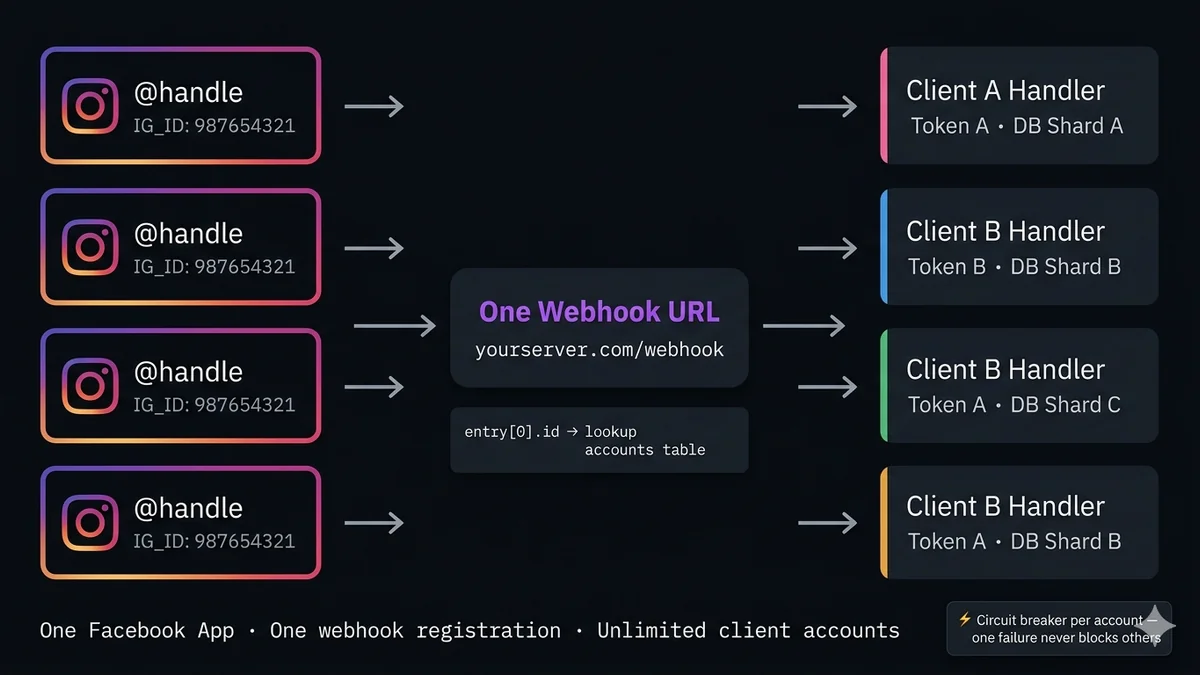
Architecture: one URL, many clients
Multi-account webhook routing architecture
IG_ID: 987654321
@ClientA Brand
IG_ID: 111222333
@ClientB Store
IG_ID: 444555666
@ClientC Fashion
IG_ID: 777888999
@ClientD Beauty
→→→
One webhook URL
yourserver.com/webhook
→→→
Routes by entry[0].id
Client A handler
Token A · DB shard A
Client B handler
Token B · DB shard B
Client C handler
Token C · DB shard C
Client D handler
Token D · DB shard D
Token management: one token per account
Each Instagram Business Account requires its own Page Access Token — generated for the Facebook Page linked to that account. This token is what you use to call the Instagram Send API for that specific account. You cannot use Client A's token to send messages on Client B's account.
Token storage guidelines:
Encrypt at rest. Page Access Tokens are sensitive credentials. Store them encrypted in your database (AES-256), not as plaintext. Decrypt only when needed for an API call.
Never log tokens. Ensure your webhook handler, error logger, and analytics pipeline never log the raw token value.
Token rotation. Long-lived Page Access Tokens don't expire by default, but rotate them periodically (quarterly) and whenever a client offboards. Immediately revoke tokens for accounts that disconnect from your platform.
One token per account, loaded at request time. Don't cache tokens in memory indefinitely — load from the database at request time so revocation takes effect immediately.
Three tables cover the complete multi-account data model. The ig_accounts table is the routing table — looked up on every incoming event. The igsids table stores user identifiers scoped to each account, ensuring total isolation between clients.
ig_accounts table — the routing registry
Column
Type
Notes
ig_business_id PK
VARCHAR(64)
entry[0].id from webhook — also path param in Send API. Store as string.
client_id FK
UUID
References clients table. Every query filters by this.
encrypted_token
TEXT
AES-256 encrypted Page Access Token. Decrypt at request time only.
ig_username
VARCHAR(64)
Human-readable label. @handle of the Instagram account.
active
BOOLEAN
Set false when client offboards. Prevents processing events from disconnected accounts.
created_at
TIMESTAMPTZ
When the account was connected.
token_rotated_at
TIMESTAMPTZ
Track token age for rotation policy enforcement.
igsids table — per-account user identifiers
Column
Type
Notes
igsid PK part
VARCHAR(64)
Instagram-Scoped ID of the user. Scoped to THIS account only.
ig_business_id PK partFK
VARCHAR(64)
Composite PK with igsid. Same user DM-ing two clients = two different IGSIDs.
client_id FK
UUID
Denormalized for fast client-scoped queries.
first_seen
TIMESTAMPTZ
First DM from this IGSID to this account.
last_message
TIMESTAMPTZ
For 24-hour window tracking per-account.
metadata
JSONB
Any client-specific data (email, name, Shopify customer ID, etc.)
The multi-account routing handler
This is the webhook POST handler that correctly processes events from any number of connected Instagram accounts. Every production concern is covered: multiple entries in one POST, unknown account IDs, inactive accounts, and clean context isolation per client.
Node.js — multi-account Instagram webhook router
multiAccountRouter.js
const { getAccountToken } = require('./tokenStore');
const { verifySignature } = require('./verifySignature');
app.post('/webhook', verifySignature, async (req, res) => {
res.sendStatus(200); // always acknowledge immediatelyconst body = req.body;
if (body.object !== 'instagram') return;
// Process ALL entries — Meta may batch multiple accounts in one POSTfor (const entry of body.entry) {
const igBusinessId = entry.id; // ← THE ROUTING KEY// Load account config — resolves token, client_id, and active statusconst account = await db.query(
'SELECT * FROM ig_accounts WHERE ig_business_id = $1 AND active = true',
[igBusinessId]
);
if (!account.rows[0]) {
// Unknown or disconnected account — log and skip
console.warn(`Unknown/inactive IG account: ${igBusinessId}`);
continue;
}
const { client_id, encrypted_token, ig_username } = account.rows[0];
const pageToken = decryptToken(encrypted_token);
// Build client-scoped context — injected into all handlersconst ctx = {
igBusinessId, // used for Send API path
clientId: client_id,
pageToken, // for sending replies
accountName: ig_username,
sendDM: (igsid, text) => sendInstagramDM(igBusinessId, pageToken, igsid, text),
logEvent: (data) => analytics.log({ ...data, client_id, igBusinessId }),
};
// Process each messaging event within this account's entryfor (const event of (entry.messaging || [])) {
// Process in try/catch so one account's errors don't affect otherstry {
awaitprocessEvent(event, ctx);
} catch (err) {
// Log with client context — never re-throw (would skip remaining accounts)
console.error(`Error processing event for ${ig_username} [${igBusinessId}]:`, err.message);
await errorTracker.capture(err, { igBusinessId, client_id });
}
}
}
});
// The client-context-aware Send API wrapperasync functionsendInstagramDM(igBusinessId, pageToken, igsid, text) {
const res = awaitfetch(
`https://graph.facebook.com/v21.0/${igBusinessId}/messages?access_token=${pageToken}`,
{ method: 'POST', headers: { 'Content-Type': 'application/json' },
body: JSON.stringify({ recipient: { id: igsid }, message: { text } }) }
);
if (!res.ok) {
const err = await res.json();
thrownewError(`DM send failed [${igBusinessId}]: ${err.error?.message}`);
}
returnawait res.json();
}
Client data isolation: preventing cross-contamination
In a multi-tenant system, the worst failure mode is one client's data appearing in another client's context. Every database query that touches user data — conversation history, IGSID records, analytics — must be filtered by client_id AND ig_business_id.
Node.js — client-scoped database operations
clientDB.js
// ✗ Wrong — no client scope, could return any account's conversationsconst convos = await db.query('SELECT * FROM conversations WHERE igsid = $1', [igsid]);
// ✓ Correct — always scope by ig_business_id AND client_idconst convos = await db.query(
'SELECT * FROM conversations WHERE igsid = $1 AND ig_business_id = $2 AND client_id = $3',
[igsid, ctx.igBusinessId, ctx.clientId]
);
// ─── Pattern: pass ctx everywhere, never pass raw IDs ────────────────────// Upsert IGSID record scoped to this accountasync functionupsertUser(igsid, ctx) {
return db.query(`
INSERT INTO igsids (igsid, ig_business_id, client_id, first_seen, last_message)
VALUES ($1, $2, $3, NOW(), NOW())
ON CONFLICT (igsid, ig_business_id)
DO UPDATE SET last_message = NOW()
RETURNING *`,
[igsid, ctx.igBusinessId, ctx.clientId]
);
}
// Log a conversation message scoped to this accountasync functionlogMessage(igsid, text, direction, ctx) {
return db.query(
'INSERT INTO messages (igsid, ig_business_id, client_id, text, direction, created_at) VALUES ($1,$2,$3,$4,$5,NOW())',
[igsid, ctx.igBusinessId, ctx.clientId, text, direction]
);
}
Error handling and circuit breakers
In a single-account webhook system, an error can bubble up and stop all processing. In a multi-account system, an error for Client A must never prevent events from processing for Clients B, C, and D. Two patterns are essential:
Per-account try/catch (already shown above): Wrap each account's event processing in its own try/catch inside the entry loop. Log errors with client context. Never re-throw — a re-thrown error inside the loop would abort all remaining entries.
Circuit breaker per account: If an account repeatedly produces errors (invalid token, rate limit, App permission revoked), stop processing that account's events temporarily rather than hammering a broken endpoint on every event.
Node.js — per-account circuit breaker
circuitBreaker.js
const errorCounts = newMap(); // igBusinessId → { count, firstErrorAt }constCIRCUIT_THRESHOLD = 5; // open circuit after 5 errorsconstRESET_AFTER_MS = 10 * 60 * 1000; // reset after 10 minutesfunctionisCircuitOpen(igBusinessId) {
const state = errorCounts.get(igBusinessId);
if (!state) returnfalse;
// Auto-reset after RESET_AFTER_MSif (Date.now() - state.firstErrorAt > RESET_AFTER_MS) {
errorCounts.delete(igBusinessId);
returnfalse;
}
return state.count >= CIRCUIT_THRESHOLD;
}
functionrecordError(igBusinessId) {
const state = errorCounts.get(igBusinessId) || { count: 0, firstErrorAt: Date.now() };
state.count++;
errorCounts.set(igBusinessId, state);
if (state.count === CIRCUIT_THRESHOLD) {
console.error(`⚡ Circuit opened for ${igBusinessId} after ${CIRCUIT_THRESHOLD} errors`);
// Alert your ops team via Slack/PagerDuty here
}
}
// In the router's per-account loop:if (isCircuitOpen(igBusinessId)) {
console.warn(`Circuit open for ${igBusinessId} — skipping`);
continue;
}
try {
awaitprocessEvent(event, ctx);
} catch (err) {
recordError(igBusinessId);
console.error(`Error for ${igBusinessId}:`, err.message);
}
Onboarding a new client account
Every time a new client connects their Instagram account to your platform, you need to execute a specific sequence of steps. Building this as a formal onboarding flow (rather than manual database inserts) makes scaling to many clients manageable:
OAuth or manual token collection: Either implement Facebook OAuth (for self-serve) or manually generate a Page Access Token in the Meta Developer Portal. The token must include instagram_manage_messages, pages_messaging, and pages_read_engagement permissions.
Resolve the Instagram Business Account ID: Call GET /me?fields=instagram_business_account with the Page Access Token. The instagram_business_account.id in the response is the value you store as ig_business_id in your accounts table.
Verify the token has messaging access: Test with a GET /{ig_business_id}?fields=id,name call. If it succeeds, the token has the permissions needed.
Insert into your accounts table: Store the encrypted token, client_id, and ig_business_id. Set active = true.
Your webhook already receives their events. No re-registration required. The existing webhook subscription on your Facebook App automatically starts delivering events for any account that grants your App permissions. Your router's database lookup handles the new account automatically.
Node.js — client onboarding sequence
onboarding.js
async functiononboardInstagramAccount(clientId, pageAccessToken) {
// Step 1: Resolve Instagram Business Account ID from the tokenconst meRes = awaitfetch(
`https://graph.facebook.com/v21.0/me?fields=instagram_business_account&access_token=${pageAccessToken}`
);
const me = await meRes.json();
if (!me.instagram_business_account?.id) {
thrownewError('No Instagram Business Account linked to this Page token');
}
const igBusinessId = me.instagram_business_account.id;
// Step 2: Get the account username for human-readable labelingconst igRes = awaitfetch(
`https://graph.facebook.com/v21.0/${igBusinessId}?fields=username&access_token=${pageAccessToken}`
);
const igAccount = await igRes.json();
// Step 3: Encrypt and store the tokenconst encryptedToken = encryptToken(pageAccessToken);
await db.query(`
INSERT INTO ig_accounts (ig_business_id, client_id, encrypted_token, ig_username, active, created_at, token_rotated_at)
VALUES ($1, $2, $3, $4, true, NOW(), NOW())
ON CONFLICT (ig_business_id) DO UPDATE
SET encrypted_token = $3, client_id = $2, active = true, token_rotated_at = NOW()
RETURNING *`,
[igBusinessId, clientId, encryptedToken, igAccount.username || igBusinessId]
);
// Step 4: No webhook re-registration needed — your existing webhook subscription// on your Facebook App automatically covers this account's events.// The router's DB lookup (ig_accounts WHERE ig_business_id = $1) handles it.
console.log(`✓ Onboarded @${igAccount.username} [${igBusinessId}] for client ${clientId}`);
return { igBusinessId, username: igAccount.username };
}
SocialHook: the managed multi-account layer
Building and maintaining a multi-account webhook router — with encryption, circuit breakers, client isolation, and onboarding flows — is weeks of infrastructure work that isn't your core product. SocialHook handles all of it as managed infrastructure.
Connect all your client Instagram accounts to one SocialHook workspace. Events from every client account arrive at your single webhook endpoint in the normalized format, with the client context already resolved:
SocialHook — multi-account events already routed
// Every event from any connected account:
{
"platform": "instagram",
"event": "message.received",
"ig_business_id": "987654321098765", // ← already extracted"account_name": "clientA_brand", // ← human-readable label"from": "12345678901234", // ← IGSID"message": { "type": "text", "body": "Hello!" },
"signature_verified": true
}
// Your handler uses ig_business_id for routing — no DB lookup needed
app.post('/webhook', express.json(), async (req, res) => {
res.sendStatus(200);
const { ig_business_id, account_name, from, message } = req.body;
// Route to client-specific handler by ig_business_idawait handlers[ig_business_id]?.handle(from, message);
// Or simply: use ig_business_id as the client partition key in your own DB
});
FAQ
Common questions
Can one Instagram webhook URL receive events from multiple accounts?
Yes. Meta's webhook architecture is multi-tenant by design. One Facebook App registration delivers events from all Instagram accounts that have granted your App instagram_manage_messages permission. Events from different accounts arrive in the same POST body, differentiated by entry[0].id — which is the Instagram Business Account ID. Your router reads this field and dispatches to the correct client handler.
How do I identify which Instagram account sent a webhook event?
Check entry[0].id in the webhook payload. This is the Instagram Business Account ID (IGID) that received the DM. It is also the numeric ID you use as the path parameter when calling the Send API: POST /{entry[0].id}/messages. Store a mapping of this ID to your client's Page Access Token, client_id, and database context. Look it up on every incoming event.
Do I need to re-register my webhook when adding a new Instagram account?
No. Your webhook registration on your Facebook App is static — it doesn't change per-account. When a new Instagram account grants your App instagram_manage_messages permission, their events automatically start arriving at your registered webhook URL. You just need to insert their credentials into your accounts routing table. Your existing router handles the rest via the entry[0].id lookup.
Can entry contain multiple accounts in one POST?
Yes. If multiple connected accounts receive messages within the same delivery batch, Meta may bundle them in one POST with multiple elements in the entry array. Always loop over all entries — for (const entry of body.entry) — not just entry[0]. Each element has its own id pointing to a different Instagram Business Account.
How do I prevent one client's errors from affecting other clients?
Wrap each account's event processing in its own try/catch inside the entry loop. Log the error with client context. Never re-throw — a re-thrown error inside the loop aborts all remaining entries. For repeated errors on one account, implement a per-account circuit breaker that skips that account temporarily. Both patterns are shown in the error handling section above.
What is the correct database schema for multi-account Instagram webhook data?
Three key tables: clients (one row per business client), ig_accounts (one row per Instagram account, with encrypted Page Access Token and ig_business_id as primary key), and igsids (composite primary key of igsid + ig_business_id — this ensures IGSID namespace isolation between accounts). Every query on user data must filter by both ig_business_id AND client_id.
All client accounts. One webhook. Zero routing code.
Connect every client's Instagram account to SocialHook. Events arrive at your endpoint pre-routed by account, HMAC verified, normalized. Add a new client account in minutes — no code changes, no re-registration, no new webhook URLs. $50/month regardless of how many accounts you manage.
Aufhören, Meta APIs zu verwalten. Anfangen zu bauen.
Verbinde dein erstes Facebook-, Instagram- oder WhatsApp-Konto in unter 2 Minuten. Dein Webhook erhält sein erstes Payload, bevor dein Kaffee kalt wird.