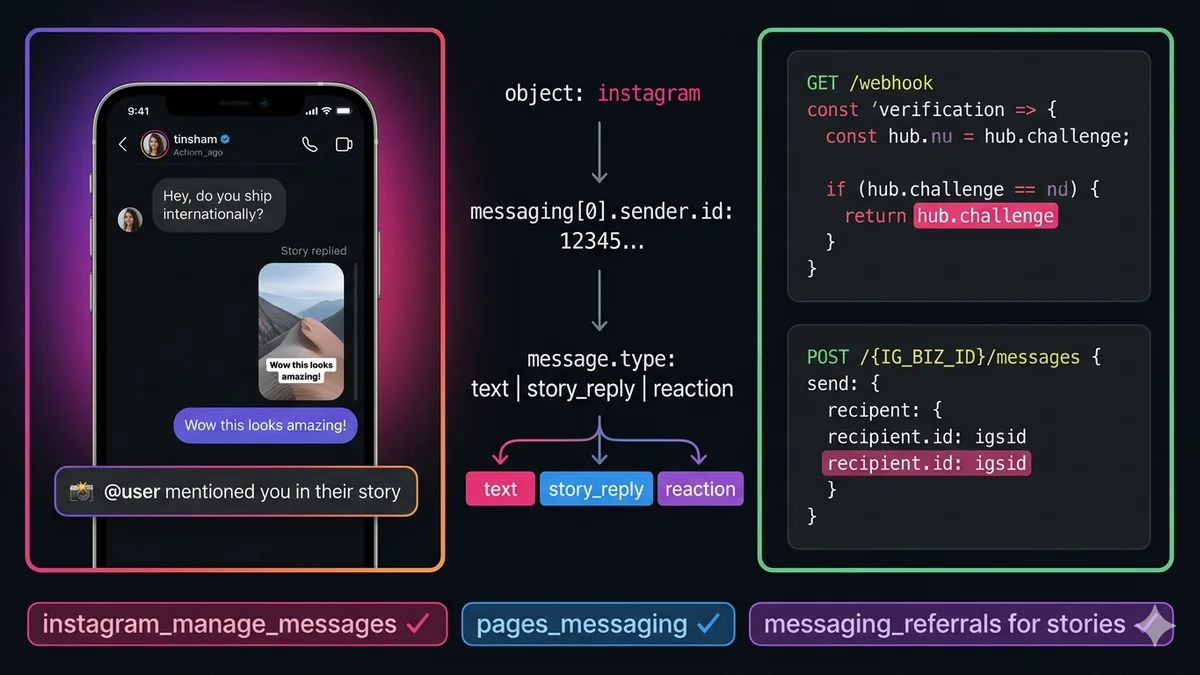
How to Receive Instagram DMs on Your Server Using the Messaging API
May 13, 2026
·
18 min read
In this guide: Why official API only · Account prerequisites · Required permissions · IGID explained · Webhook setup steps · All event type schemas · Story mentions & replies · Reactions · Reply with the Send API · SocialHook normalized format
Why the official API — and only the official API
Most "Instagram DM automation" tutorials use unofficial methods: browser automation, session token scraping, third-party automation tools that bypass Instagram's API. These all violate Instagram's Terms of Service. Instagram actively detects and bans accounts using them — sometimes permanently, often without warning or appeal.
The official Instagram Messaging API is the only approach that is:
Sanctioned by Meta and compliant with Instagram's ToS
Eligible for business use at scale (up to 1,000 API calls per hour per user)
Covered by Meta's SLA and infrastructure reliability
Safe for your business's Instagram account long-term
This guide covers the official Meta Graph API v21.0 Instagram Messaging API exclusively.
Account prerequisites: what you need before writing code
The Instagram Messaging API has stricter account requirements than the Messenger API. All three of these must be true:
Instagram Professional account: Your Instagram account must be converted to a Business or Creator account (not a personal account). Do this in the Instagram app → Settings → Account → Switch to Professional Account. Creator accounts have slightly different available features than Business accounts — for DM automation, both work.
Linked Facebook Page: Your Instagram Professional account must be connected to a Facebook Page that you own and admin. This is required — the Instagram Messaging API authenticates through Facebook's infrastructure. Connect in Instagram Settings → Account → Linked Accounts → Facebook.
Facebook Developer App: A Facebook App with the Instagram product added. Your Instagram Business Account must be linked in the App's Instagram settings. This is where you generate access tokens and register your webhook.
Personal Instagram accounts cannot use the Messaging API. If you're working with a personal account, you must convert to Professional first. This is free and reversible — switching to Professional does not change your content, followers, or posting workflow. It only adds business features including API access.
Required permissions
Permission
Required?
What it allows
instagram_manage_messages
Required
Receive DM webhook events, send messages on behalf of the Instagram account. This is the core permission for everything in this guide.
pages_messaging
Required
Subscribe to and receive webhook events via the linked Facebook Page. Without this, Instagram DM webhooks do not fire.
pages_read_engagement
Required
Read Instagram Business Account information needed for the webhook subscription and token validation.
instagram_manage_insights
Optional
Access Instagram account insights and analytics. Not needed for pure DM receiving/sending.
instagram_basic
Optional
Read basic profile information of the connected Instagram account. Useful for profile setup verification.
App Review required for production. During development, permissions work for accounts added as Test Users in your App settings. For production (receiving DMs from real customers who haven't been added as test users), you must submit for App Review. The review asks for your use case description and typically takes 5–10 business days. Prepare a clear use case description and a screen recording showing your bot in action.
Instagram-Scoped ID (IGSID): how Instagram identifies users
When an Instagram user sends your business account a DM, Instagram identifies them to your webhook using their IGSID (Instagram-Scoped ID) — a unique opaque numeric string that is specific to your Instagram Business Account.
Key facts about IGSIDs:
Scope-specific. The same user has a different IGSID for every Instagram Business Account they message. User A's IGSID on your account is different from their IGSID on a competitor's account — privacy by design.
Not the same as PSID. Even if you also operate a Facebook Page connected to the same Instagram account, the user's Facebook Messenger PSID and their Instagram IGSID are different identifiers. Don't mix them in your database without a type label.
Store as string, not integer. IGSIDs are numeric strings that can exceed JavaScript's Number.MAX_SAFE_INTEGER. Always store as VARCHAR/TEXT, never INT or BIGINT. Casting to a JavaScript number loses precision on the last few digits.
Appears at:entry[0].messaging[0].sender.id in the raw webhook payload — same location as Messenger PSIDs.
1
Create your Facebook App and connect Instagram
Go to developers.facebook.com → My Apps → Create App → choose "Business" type
Add the Instagram product to your app from the Products menu
Under Instagram → Settings, add your Instagram Business Account
Generate a Page Access Token: Graph API Explorer → select your App → select your Facebook Page → Generate Token → grant instagram_manage_messages + pages_messaging + pages_read_engagement
Copy your Instagram Business Account ID (the numeric ID, not your username) — find it at Graph API Explorer by querying GET /me?fields=id,instagram_business_account
After running your server, register the webhook in the Facebook Developer Dashboard: App → Instagram → Webhooks → Add Callback URL. Enter your ngrok URL + /webhook and your verify token. Subscribe to the messages field — this is the key subscription for Instagram DMs.
3
HMAC-SHA256 signature verification
Instagram uses the same X-Hub-Signature-256 header and HMAC pattern as Facebook Messenger. The same verification middleware works for both:
const { verifyInstagramSignature } = require('./verifySignature');
app.post('/webhook', verifyInstagramSignature, async (req, res) => {
res.sendStatus(200); // acknowledge immediatelyconst body = req.body;
// Instagram DMs arrive with object: "instagram"// (contrast: Messenger uses object: "page")if (body.object !== 'instagram') return;
for (const entry of body.entry) {
const igBusinessId = entry.id; // your Instagram Business Account IDfor (const event of (entry.messaging || [])) {
const igsid = event.sender.id; // user's IGSID — store as stringif (event.message) {
const { text, attachments, mid, reply_to } = event.message;
if (reply_to?.story) {
// User replied to your storyawaithandleStoryReply(igsid, reply_to.story, text);
} else if (attachments) {
// Image, video, audio, sticker, or sharefor (const att of attachments) {
awaithandleAttachment(igsid, att);
}
} else if (text) {
// Standard text DMawaithandleTextDM(igsid, text, mid);
}
} else if (event.reaction) {
// User reacted to one of your messagesconst { reaction, action, mid } = event.reaction;
awaithandleReaction(igsid, action, reaction, mid); // action: 'react' | 'unreact'
} else if (event.read) {
// User read your messagesawaithandleRead(igsid, event.read.mid);
} else if (event.referral) {
// User arrived via story mention or ad CTAawaithandleReferral(igsid, event.referral);
}
}
}
});
Python (Flask)
app.py
@app.route("/webhook", methods=["POST"])
defreceive_webhook():
# Verify HMAC signature
sig = request.headers.get("X-Hub-Signature-256", "")
expected = hmac.new(
os.environ["IG_APP_SECRET"].encode(),
request.data, hashlib.sha256
).hexdigest()
if not hmac.compare_digest(sig, f"sha256={expected}"):
return"Forbidden", 401
body = request.get_json()
if body.get("object") != "instagram":
return"OK", 200for entry in body.get("entry", []):
for event in entry.get("messaging", []):
igsid = event["sender"]["id"] # IGSID — store as string
msg = event.get("message")
react = event.get("reaction")
if msg:
reply_to = msg.get("reply_to", {})
if reply_to.get("story"):
handle_story_reply(igsid, reply_to["story"], msg.get("text"))
elif msg.get("text"):
handle_text_dm(igsid, msg["text"])
elif msg.get("attachments"):
handle_attachment(igsid, msg["attachments"])
elif react:
handle_reaction(igsid, react["action"], react.get("reaction"))
return"OK", 200
All Instagram DM event schemas
Text DM
messages
event.message.text
Standard text message from a user. The most common event type. Contains the text body and a message ID (mid) you can use for read receipts and reactions.
Image / Video / Audio
attachments
event.message.attachments
Media sent in a DM. Each attachment has a type (image, video, audio, file) and a payload.url for downloading. URLs are temporary — download immediately.
Story Reply
reply_to.story
event.message.reply_to.story
User replied to one of your Instagram Stories. Contains the story ID and CDN URL of the story media. Also includes the user's reply text in event.message.text.
User sent a sticker or a heart/like reaction (as a sticker). The attachment type is sticker. The sticker_id identifies the specific sticker used.
Emoji Reaction
reaction
event.reaction.action
User reacted (or un-reacted) to one of your messages. action is "react" or "unreact". reaction is the emoji character. mid is the message ID they reacted to.
Story Mention
referral
event.referral.source === 'STORY_MENTION'
User mentioned your account in their Story and then sent you a DM. Arrives as a referral event with source: "STORY_MENTION". The user's story URL is in event.referral.story.url.
The exact JSON for the three most common event types:
Raw webhook payloads — all key event types
// ── Text DM ─────────────────────────────────────────────────────────────
{
"object": "instagram", // CRITICAL: "instagram" not "page" like Messenger"entry": [{
"id": "987654321098765", // your Instagram Business Account ID"messaging": [{
"sender": { "id": "12345678901234" }, // user's IGSID — store as string"recipient": { "id": "987654321098765" }, // your IG Business Account ID"timestamp": 1747231892,
"message": {
"mid": "aWdtc2c...",
"text": "Hey, do you ship internationally?"
}
}]
}]
}
// ── Story Reply ─────────────────────────────────────────────────────────
{
"message": {
"mid": "aWdtc2c...",
"text": "Wow, this looks amazing!", // the user's reply text"reply_to": {
"story": {
"id": "17893310459840806", // story ID they replied to"url": "https://lookaside.fbsbx.com/..."// story media URL (CDN)
}
}
}
}
// ── Emoji Reaction ──────────────────────────────────────────────────────
{
"reaction": {
"action": "react", // 'react' | 'unreact'"reaction": "❤️", // the emoji character"mid": "aWdtc2c..."// which of your messages they reacted to
}
}
Story mentions: when users feature your account
When a user mentions your Instagram Business Account in their Story (by tagging you), Instagram fires a referral event to your webhook. This is a high-value signal — the user is endorsing your brand to their followers and often expects you to react (DM them, repost their story, etc.).
Story mention event schema
{
"sender": { "id": "USER_IGSID" },
"recipient": { "id": "YOUR_IG_BUSINESS_ID" },
"timestamp": 1747231892,
"referral": { // present for story mentions"ref": "STORY_MENTION", // your tracking string (if set)"source": "STORY_MENTION",
"type": "OPEN_THREAD",
"story": {
"id": "17893310459840806", // story ID from the user's account"url": "https://lookaside...", // story media URL (CDN, may expire)"mention": {
"page_id": "YOUR_IG_BUSINESS_ID"// confirms it's your account mentioned
}
}
},
"message": { // often empty for pure story mentions"mid": "aWdtc2c..."
}
}
// Subscribe to messaging_referrals webhook field to receive story mentions// WITHOUT this subscription, story mentions never arrive at your webhook
Sending replies with the Instagram Send API
The Instagram Send API uses the same base URL as Messenger but with a different endpoint — your Instagram Business Account ID instead of /me:
SocialHook: pre-parsed Instagram DMs in normalized format
When you connect your Instagram account to SocialHook, the entire inbound pipeline — HMAC verification, object: "instagram" parsing, IGSID extraction, event type detection — is handled before the event reaches your server. You receive:
SocialHook normalized Instagram DM event
// Text DM
{
"platform": "instagram",
"event": "message.received",
"from": "12345678901234", // IGSID — pre-extracted"timestamp": 1747231892,
"message": {
"type": "text",
"body": "Hey, do you ship internationally?",
"id": "aWdtc2c..."
},
"signature_verified": true
}
// Story reply
{
"platform": "instagram",
"event": "message.received",
"from": "12345678901234",
"message": {
"type": "story_reply",
"body": "Wow, this looks amazing!",
"story_id": "17893310459840806",
"story_url":"https://lookaside..."
}
}
// Same platform field pattern as WhatsApp ("whatsapp") and Messenger ("facebook")// One handler function serves all three channels
FAQ
Common questions
What permissions do I need for the Instagram Messaging API?
Three required: instagram_manage_messages (receive/send DMs), pages_messaging (subscribe to webhooks via the linked Page), and pages_read_engagement (read account info). During development, these work for accounts added as test users in your App settings. For production (real customer DMs), you must submit all three permissions for Meta App Review.
What is an IGSID and how is it different from a Facebook PSID?
An IGSID (Instagram-Scoped ID) is the unique identifier for an Instagram user in the context of your specific Instagram Business Account — analogous to PSID for Messenger. A PSID identifies a user on a Facebook Page; an IGSID identifies the same user on your Instagram account. They are different identifiers even if your Instagram account and Facebook Page are linked. Always store IGSIDs as strings (VARCHAR) — they can exceed JavaScript's Number.MAX_SAFE_INTEGER.
How does the Instagram Send API endpoint differ from Facebook Messenger?
Messenger: POST /me/messages (where "me" resolves to your Page). Instagram: POST /{IG_BUSINESS_ID}/messages (where IG_BUSINESS_ID is your Instagram Business Account numeric ID, not your username). Both use the same base URL and the same Page Access Token. The message body structure is identical — recipient.id takes the IGSID, message.text contains your reply.
How do I receive story mentions in my Instagram webhook?
You must subscribe to the messaging_referrals webhook field in addition to messages. When a user mentions your account in their Story, Instagram fires a referral event with source: "STORY_MENTION" and a story URL in the payload. The event allows you to DM the user back (within the 24-hour window) to thank them, ask for a repost permission, or offer a discount.
Can I receive Instagram DMs from any user or only my followers?
You can receive DMs from any Instagram user who can message your account — not just followers. By default, DMs from non-followers go to a "Message Requests" folder and don't trigger webhooks until the request is accepted. In your Instagram Settings → Privacy → Messages, set "Others on Instagram" to "Don't require approval" for DMs to flow immediately to your webhook. Business accounts that enable the Message Requests API can also handle request events programmatically.
How is the Instagram webhook object type different from Facebook Messenger?
Instagram webhooks arrive with "object": "instagram" in the payload envelope. Messenger webhooks arrive with "object": "page". This is the first field to check in your handler — if you're handling both channels, branch on this field. The nested payload structure (entry[0].messaging[0].sender.id) is the same for both, but the user identifier type differs: IGSID for Instagram, PSID for Messenger.
Connect your Instagram Business Account to SocialHook. Every DM, story reply, and story mention arrives as normalized JSON — IGSID extracted, event type labeled, HMAC already verified. Same format as your Messenger and WhatsApp events.
Aufhören, Meta APIs zu verwalten. Anfangen zu bauen.
Verbinde dein erstes Facebook-, Instagram- oder WhatsApp-Konto in unter 2 Minuten. Dein Webhook erhält sein erstes Payload, bevor dein Kaffee kalt wird.