Webhooks الرد على ستوري Instagram: كيفية الالتقاط والرد التلقائي
13 مايو 2026
·
16 دقيقة قراءة
في هذا الدليل: الرد على الستوري مقابل الإشارة إلى الستوري — الفرق الذي يهم · مخططات حمولة webhook الدقيقة لكليهما · اشتراك messaging_referrals · انتهاء صلاحية رابط CDN وكيفية التعامل معه · نافذة 24 ساعة للردود التلقائية · كود خط أنابيب الرد التلقائي الكامل (Node.js + Python) · حالات الاستخدام والقوالب · الصيغة الموحّدة من SocialHook
حدثان متمايزان: الرد على الستوري مقابل الإشارة إلى الستوري
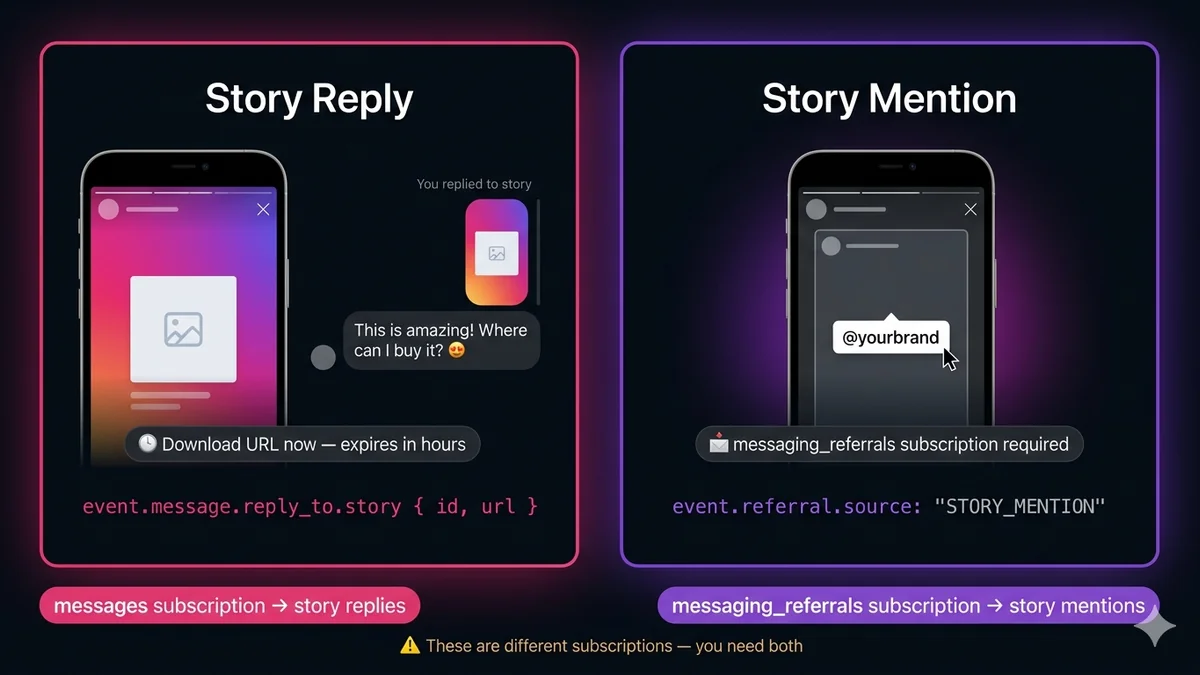
أول ما يجب فهمه: "تفاعلات ستوري Instagram" تشمل حدثَي webhook مختلفَين تماماً، بهياكل حمولة مختلفة، واشتراكات webhook مختلفة، وإجراءات مُحفَّزة مختلفة. الخلط بينهما هو المصدر الأول للأخطاء في أنظمة أتمتة الستوري.
الرد على الستوري
المستخدم يردّ على ستوريك أنت
"تنشر ستوري. متابع يسحب لأعلى ويرسل 'هذا رائع!' في رد DM على ستوريك."
الاشتراك: messages
نوع الحدث: حدث رسالة
الكشف: event.message.reply_to.story
مسار الحمولة: event.message.text (ردهم)
رابط الستوري: event.message.reply_to.story.url
الإشارة إلى الستوري
المستخدم يشير إليك في ستوريه هو
"عميل ينشر ستوري يعرض منتجك ويضع علامة على حساب أعمالك بـ @yourbrand."
الاشتراك: messaging_referrals
نوع الحدث: حدث referral
الكشف: event.referral.source === 'STORY_MENTION'
مسار الحمولة: event.referral.story.url
معرّف الستوري: event.referral.story.id
اشتراكات webhook: الحقول التي تحتاجها
هذه أكثر تفاصيل الإعداد التي يتم تجاهلها — كل نوع من أحداث الستوري يتطلب اشتراك حقل webhook خاص به. يجب تفعيل كليهما في Facebook App ← Instagram ← Webhooks ← Edit Subscriptions.
الحقل
مطلوب لـ
ما تفوّته بدونه
messages
مطلوب
جميع رسائل DM بما فيها ردود الستوري. بدون هذا، لن تستقبل أي أحداث رسائل على الإطلاق — لا رسائل DM نصية، ولا ردود ستوري، ولا رسائل وسائط. هذا هو الاشتراك الأساسي.
messaging_referrals
مطلوب
إشارات الستوري (عندما يضع المستخدمون علامة عليك في ستوريهم) ودخول إعلانات Click-to-DM. بدون هذا، تختفي إشارات الستوري بصمت — لا خطأ، ولا حدث، فقط لا شيء.
messaging_optins
اختياري
أحداث الاشتراك عندما يضغط المستخدمون على Allow في واجهة الاشتراك في الإشعارات المتكررة. غير مطلوب لتفاعلات الستوري.
اشترك في كليهما الآن. إذا كنت مشتركاً حالياً في messages فقط، فقد فاتتك بالفعل كل إشارة ستوري وصلت إلى حسابك. لا توجد طريقة لاسترجاعها بأثر رجعي — فالأحداث أُطلقت وفُقدت. أضف messaging_referrals في إعدادات تطبيقك فور الانتهاء من قراءة هذا القسم.
الرد على الستوري: حمولة webhook الدقيقة
عندما يردّ مستخدم على ستوري Instagram الخاص بك عبر DM، يصل الحدث كحدث webhook قياسي من نوع messages — ولكن مع كائن reply_to إضافي متداخل داخل الرسالة. هكذا تميّز ردّ الستوري عن رسالة DM عادية.
Story reply — full webhook payload
{
"object": "instagram",
"entry": [{
"id": "987654321098765", // your IG Business Account ID"messaging": [{
"sender": { "id": "12345678901234" }, // IGSID of the user who replied"recipient": { "id": "987654321098765" },// your account ID"timestamp": 1747231892,
"message": {
"mid": "aWdtc2c_ZmlkPW...",
"text": "This is amazing! Where can I buy it? 😍", // their reply text"reply_to": { // ← presence of this object = it's a story reply"story": {
"id": "17893310459840806", // story ID (stable for 30 days)"url": "https://lookaside.fbsbx.com/..."// CDN URL — expires! download now
}
}
}
}]
}]
}
// If user replied with an emoji reaction instead of text, you get:// "message": { "mid": "...", "attachments": [{ "type": "like_heart", ... }], "reply_to": {...} }// If user replied with an image/video, attachments array contains the media
الإشارة إلى الستوري: حمولة webhook الدقيقة
عندما يضع مستخدم علامة على حسابك في ستوريه الخاص، يصل الحدث كحدث referral — منفصل تماماً عن كائن message. البنية مختلفة بوضوح، ولهذا يتم الخلط بين الاثنين كثيراً.
Story mention — full webhook payload
{
"object": "instagram",
"entry": [{
"id": "987654321098765",
"messaging": [{
"sender": { "id": "12345678901234" }, // IGSID of user who mentioned you"recipient": { "id": "987654321098765" },
"timestamp": 1747231892,
"referral": { // ← presence of this = story mention or ad entry"source": "STORY_MENTION", // confirms this is a story mention (not an ad)"type": "OPEN_THREAD",
"story": {
"id": "17893310459898765", // the user's story ID"url": "https://lookaside.fbsbx.com/..."// CDN — download immediately!
}
},
"message": { // present but often empty for cold-start story mentions"mid": "aWdtc2c..."
}
}]
}]
}
// KEY DIFFERENCES from story reply:// 1. referral object present, not reply_to// 2. referral.source === "STORY_MENTION" (could also be "ADS" or "CUSTOMER_CHAT_PLUGIN")// 3. Story URL is at referral.story.url, not message.reply_to.story.url// 4. No reply text — user didn't type anything, they just tagged you
مشكلة انتهاء صلاحية رابط CDN — نزّل فوراً
كل من حمولتَي الرد على الستوري والإشارة إلى الستوري تتضمنان رابط ستوري — رابط CDN يشير إلى وسائط الستوري (صورة أو فيديو). هذا الرابط مؤقت. تنتهي صلاحيته عادةً خلال ساعات قليلة من إطلاق webhook. إذا خزّنت الرابط وحاولت تحميله لاحقاً — في قاعدة بياناتك، أو في CRM الخاص بك، أو في رسالة Slack — ستحصل على 403 أو 404.
المقاربة الصحيحة الوحيدة: نزّل بايتات وسائط الستوري فوراً عند إطلاق webhook، قبل تأكيد أو إنهاء معالجة الحدث.
Node.js — download story media before it expires
downloadStory.js
const { S3Client, PutObjectCommand } = require('@aws-sdk/client-s3');
const s3 = newS3Client({ region: process.env.AWS_REGION });
async functiondownloadAndStoreStory(storyUrl, storyId) {
// Download story media from CDN — no auth header needed for these URLsconst res = awaitfetch(storyUrl);
if (!res.ok) {
// URL may have already expired if webhook processing was delayed
console.warn(`Story URL expired for story ${storyId}: ${res.status}`);
returnnull;
}
const contentType = res.headers.get('content-type'); // image/jpeg, video/mp4, etc.const bytes = Buffer.from(await res.arrayBuffer());
const ext = contentType.includes('video') ? 'mp4' : 'jpg';
const key = `stories/${storyId}.${ext}`;
// Store permanently in S3await s3.send(newPutObjectCommand({
Bucket: process.env.S3_BUCKET,
Key: key,
Body: bytes,
ContentType: contentType,
}));
return`s3://${process.env.S3_BUCKET}/${key}`; // save THIS, not the CDN URL
}
Python + boto3
download_story.py
import os, boto3, requests
s3 = boto3.client("s3", region_name=os.environ["AWS_REGION"])
defdownload_and_store_story(story_url: str, story_id: str) -> str | None:
"""Download story media and store permanently. Return S3 path."""
res = requests.get(story_url)
if not res.ok:
# URL may have already expiredprint(f"Story URL expired: {res.status_code} for story {story_id}")
returnNone
content_type = res.headers.get("content-type", "image/jpeg")
ext = "mp4"if"video"in content_type else"jpg"
key = f"stories/{story_id}.{ext}"
s3.put_object(
Bucket=os.environ["S3_BUCKET"],
Key=key,
Body=res.content,
ContentType=content_type,
)
returnf"s3://{os.environ['S3_BUCKET']}/{key}"# save THIS, not CDN URL
كود الكشف والتوجيه الكامل
هذا هو المعالج بجودة الإنتاج الذي يحدد كلا نوعَي الحدث بشكل صحيح من webhook الخام ويوجّههما إلى المعالجات المناسبة:
Node.js — story event detection and routing
storyRouter.js
async functionrouteInstagramEvent(event) {
const igsid = event.sender.id;
// ── Story MENTION (user tagged you in THEIR story) ───────────────────────if (event.referral?.source === 'STORY_MENTION') {
const { story } = event.referral;
const storagePath = awaitdownloadAndStoreStory(story.url, story.id);
awaithandleStoryMention({ igsid, storyId: story.id, storagePath });
return;
}
// ── Story REPLY (user replied to YOUR story via DM) ─────────────────────if (event.message?.reply_to?.story) {
const { story } = event.message.reply_to;
const replyText = event.message.text || null; // may be null if emoji reactionconst attachments = event.message.attachments || []; // for emoji/media repliesconst storagePath = awaitdownloadAndStoreStory(story.url, story.id);
awaithandleStoryReply({
igsid,
storyId: story.id,
storagePath,
replyText,
attachments,
mid: event.message.mid,
});
return;
}
// ── Regular DM (no story context) ───────────────────────────────────────if (event.message?.text) {
awaithandleTextDM({ igsid, text: event.message.text, mid: event.message.mid });
return;
}
// ── Reaction, read, or other ────────────────────────────────────────────if (event.reaction) {
awaithandleReaction({ igsid, ...event.reaction });
}
}
Python — story event detection and routing
story_router.py
async defroute_instagram_event(event: dict) -> None:
igsid = event["sender"]["id"]
# ── Story MENTION (user tagged you in THEIR story) ───────────────────
referral = event.get("referral", {})
if referral.get("source") == "STORY_MENTION":
story = referral["story"]
storage_path = download_and_store_story(story["url"], story["id"])
awaithandle_story_mention(igsid=igsid, story_id=story["id"], storage_path=storage_path)
return# ── Story REPLY (user replied to YOUR story via DM) ──────────────────
message = event.get("message", {})
reply_to = message.get("reply_to", {})
if"story"in reply_to:
story = reply_to["story"]
storage_path = download_and_store_story(story["url"], story["id"])
awaithandle_story_reply(
igsid=igsid,
story_id=story["id"],
storage_path=storage_path,
reply_text=message.get("text"),
mid=message.get("mid"),
)
return# ── Regular DM ────────────────────────────────────────────────────────if message.get("text"):
awaithandle_text_dm(igsid=igsid, text=message["text"])
خط أنابيب الرد التلقائي الكامل
الآن الجزء المفيد — الرد التلقائي على تفاعلات الستوري. النمط واحد لكلا نوعَي الحدث: اكتشف سياق الستوري، صُغ رداً ملائماً للسياق، واستدعِ Instagram Send API ضمن نافذة 24 ساعة.
Node.js — auto-respond to story replies and mentions
storyAutoReply.js
constGRAPH = 'https://graph.facebook.com/v21.0';
constIG_BIZ_ID = process.env.IG_BUSINESS_ID;
constTOKEN = process.env.IG_PAGE_TOKEN;
async functionsendDM(igsid, text) {
const res = awaitfetch(`${GRAPH}/${IG_BIZ_ID}/messages?access_token=${TOKEN}`, {
method: 'POST',
headers: { 'Content-Type': 'application/json' },
body: JSON.stringify({ recipient: { id: igsid }, message: { text } }),
});
if (!res.ok) console.error('DM send failed', await res.json());
return res.ok;
}
// Handle story REPLY — user replied to one of your storiesasync functionhandleStoryReply({ igsid, storyId, replyText, storagePath }) {
// Log for your team
console.log(`Story reply from ${igsid}: "${replyText}" to story ${storyId}`);
awaitdb.storyReplies.insert({ igsid, storyId, replyText, storagePath });
// Auto-respond within the 24h service windowconst autoReply = buildStoryReplyResponse(replyText);
awaitsendDM(igsid, autoReply);
}
// Handle story MENTION — user tagged you in their own storyasync functionhandleStoryMention({ igsid, storyId, storagePath }) {
console.log(`Story mention from ${igsid}, story ${storyId} saved: ${storagePath}`);
awaitdb.storyMentions.insert({ igsid, storyId, storagePath });
// Auto-reply to thank them for the mentionawaitsendDM(igsid,
"Hi! 👋 We just saw you mentioned us in your story — thank you so much! " +"We'd love to repost it. Would you be okay with that? Just reply 'Yes' if you agree. 🙏"
);
// Optional: alert your team via SlackawaitnotifySlack(`📸 New story mention from ${igsid} | Media: ${storagePath}`);
}
functionbuildStoryReplyResponse(replyText) {
const text = replyText?.toLowerCase() || '';
// Route to different responses based on intent signals in reply textif (text.includes('buy') || text.includes('price') || text.includes('cost')) {
return"Thanks for your interest! 💛 Check our link in bio for pricing. Want me to send you the direct link to this specific product?";
}
if (text.includes('where') || text.includes('ship') || text.includes('deliver')) {
return"We ship worldwide! 🌍 Orders typically arrive in 5-7 days. Want to place an order?";
}
if (text.includes('love') || text.includes('amazing') || text.includes('beautiful')) {
return"Aw, thank you so much! 😍 That really makes our day. Check out more on our page!";
}
// Default auto-reply for emoji reactions or unmatched textreturn"Thanks for watching our story! 🙏 Let us know if you have any questions — we're here to help!";
}
نافذة 24 ساعة: متى يمكنك ومتى لا يمكنك الرد
تفاعلات الستوري تفتح نافذة مراسلة مدتها 24 ساعة — تماماً مثل رسائل DM العادية. عندما يردّ مستخدم على ستوريك أو يشير إليك، تُفتح النافذة فوراً وتبقى مفتوحة لمدة 24 ساعة بعد آخر رسالة منه. خلال هذه النافذة يمكنك إرسال أي رسالة بحرية. بعد 24 ساعة، لا يمكنك مراسلة ذلك المستخدم مجدداً إلا إذا أرسل رسالة أخرى.
الرد على الستوري ← تُفتح النافذة فوراً. المستخدم بادر بالاتصال بالرد على ستوريك. يمكنك الرد في الحال ومتابعة المحادثة لمدة 24 ساعة.
الإشارة إلى الستوري ← تُفتح النافذة أيضاً. تُعامَل الإشارة كحدث بدء. يمكنك مراسلة الشخص الذي أشار إليك عبر DM خلال 24 ساعة من إطلاق حدث referral.
انتهاء النافذة ← لا يمكنك الرد. إذا عالجت حدث webhook بعد أكثر من 24 ساعة من إطلاقه (معالجة متأخرة، فشل إعادة المحاولة)، سيفشل ردك عبر DM بخطأ نافذة Messenger.
الرد التلقائي داخل معالج webhook. المقاربة الأكثر أماناً: أرسل ردك التلقائي بشكل متزامن داخل معالج الحدث، فور إطلاق webhook. هذا يضمن أنك ضمن النافذة.
تحقق من الطوابع الزمنية قبل الرد. إذا كان لدى webhook منطق إعادة محاولة قد يُعيد تسليم حدث قديم، تحقق دائماً من event.timestamp قبل إرسال الرد. إذا كان عمر الحدث أكثر من 23 ساعة، تخطَّ الرد التلقائي — قد تُخاطر بإرساله خارج النافذة (مما يسبب خطأ API) أو إرسال نسخة مكررة (إذا كان المستخدم قد استقبل واحداً بالفعل).
حالات الاستخدام وقوالب الرد
حالات استخدام الرد على الستوري
كشف نية الشراء: كلمات مفتاحية مثل "buy" و"price" و"where to get" في نص الرد تُحفّز إرسال رابط منتج أو كود خصم.
فرز الدعم: كلمات مفتاحية مثل "help" و"problem" و"issue" توجّه المستخدم إلى فريق الدعم لديك عبر تنبيه Slack وترسل رسالة انتظار.
تعزيز التفاعل: التفاعلات بالإيموجي أو الردود الإيجابية العامة تحصل على شكر ودود ودعوة لاتخاذ إجراء (متابعة، اشتراك، التحقق من رابط البايو).
استطلاع أو تصويت: الستوريات التي تسأل "هل تفضّل A أم B؟" يمكنها التقاط الرد النصي تلقائياً وتسجيله في جدول بيانات.
حالات استخدام الإشارة إلى الستوري
جمع المحتوى الذي ينشئه المستخدم (UGC): نزّل وسائط الستوري وخزّنها فوراً. اطلب من المستخدم إذن إعادة النشر. ابنِ مكتبة من محتوى العملاء الأصيل.
خط أنابيب المؤثرين: ضع علامة على الإشارات الواردة من حسابات تتجاوز حداً معيناً من المتابعين لمراجعتها يدوياً من قبل فريق التسويق.
حملة شكر: أرسل كود خصم تلقائياً لكل من يشير إليك في ستوريه — يكافئ الترويج العضوي.
إنشاء جهة اتصال CRM: إشارة لأول مرة من مستخدم غير موجود في CRM لديك؟ أنشئ سجل جهة اتصال بـ IGSID الخاص به.
SocialHook: أحداث الستوري مُصنّفة مسبقاً بصيغة موحّدة
عندما تربط حساب Instagram الخاص بك بـ SocialHook، تصل ردود الستوري وإشارات الستوري مُصنّفة بالفعل — لا تُحلّل reply_to.story مقابل referral.source. حقل نوع الحدث يخبرك بدقة بما حدث:
SocialHook — story events already classified
// Story reply (user replied to YOUR story)
{
"platform": "instagram",
"event": "story.reply", // ← already classified, no parsing needed"from": "12345678901234", // IGSID"timestamp": 1747231892,
"story": {
"id": "17893310459840806",
"storage_url": "s3://bucket/stories/17893..."// already downloaded! no CDN expiry
},
"message": {
"type": "text",
"body": "This is amazing! Where can I buy it? 😍"
}
}
// Story mention (user tagged YOU in their story)
{
"platform": "instagram",
"event": "story.mention", // ← no referral.source parsing needed"from": "98765432109876",
"timestamp": 1747231892,
"story": {
"id": "17893310459898765",
"storage_url": "s3://bucket/stories/17893..."// already downloaded + stored
}
}
// Your handler becomes trivial:
app.post('/webhook', async (req, res) => {
res.sendStatus(200);
const { event, from, story, message } = req.body;
if (event === 'story.reply') awaithandleStoryReply({ igsid: from, ...story, replyText: message?.body });
if (event === 'story.mention') awaithandleStoryMention({ igsid: from, ...story });
});
FAQ
أسئلة شائعة
ما الفرق بين الرد على ستوري Instagram والإشارة إلى ستوري؟
الرد على الستوري: مستخدم يردّ على إحدى ستورياتك عبر DM. يصل كحدث messages مع event.message.reply_to.story. يتطلب اشتراك webhook في messages. الإشارة إلى الستوري: مستخدم يضع علامة على حسابك في ستوريه هو. يصل كحدث referral مع event.referral.source === "STORY_MENTION". يتطلب اشتراك webhook في messaging_referrals — وهو منفصل عن messages.
لماذا تنتهي صلاحية رابط الستوري في webhook؟
روابط وسائط ستوري Instagram مستضافة على CDN التابع لـ Meta وهي مؤقتة — تنتهي صلاحيتها عادةً خلال ساعات قليلة. المقاربة الصحيحة: نزّل بايتات وسائط الستوري فوراً عند إطلاق webhook وخزّنها في تخزينك الدائم الخاص (S3، GCS، إلخ). احفظ مسار التخزين في قاعدة بياناتك، لا رابط CDN. معرّف الستوري (story.id) ثابت ويمكن استخدامه كمفتاح مرجعي.
كيف أستقبل إشارات ستوري Instagram في webhook الخاص بي؟
يجب أن تشترك في حقل webhook messaging_referrals — وهذا منفصل عن حقل messages. اذهب إلى: Facebook App ← Instagram ← Webhooks ← Edit Subscriptions ← فعّل messaging_referrals. بدون هذا الاشتراك، تختفي أحداث الإشارة إلى الستوري بصمت — لا خطأ، ولا حدث. إذا كان هذا الاشتراك مفقوداً لديك، فلا يمكنك استرجاع إشارات الستوري الفائتة بأثر رجعي.
كيف أحدد ما إذا كان الرد على الستوري ردّاً نصياً أم تفاعلاً بإيموجي؟
تحقق من كل من event.message.text وevent.message.attachments. ردّ نصي: event.message.text يحتوي على السلسلة. تفاعل بإيموجي/قلب كرد: event.message.attachments يحتوي على كائن بـ type: "like_heart" أو نوع ملصق مشابه. ردّ بوسائط (المستخدم أرسل صورة/فيديو كرد): event.message.attachments بـ type: "image" أو "video" ورابط حمولة. كل من النصوص والمرفقات يحملان أيضاً سياق reply_to.story فتعرف أنها ردود ستوري.
هل يمكنني الرد التلقائي على إشارات الستوري ضمن نافذة 24 ساعة؟
نعم. عندما يشير إليك مستخدم في ستوريه، تُفتح نافذة مراسلة مدتها 24 ساعة تسمح لك بمراسلته عبر DM. يستقبل webhook الخاص بك حدث referral — استدعِ Instagram Send API مع IGSID الخاص بالمستخدم كمستلم خلال 24 ساعة. هكذا ترسل رسائل "شكراً على الإشارة!" وطلبات إذن إعادة النشر، أو أكواد الخصم تلقائياً. بعد 24 ساعة بدون تفاعل إضافي، تُغلق النافذة ولا يمكنك مراسلته عبر DM.
ما الأذونات التي أحتاجها لـ webhooks الرد على الستوري؟
نفس أذونات Instagram Messaging API بشكل عام: instagram_manage_messages وpages_messaging وpages_read_engagement. لإشارات الستوري تحديداً، تحتاج أيضاً إلى اشتراك webhook في messaging_referrals (هذا حقل اشتراك، وليس إذن تطبيق — فعّله في إعدادات webhook لتطبيقك). جميع الأذونات تتطلب App Review للاستخدام الإنتاجي خارج المستخدمين التجريبيين.
يستقبل SocialHook أحداث ستوري Instagram الخاصة بك، ويُنزِّل الوسائط قبل انتهاء صلاحية رابط CDN، ويُصنّف ردود الستوري مقابل الإشارات، ويسلّم كل شيء كـ JSON موحّد ونظيف. لا تحليل للحمولات. لا تنافسات على CDN. 50 دولاراً شهرياً لجميع أحداث Instagram و Messenger و WhatsApp الخاصة بك.