
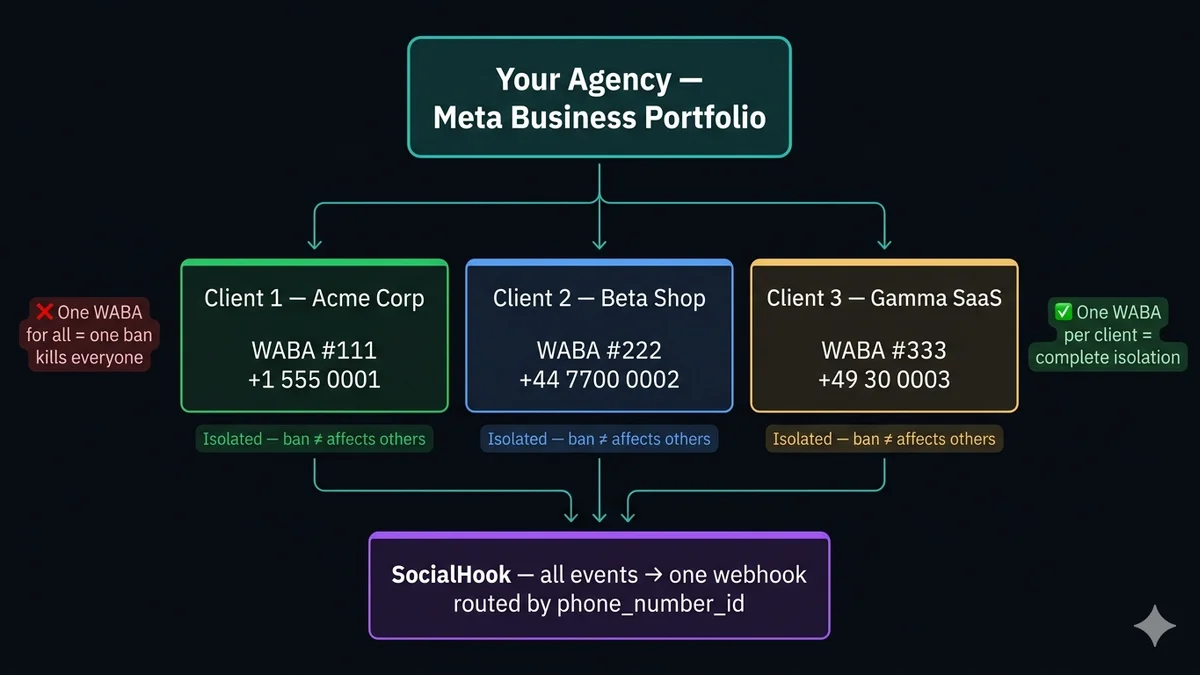
الخطأ الذي يُخرج جميع عملائك من الخدمة في وقت واحد
الخطأ المعماري الأخطر الذي يمكن أن ترتكبه أي وكالة: وضع عدة عملاء على نفس WhatsApp Business Account (WABA). يبدو وكأنه يوفر أعباء الإدارة. إنه قنبلة موقوتة.
إليك ما يحدث عندما ينتهك أحد العملاء سياسات المراسلة لـ Meta — إرسال رسائل غير مرغوب فيها، أو الإبلاغ عنه كرسائل مزعجة من قبل عدد كافٍ من المستلمين، أو استخدام قالب غير معتمد لغرض خاطئ:
تقيّد Meta أو تعلّق WABA. ليس فقط رقم الهاتف المخالف — بل حساب WhatsApp Business بأكمله. كل رقم هاتف تحت ذلك الـ WABA يتوقف عن استقبال وإرسال الرسائل في وقت واحد. إذا كان لديك 10 عملاء على WABA واحد ويقوم العميل رقم 4 بإطلاق بث عدواني يتم الإبلاغ عنه، فإن جميع العملاء العشرة يخرجون من الخدمة حتى يتم رفع التقييد — والذي قد يستغرق أياماً أو لا يتم حله أبداً للانتهاكات الجسيمة.
هذا ليس خطراً نظرياً. إنها الطريقة الأكثر شيوعاً التي تفقد بها الوكالات عملاءها وتواجه نزاعات إخلال بالخدمة. البنية الصحيحة تمنع ذلك تماماً.
بنية WABA المتعددة الصحيحة
القاعدة مطلقة: WABA واحد لكل عميل، ورقم هاتف واحد لكل WABA (في معظم الحالات). البنية التحتية لـ WhatsApp لكل عميل معزولة تماماً عن البنية التحتية لكل عميل آخر. انتهاك السياسة على العميل أ ليس له أي تأثير على العملاء من ب إلى ي.
الرقم: +1 555 0001
فوترة Meta: بطاقة العميل
الرقم: +44 7700 0002
فوترة Meta: بطاقة العميل
الرقم: +49 30 0003
فوترة Meta: بطاقة الوكالة
الحظر ≠ يؤثر على الآخرين
الحظر ≠ يؤثر على الآخرين
الحظر ≠ يؤثر على الآخرين
الإعداد الخاطئ مقابل الإعداد الصحيح
توجيه webhook مركزي — نقطة وصول واحدة، كل العملاء
مع وجود WABAs منفصلة لكل عميل، قد تفترض أنك تحتاج إلى نقاط webhook منفصلة لكل عميل. أنت لا تحتاج. كل حدث Cloud API — بغض النظر عن أي WABA لعميل أتى منه — يحتوي على حقل metadata.phone_number_id الذي يحدد بشكل فريد أي رقم هاتف استقبل الرسالة. وجّه جميع العملاء إلى نقطة وصول مركزية واحدة واستخدم هذا المعرّف للتوزيع.
phone_number_id والحمولة المطبّعة المستخرجة بالفعل. كود الموجّه أعلاه يعمل فوراً، دون تنفيذ تحقق HMAC أو تحليل حمولة لكل عميل.سير عمل دمج العملاء: خطوة بخطوة
سير العمل الكامل من البداية إلى النهاية لتشغيل رقم WhatsApp لعميل جديد — من محادثته الأولى معك إلى أول حدث webhook يصل إلى نظامك:
phone_number_id الخاص بالعميل للتوجيه.whatsapp_business_messaging و whatsapp_business_management. خزّن هذا الرمز في نظام إدارة المفاتيح الآمن الخاص بك — يُستخدم لكل الرسائل الصادرة المُرسلة بالنيابة عن هذا العميل.phone_number_id الصحيح. أرسل رداً من نظامك وأكّد أنه يظهر على WhatsApp الشخصي. بمجرد التحقق، امنح العميل الوصول إلى أي لوحة تحكم أو تقارير بنيتها له. اكتمل دمجه.وصول الشريك مقابل الملكية — لماذا يهم
هذا هو التمييز الذي يفصل بين وكالة محترفة وأخرى هاوية. هناك طريقتان للوصول إلى WABA الخاص بالعميل:
- الملكية (تجنّبها لعمل العملاء): وكالتك تُنشئ WABA ويُسجَّل رقم هاتف العميل تحت حساب Meta Business الخاص بك. أنت تملك الأصل. عندما يريد العميل المغادرة، ليس لديه رقم، ولا تاريخ محادثات، ولا استمرارية. هذا تكتيك حبس يخلق استياء العميل وتعرّضاً قانونياً.
- وصول الشريك (الصحيح): العميل يُنشئ أو يملك بالفعل حساب Meta Business. يصرّح لوكالتك عبر Embedded Signup من Meta أو Partner API. تحصل على صلاحية إدارة WABA الخاص به دون امتلاكه. إذا أنهى العميل العلاقة، يمكنه إلغاء وصولك والاستمرار مع وكالة أخرى — رقمه، بياناته، استمراريته سليمة.
الوكالات المحترفة تستخدم دائماً وصول الشريك. هو أيضاً أفضل للوكالة تجارياً: يثق بك العملاء أكثر عندما يعرفون أنهم ليسوا محبوسين، مما يجعلهم أكثر احتمالاً لإحالتك والبقاء على المدى الطويل. الإيرادات في الإدارة المستمرة والخدمات ذات القيمة المضافة، لا في احتجاز الرقم رهينة.
نماذج فوترة العملاء: ثلاثة خيارات
تفوتر Meta لكل محادثة على طريقة الدفع المرفقة بكل WABA. كوكالة، لديك ثلاث طرق لهيكلة هذا:
العميل يدفع للوكالة: $X ثابت
مخاطرة الوكالة: لا شيء
الوكالة تفوتر العميل: +20–50% هامش
مخاطرة الوكالة: عدم الدفع
الوكالة تدفع Meta: ~$40
هامش الوكالة: ~$260
معظم الوكالات التقنية التي تبني أتمتة مخصصة تبدأ بالنموذج 1 (الأبسط، صفر مخاطرة فوترة). معظم وكالات الخدمة المُدارة — حيث تدير حملات وخدمة عملاء للعملاء — تستخدم النموذج 3 للحصول على فوترة عملاء يمكن التنبؤ بها وهوامش أعلى.
نموذج الإيرادات: ما تجنيه خدمات WhatsApp فعلاً
فهم ما يُفوتر يساعدك على هيكلة عرض وكالتك. هناك ثلاث مصادر إيرادات متميزة في أعمال وكالة WhatsApp:
- رسوم الإعداد: مرة واحدة لكل عميل لتسجيل WABA، والتحقق من رقم الهاتف، وإنشاء القوالب، وتكوين webhook، وتكامل النظام. عادةً 500–2,000 دولار حسب التعقيد.
- مرتب إدارة شهري: إدارة مستمرة، مراقبة تقييمات الجودة، الحفاظ على طبقة المراسلة، تحديثات القوالب، الدعم. عادةً 200–1,500 دولار/شهر لكل عميل.
- خدمات ذات قيمة مضافة: بناء وكيل ذكاء اصطناعي، تكامل CRM، إدارة الحملات، لوحات التحليلات، إدارة البث. تُسعَّر لكل مشروع أو كإضافات إلى المرتب.
نموذج وكالة WhatsApp ذو هامش عالٍ مقارنةً بإدارة وسائل التواصل الاجتماعي لأن الحاجز التقني مرتفع (لا يمكن للمنافسين نسخه بسهولة) والخدمة مهمة للغاية (لا يمكن للعملاء التخلي بسهولة). وكالة بـ 15 عميلاً بمرتب متوسط 500 دولار/شهر تولّد 7,500 دولار/شهر من الإيرادات المتكررة — فوق رسوم الإعداد وأعمال المشاريع.
فصل بيانات GDPR: متطلب الامتثال
إذا كان أي من عملائك يخدم عملاء في الاتحاد الأوروبي (أو كنت تعمل تحت نطاق GDPR بنفسك)، فصل البيانات بين العملاء ليس اختيارياً — إنه متطلب قانوني. بموجب GDPR، كل عميل هو وحدة تحكم بيانات منفصلة. خلط بيانات عملائهم تحت WABA واحد أو قاعدة بيانات واحدة يخلق تعرّضاً للمسؤولية للطرفين.
المتطلبات العملية لإدارة WhatsApp متعدد العملاء المتوافقة مع GDPR:
- WABAs منفصلة — بيانات المحادثة معزولة على مستوى Meta لكل WABA. هذا يُحَل معمارياً بقاعدة WABA واحد لكل عميل.
- متاجر قاعدة بيانات منفصلة — معالج webhook الخاص بك يجب أن يكتب بيانات محادثة كل عميل إلى مساحات أسماء تخزين، أو مخططات، أو قواعد بيانات منفصلة. لا تخلط أبداً بيانات اتصال العميل أ مع العميل ب في نفس الجدول.
- اتفاقيات معالجة البيانات (DPAs) — تحتاج إلى DPA موقّع مع كل عميل يحدد دورك كمعالج بيانات يعمل بالنيابة عنه (كوحدة تحكم بيانات).
- حذف البيانات — عند خروج عميل، يجب أن تكون قادراً على حذف جميع بيانات اتصاله من أنظمتك ضمن الإطار الزمني المحدد في DPA. نموذج بياناتك يجب أن يدعم هذا منذ اليوم الأول.
- ضوابط الوصول — نظامك يجب أن يمنع أي فريق من عميل واحد من الوصول إلى بيانات محادثة عميل آخر. تحكم وصول قائم على الدور على مستوى العميل.
التعايش: الإبقاء على تطبيق Business مع استخدام API
كثير من عملائك من الشركات الصغيرة والمتوسطة سيسألون: "هل لا يزال بإمكاني استخدام تطبيق WhatsApp Business على هاتفي بينما يعمل API؟" اعتباراً من 2026، تدعم Meta وضع التعايش لهذا السيناريو.
التعايش يسمح بتسجيل رقم هاتف على كل من تطبيق WhatsApp Business وCloud API في وقت واحد. تتدفق الرسائل إلى كليهما — يستقبلها التطبيق بشكل طبيعي، ويُطلق API أحداث webhook إلى خادمك. يمكن لفريق العميل الاستمرار في التعامل مع المحادثات يدوياً في التطبيق بينما يتعامل API الخاص بك مع الأتمتة، والتوجيه، وردود الذكاء الاصطناعي بالتوازي.
قيود التعايش:
- الرسائل المُرسلة من Cloud API تظهر أيضاً في تطبيق Business. الرسائل المُرسلة من تطبيق Business لا تُطلق webhooks لـ Cloud API (لا تصل إلى خادمك).
- يمكن ربط تطبيق Business بجهاز واحد + ما يصل إلى 4 أجهزة مرتبطة. ليس لـ Cloud API حد للوكلاء.
- بعض أنواع الرسائل التفاعلية (الأزرار، القوائم) المُرسلة عبر API قد تُعرض بشكل مختلف أو لا تُعرض في واجهة تطبيق Business.
لمعظم عملاء الوكالة، التعايش هو الحالة الانتقالية قبل أن ينتقلوا بالكامل إلى عمليات API فقط. خطط له — قم بإعداد API جنباً إلى جنب مع التطبيق أولاً، دع العميل يعتاد على سير العمل الجديد، ثم تخلّص من استخدام التطبيق المباشر على مدى 30–60 يوماً.
كيف يعمل SocialHook للوكالات
SocialHook مبني تحديداً لهذه البنية. حساب واحد، أرقام هواتف غير محدودة، كل الأحداث مطبّعة بنفس تنسيق JSON ومفرّقة بـ phone_number_id. إليك ما تحصل عليه مقابل إدارة webhooks بنفسك لكل عميل:
ما يعنيه هذا تشغيلياً:
- عنوان webhook واحد للإدارة — ليس 15 أو 50 نقطة webhook منفصلة، وأسرار HMAC، وتكوينات إعادة محاولة لكل عميل. يتعامل SocialHook مع كل ذلك.
- أضف عملاء جدد في دقيقتين — أضف رقم الهاتف إلى حساب SocialHook لديك. يبدأ بتسليم الأحداث فوراً. لا بنية تحتية جديدة.
- إعادة محاولة تلقائية — إذا كان خادمك معطلاً خلال نافذة صيانة، يعيد SocialHook المحاولة. لا أحداث مفقودة عبر أي عميل.
- سجلات تسليم كاملة — لكل حدث، لكل رقم، لكل عميل. عندما يسأل عميل "هل استلمت رسالة عميلي في 3:22 مساءً يوم الثلاثاء؟" — لديك إجابة دقيقة بالطابع الزمني.
- كل قنوات Meta الثلاث — نفس إدخال رقم الهاتف في SocialHook يتعامل مع WhatsApp، ويمكنك إضافة Facebook Messenger وInstagram DMs لنفس العميل تحت نفس التنسيق المطبّع.
أسئلة شائعة
phone_number_id. كل حدث Cloud API يتضمن معرّف رقم الهاتف في الحمولة — استخدمه للبحث عن العميل الذي ينتمي إليه الحدث وتوزيعه إلى معالجات خاصة بالعميل. مع SocialHook، تُسلَّم جميع أرقام العملاء إلى نقطة مطبّعة واحدة تلقائياً، مفرّقة بالفعل بـ phone_number_id. انظر كود التوجيه أعلاه.phone_number_id (WhatsApp) أو معرّف الصفحة (Facebook/Instagram). كود التوجيه والمعالج لديك يعمل بشكل مطابق لكل القنوات الثلاث. انظر صفحات تكامل Facebook وInstagram للإعداد الخاص بالقناة.حساب واحد.
كل أرقام عملائك.
أضف رقم WhatsApp لكل عميل إلى SocialHook. تصل كل الأحداث إلى webhook مطبّع واحد — مفرّقة بـ phone_number_id، متحقق منها بـ HMAC، يُعاد المحاولة عند الفشل. توقف عن إدارة بنية webhook منفصلة لكل عميل.