Cómo construir un bot de generación de leads de WhatsApp con webhooks
21 de mayo de 2026
·
13 min de lectura
Lo que construirás: Bot de generación de leads entrante en WhatsApp · Máquina de estados de conversación (Redis) · Scoring de cualificación con GPT-4o · Escritura en CRM API · Alerta de handover en Slack · Alternativa no-code en n8n · Código Node.js completo en todo el tutorial
Lo que construirás en este tutorial
Bot de WhatsApp entrante que cualifica leads a través de la conversación
Máquina de estados respaldada por Redis que rastrea la etapa de cada contacto
GPT-4o puntuando leads de 1 a 10 con salida JSON
Escritura en CRM HubSpot/Pipedrive al cualificar
Alerta en Slack para handover humano de leads con puntuación alta
Alternativa no-code en n8n para todo el flujo
Inbound primero: por qué esta arquitectura supera a los bots outbound
Todo tutorial no-code de chatbot de WhatsApp asume outbound por defecto — plantillas, BotPress, Make.com, envío de mensajes a listas. Ese es el camino difícil. Meta requiere aprobación de plantillas (1 a 5 días hábiles), cobra por cada mensaje saliente y banea números que envían contenido marcado como spam. La mayoría de los tutoriales pasan por alto esto y luego lo descubres a las 11 de la noche cuando tu número queda restringido.
La mejor arquitectura es inbound primero:
El cliente te envía un mensaje primero (desde un anuncio Click-to-WhatsApp, un enlace de WhatsApp o un código QR)
Eso abre una ventana de servicio gratuita de 24 horas — todas tus respuestas son gratis
No se requiere aprobación de plantilla para ninguna respuesta dentro de esa ventana
Tu webhook se dispara, tu bot toma el control, los leads se cualifican solos
Esta no es una estrategia pasiva. Tú impulsas el tráfico entrante con anuncios pagados — Click-to-WhatsApp en Facebook e Instagram lleva a la gente directamente a una conversación de WhatsApp con tu número. Meta te da una ventana gratuita de 72 horas para esas conversaciones (no solo 24). Pagas por el clic en el anuncio. La conversación de cualificación es gratis.
Visión general de la arquitectura
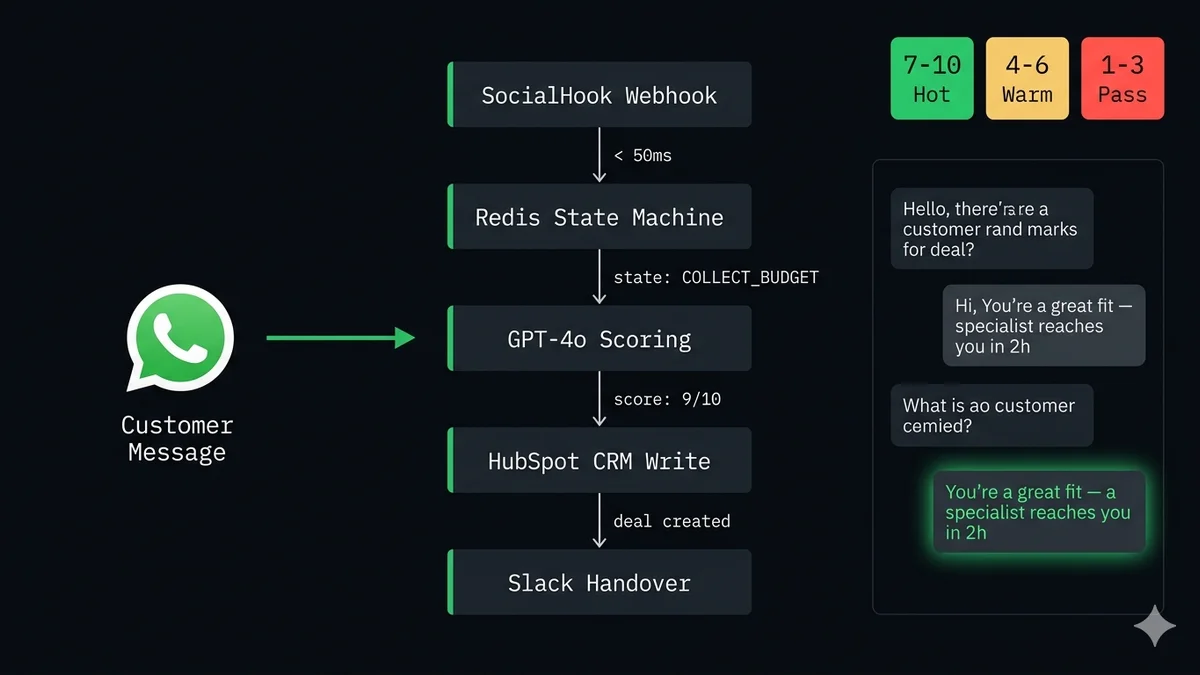
Cinco componentes. Todos son intercambiables — cambia HubSpot por Salesforce, GPT-4o por Claude 3, Redis por DynamoDB. La arquitectura es la constante; los proveedores son opcionales.
Architecture
pipeline.txt
El cliente envía un mensaje de WhatsApp
↓
[WhatsApp Cloud API] — dispara webhook HTTP POST
↓
[SocialHook] — verifica HMAC, normaliza payload, entrega <50ms
↓
[Tu servidor de webhook — Node.js / Express]
1. Cargar estado de conversación desde Redis (por número de teléfono)
2. Avanzar máquina de estados: hacer la siguiente pregunta de cualificación
3. O: llamar a GPT-4o para el scoring final
4. Responder vía endpoint Graph de Cloud API
5. Guardar estado actualizado en Redis
↓
[Redis] — almacén de estado de conversación (TTL: 48h por contacto)
↓
Al QUALIFIED (score ≥ 7):
→ POST a HubSpot / Pipedrive CRM API
→ POST a webhook de Slack (alerta al equipo de ventas)
→ Responder al cliente: "Un especialista te contactará en 2h"
Al DISQUALIFIED (score < 4):
→ Registrar en base de datos
→ Enviar enlace de recurso útil
→ Cerrar conversación
Paso 1: poner en marcha la capa de webhook
Antes de escribir la lógica del bot, necesitas que los mensajes entrantes de WhatsApp lleguen a tu servidor como JSON limpio. La vía más rápida: conecta tu número de WhatsApp a SocialHook, pega la URL de tu servidor como destino, y cada mensaje entrante llega como un payload normalizado en menos de 50ms.
Si prefieres webhooks directos de Cloud API, sigue la guía completa de configuración. Para este tutorial usaremos el formato normalizado de SocialHook, que elimina la necesidad de código de verificación HMAC y extracción de payload anidado en tu handler del bot.
El payload que tu handler del bot recibe por cada mensaje entrante del cliente:
JSON
inbound-event.json (SocialHook normalized)
{
"platform": "whatsapp",
"event": "message.received",
"timestamp": 1747231892,
"from": "+1 555 000 1234", // E.164 — la clave de la máquina de estados"conversation_id": "conv_8j3k...",
"message": {
"type": "text",
"body": "Hi, I want to know more about your product",
"id": "wamid.HBgL..."
},
"signature_verified": true
}
Paso 2: diseñar la máquina de estados de la conversación
La máquina de estados es el núcleo del bot. Cada mensaje de WhatsApp es un evento HTTP sin estado — tu servidor no recuerda mensajes anteriores a menos que los guardes. Redis te da un almacén clave-valor rápido basado en TTL por número de teléfono. El objeto de estado rastrea tanto en qué paso está la conversación como qué datos se han recopilado hasta el momento.
Aquí está el flujo completo de cualificación con 7 estados:
EstadoMensaje del bot enviadoAvanza a
GREETING
¡Hola! 👋 Gracias por contactar con [Empresa]. Estoy aquí para ayudarte a encontrar la solución correcta. ¿Cómo te llamas?
→ COLLECT_NAME
COLLECT_NAME
¡Encantado de conocerte, [nombre]! ¿De qué empresa eres?
→ COLLECT_COMPANY
COLLECT_COMPANY
Genial. ¿Qué estás intentando resolver? ¿Cuál es el principal problema que te trae hoy?
→ COLLECT_USE_CASE
COLLECT_USE_CASE
Entendido. ¿Aproximadamente cuántos mensajes o conversaciones manejas al mes?
→ COLLECT_VOLUME
COLLECT_VOLUME
¿Y cuál es tu presupuesto mensual aproximado para este tipo de herramienta?
→ COLLECT_BUDGET
COLLECT_BUDGET
Gracias — dame un momento mientras preparo la información correcta para ti. ⏳
→ QUALIFYING (GPT-4o)
QUALIFIED (score ≥ 7)
Encajas perfecto con lo que ofrecemos. Un especialista te contactará en 2 horas. ¿Puedo confirmar tu email?
→ Escritura CRM + Slack
DISQUALIFIED (score < 4)
¡Gracias [nombre]! Según tus necesidades, aquí tienes un recurso que puede ayudarte: [enlace]. No dudes en contactarnos cuando sea el momento adecuado.
→ Log + cerrar
Cómo se ve la conversación desde la perspectiva del cliente:
🤖
YourCompany Bot
● en línea
Estado: GREETING
¡Hola! 👋 Gracias por contactar. Estoy aquí para ayudarte a encontrar la solución correcta. ¿Cómo te llamas?
Hola, soy Sarah
Estado: COLLECT_COMPANY
¡Encantado de conocerte, Sarah! ¿De qué empresa eres?
Acme Corp, somos una marca de e-commerce que hace unos 50k pedidos al mes
Estado: COLLECT_USE_CASE
Genial. ¿Qué estás intentando resolver? ¿Cuál es el principal problema que te trae hoy?
Nos estamos ahogando con tickets de soporte por WhatsApp. Necesitamos automatizar el estado de pedidos y las devoluciones
Estado: QUALIFYING → scoring GPT-4o
Gracias — dame un momento mientras preparo la información correcta para ti. ⏳
Encajas perfecto con lo que ofrecemos, Sarah. Un especialista te contactará en 2 horas para hablar de tu configuración. ¿Puedo confirmar tu email para el seguimiento?
Paso 3: construir la máquina de estados en Node.js
El handler de webhook carga el estado desde Redis, ejecuta la lógica de la máquina de estados, responde vía Cloud API y guarda el nuevo estado. Esta es la implementación completa lista para producción:
Node.js + Express + Redis
leadBot.js
const express = require('express');
const redis = require('redis');
const { sendWhatsApp } = require('./whatsapp'); // ver abajoconst { scoreLead } = require('./scorer'); // scorer GPT-4oconst { writeCRM, notifySlack } = require('./integrations');
const app = express();
const store = redis.createClient({ url: process.env.REDIS_URL });
await store.connect();
app.use(express.json());
// SocialHook envía eventos normalizados aquí
app.post('/webhook', async (req, res) => {
res.sendStatus(200); // acuse de recibo inmediatoconst event = req.body;
if (event.event !== 'message.received') return;
if (event.message.type !== 'text') return;
const phone = event.from;
const text = event.message.body.trim();
// Cargar estado — por defecto GREETING si es el primer contactoconst raw = await store.get(`lead:${phone}`);
const state = raw ? JSON.parse(raw) : { stage: 'GREETING', data: {} };
const next = awaitadvance(phone, text, state);
// Guardar estado actualizado con TTL de 48hawait store.set(
`lead:${phone}`,
JSON.stringify(next),
{ EX: 172800 } // 48 horas
);
});
async functionadvance(phone, text, state) {
switch (state.stage) {
case'GREETING':
awaitsendWhatsApp(phone,
"Hey! 👋 Thanks for reaching out. What's your name?"
);
return { stage: 'COLLECT_NAME', data: {} };
case'COLLECT_NAME':
awaitsendWhatsApp(phone,
`Nice to meet you, ${text}! What company are you from?`
);
return { stage: 'COLLECT_COMPANY', data: { name: text } };
case'COLLECT_COMPANY':
awaitsendWhatsApp(phone,
"What's the main pain point bringing you here today?"
);
return {
stage: 'COLLECT_USE_CASE',
data: { ...state.data, company: text }
};
case'COLLECT_USE_CASE':
awaitsendWhatsApp(phone,
"How many conversations do you handle per month roughly?"
);
return {
stage: 'COLLECT_VOLUME',
data: { ...state.data, useCase: text }
};
case'COLLECT_VOLUME':
awaitsendWhatsApp(phone,
"And your approximate monthly budget for this?"
);
return {
stage: 'COLLECT_BUDGET',
data: { ...state.data, volume: text }
};
case'COLLECT_BUDGET': {
awaitsendWhatsApp(phone,
"Thanks — just a moment while I put together the right info for you. ⏳"
);
const leadData = { ...state.data, budget: text };
// Scoring asíncrono — no bloquear, el caller maneja el estadoqualifyLead(phone, leadData); // fire-and-forget con su propio manejo de erroresreturn { stage: 'QUALIFYING', data: leadData };
}
case'COLLECT_EMAIL': {
// Paso final tras QUALIFIED — recoger email y cerrarconst finalData = { ...state.data, email: text };
awaitwriteCRM(phone, finalData);
awaitsendWhatsApp(phone,
`Perfect, ${finalData.name}! You're all set. Talk soon. 🚀`
);
return { stage: 'DONE', data: finalData };
}
default:
return state; // QUALIFYING / DONE / DISQUALIFIED — ignorar mensajes adicionales
}
}
app.listen(3000);
Paso 4: scoring de cualificación de leads con GPT-4o
Una vez recopilados todos los datos de cualificación, los envías a GPT-4o con un prompt estructurado. El modelo devuelve un objeto JSON con el score — sin parseo regex, sin adivinanzas. La clave está en indicarle al modelo que devuelva solo JSON y nada más.
7 – 10
Lead caliente
Handover humano inmediato. Alerta Slack a ventas. Trato creado en CRM con alta prioridad. Cliente avisado de que el especialista contacta en 2h.
4 – 6
Lead tibio
Contacto creado en CRM con prioridad media. Secuencia de email automatizada activada. Cliente recibe recursos del producto y caso de éxito.
1 – 3
No encaja
Registrado pero sin trato en CRM. Cliente recibe recurso útil. Conversación cerrada con mensaje de salida cortés.
Node.js + OpenAI
scorer.js
const OpenAI = require('openai');
const oai = newOpenAI({ apiKey: process.env.OPENAI_API_KEY });
async functionscoreLead(leadData) {
const prompt = `You are a B2B lead qualification expert.
Score this lead from 1 to 10 based on fit and intent.
Return ONLY a JSON object — no preamble, no markdown.
Lead data:
- Name: ${leadData.name}
- Company: ${leadData.company}
- Use case: ${leadData.useCase}
- Volume: ${leadData.volume} conversations/month
- Budget: ${leadData.budget}/month
Our product: WhatsApp webhook infrastructure for developers.
Ideal customer: technical team, 500+ convos/month, budget $50–$500.
Return this exact JSON shape:
{
"score": <1-10 integer>,
"rationale": "<2 sentence explanation>",
"action": "handover" | "nurture" | "disqualify",
"priority": "high" | "medium" | "low"
}`;
const response = await oai.chat.completions.create({
model: 'gpt-4o',
max_tokens: 200,
temperature: 0.2, // temp baja = scoring consistente
messages: [{ role: 'user', content: prompt }],
response_format: { type: 'json_object' } // forzar salida JSON
});
returnJSON.parse(response.choices[0].message.content);
}
// Llamado tras COLLECT_BUDGET — flujo asíncrono completoasync functionqualifyLead(phone, leadData) {
try {
const result = awaitscoreLead(leadData);
if (result.action === 'handover') {
awaitsendWhatsApp(phone,
`You're a great fit, ${leadData.name}! A specialist reaches out in 2h. What's your email?`
);
await store.set(`lead:${phone}`, JSON.stringify({
stage: 'COLLECT_EMAIL', data: { ...leadData, score: result.score }
}), { EX: 172800 });
awaitnotifySlack(phone, leadData, result);
} else if (result.action === 'nurture') {
awaitsendWhatsApp(phone,
`Thanks ${leadData.name}! Here's a case study that fits your situation: [link]`
);
} else {
awaitsendWhatsApp(phone,
`Thanks for reaching out! We might not be the best fit right now, but here's a resource: [link]`
);
}
} catch (err) {
console.error('Scorer error:', err);
// Fallback: enrutar a humano de todos modosawaitsendWhatsApp(phone, "Let me connect you with our team. One moment!");
awaitnotifySlack(phone, leadData, { score: 'ERROR', rationale: err.message });
}
}
module.exports = { scoreLead, qualifyLead };
Paso 5: escribir leads cualificados en tu CRM
Una vez puntuado, escribes el lead en HubSpot (o Pipedrive, Salesforce — cambia el endpoint). El número de teléfono de WhatsApp se convierte en el identificador del contacto. Incluye el resumen de la conversación para que el comercial tenga contexto completo al llamar.
Paso 6: enviar respuestas de WhatsApp desde tu servidor
Tu bot envía respuestas vía el endpoint /messages de WhatsApp Cloud API. Este es el lado outbound — usa tu token de acceso permanente de System User y tu Phone Number ID.
Formato del número de teléfono: SocialHook entrega from en E.164 con el prefijo + (+15550001234). El campo to de Cloud API también espera E.164. Usa event.from directamente como tu valor de to — no se requiere transformación con el formato normalizado de SocialHook.
Alternativa no-code: el workflow de n8n
Si quieres el mismo bot sin escribir Node.js, puedes construirlo en n8n. La arquitectura es idéntica — SocialHook entrega el webhook a n8n, y n8n maneja la lógica de estado usando sus code nodes e integración con Redis.
n8n Workflow
n8n-lead-gen-workflow.txt
Workflow n8n: Bot de generación de leads de WhatsApp──────────────────────────────────────
1. Webhook Trigger
→ Método: POST
→ Path: /whatsapp-lead
→ URL: pégala en el destino de SocialHook
2. Code Node — Cargar estado
→ Redis: GET lead:{{ $json.from }}
→ Parsear JSON o por defecto { stage: 'GREETING', data: {} }
3. Switch Node — Ramificar por state.stage
→ GREETING → Rama A
→ COLLECT_NAME → Rama B
→ COLLECT_* → Ramas C–E
→ COLLECT_BUDGET → Rama F (dispara scoring)
→ COLLECT_EMAIL → Rama G (escritura final en CRM)
4. HTTP Request Node (por rama)
→ POST a graph.facebook.com/v21.0/${PHONE_ID}/messages
→ Body: { messaging_product, to, type: 'text', text: { body } }
→ Auth: header Bearer token
5. Code Node — Actualizar estado
→ Redis: SET lead:{{ $json.from }} {{ JSON.stringify(newState) }} EX 172800
6. En la rama COLLECT_BUDGET:
→ OpenAI Node: Chat Completions (gpt-4o)
→ Mensaje: prompt de scoring con datos del lead
→ Parsear respuesta JSON: score, action
7. Switch Node — Ramificar por action
→ handover: → Slack Node + Crear contacto HubSpot
→ nurture: → HTTP Request (enviar mensaje con recurso)
→ disqualify: → HTTP Request (mensaje de salida cortés)
Dependencias: integración Redis, integración OpenAI,integración HubSpot — todas disponibles nativamente en n8n.
SocialHook + n8n: Configura SocialHook para reenviar eventos de webhook a tu URL de webhook de n8n. SocialHook se encarga de la verificación HMAC de Meta y la normalización del payload — n8n recibe un body JSON limpio sin preprocesamiento. Esto funciona tanto si autoalojas n8n como en n8n Cloud. Consulta la guía de integración SocialHook con n8n para la configuración exacta del destino HTTP.
Paso 7: dirigir tráfico entrante a tu bot
Un bot de webhook sin tráfico es solo un servidor quemando cómputo. Tres canales que generan conversaciones entrantes de WhatsApp sin requerir aprobación de plantilla:
Anuncios Click-to-WhatsApp (Facebook + Instagram)
Crea un anuncio de generación de leads en Facebook o Instagram con un CTA Click-to-WhatsApp. Cuando alguien hace clic, WhatsApp se abre con tu número precargado. Envían un mensaje, se abre tu ventana gratuita de 72 horas, tu bot se activa. Este es el canal entrante con mayor conversión — segmentas por interés e intención, y el salto del anuncio a la conversación es un solo tap. Cada conversación que tu bot cualifica desde un anuncio CTA está libre de tarifas de mensajes de Meta durante 72 horas.
Enlace de WhatsApp / código QR
Genera un enlace wa.me/+{your_number}?text=Hi. Incrústalo en tu sitio web, firma de email, perfil de LinkedIn y landing pages. Cualquiera que haga clic abre una conversación de WhatsApp precargada hacia tu número. Una versión con código QR funciona en materiales impresos, eventos y packaging. Cero coste, cero configuración más allá de generar el enlace.
Botón de WhatsApp en tu sitio web
Un botón flotante de WhatsApp reemplaza tu widget de chat en vivo — y convierte a tasas significativamente más altas. Los visitantes que hacen clic van directamente a WhatsApp (móvil) o escanean un código QR (escritorio). Tu bot maneja la cualificación antes de que un humano vea la conversación. Esto sustituye una suscripción de chat en vivo costosa con tu propia infraestructura de cualificación por 50 $/mes en total.
FAQ
Preguntas frecuentes
¿Cómo funciona un bot de generación de leads de WhatsApp con webhooks?
Cuando un cliente envía un mensaje a tu número de WhatsApp Business, Cloud API dispara un HTTP POST a tu endpoint de webhook. Tu servidor lee el mensaje, carga el estado de la conversación desde Redis, hace la siguiente pregunta de cualificación, envía una respuesta vía Cloud API y guarda el estado actualizado. Este ciclo se repite por cada mensaje hasta que el lead se puntúa y se enruta. Mira el flujo completo en la sección de arquitectura arriba.
¿Puedo construir esto sin un BSP?
Sí. Registra tu número de WhatsApp directamente a través del Meta Developer Portal (gratis, lleva 30 minutos). Usa SocialHook como tu capa de entrega de webhooks — maneja la verificación HMAC y la normalización del payload. Llamas directamente a Cloud API para respuestas outbound. Sin BSP, sin tarifa de plataforma BSP. Guía completa: obtén acceso al API sin un BSP.
¿Por qué Redis para el estado de conversación en lugar de una base de datos?
Redis es en memoria, lecturas en submilisegundos, y soporta expiración de claves basada en TTL de forma nativa. Tu handler de webhook necesita cargar el estado de conversación con cada mensaje — la latencia aquí impacta directamente la velocidad de respuesta. Una consulta a PostgreSQL o MongoDB añade 5–50ms por mensaje; Redis añade <1ms. La función TTL maneja conversaciones abandonadas automáticamente (TTL de 48h significa que el estado obsoleto se recolecta como basura sin ningún cron). Para volumen bajo (<100 conversaciones concurrentes), un Map local o incluso una base SQLite funciona bien.
¿Cuál es la diferencia entre generación de leads inbound y outbound en WhatsApp?
Inbound: el cliente te escribe primero → ventana gratuita de 24h (72h desde anuncios Click-to-WhatsApp) → no requiere plantilla → respuestas gratuitas dentro de la cuota. Outbound: tú inicias el contacto → requiere plantilla aprobada por Meta → aprobación de 1–5 días → cobro por mensaje → mayor riesgo de baneo. Para generación de leads, inbound primero es la arquitectura correcta. Dirige tráfico con anuncios o enlaces, deja que el bot maneje la cualificación en la conversación entrante.
¿Cuánto cuesta operar este bot al mes?
Desglose de infraestructura: SocialHook (capa de webhook) = 50 $/mes plano. Redis (nivel gratuito de Upstash o 7 $/mes) = ~7 $. OpenAI GPT-4o (200 tokens por llamada de scoring × tu volumen de leads a ~0,005 $ por llamada) = ~5–50 $ según volumen. HubSpot (nivel gratuito de CRM) = 0 $. Cloud API inbound = 0 $ (dentro de la cuota gratuita). Total para una operación de 500 leads/mes: ~60–100 $/mes. Sin tarifa por lead, sin suscripción BSP, sin tarificación por contactos.
¿Cómo manejo mensajes no textuales (imágenes, notas de voz) en el bot?
Fíltralos en el handler de webhook comprobando event.message.type !== 'text' y envía un aviso amable: "Por favor envía tu respuesta como texto para que pueda ayudarte mejor." Para notas de voz, opcionalmente puedes pasar event.message.id por el API de Whisper para transcripción antes del procesamiento — aunque esto añade latencia y coste. Para cualificación de leads, solo texto es el punto de partida correcto. Mira todos los tipos de mensaje explicados.
Tu capa de webhook está a una conexión de distancia.
Conecta tu número de WhatsApp a SocialHook y empieza a recibir eventos JSON normalizados en tu bot en menos de 5 minutos. La máquina de estados, el scoring y la escritura en CRM son tuyos para construir — SocialHook solo se asegura de que cada mensaje entrante llegue limpio, verificado y reintentado.